- Mark as New
- Bookmark
- Subscribe
- Mute
- Subscribe to RSS Feed
- Permalink
- Report Inappropriate Content
02-14-2022 10:53 AM


- Mark as New
- Bookmark
- Subscribe
- Mute
- Subscribe to RSS Feed
- Permalink
- Report Inappropriate Content
02-14-2022 11:06 AM
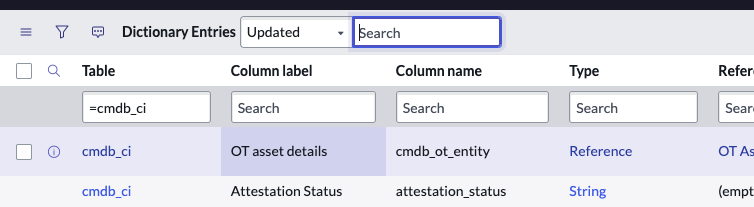
go to system Defintion > Tables
search for cmdb_ci:

click into the configuration Item table to see all the fields
please mark helpful or correct 🙂

- Mark as New
- Bookmark
- Subscribe
- Mute
- Subscribe to RSS Feed
- Permalink
- Report Inappropriate Content
02-14-2022 10:57 AM

- Mark as New
- Bookmark
- Subscribe
- Mute
- Subscribe to RSS Feed
- Permalink
- Report Inappropriate Content
02-14-2022 11:06 AM


- Mark as New
- Bookmark
- Subscribe
- Mute
- Subscribe to RSS Feed
- Permalink
- Report Inappropriate Content
02-14-2022 03:25 PM
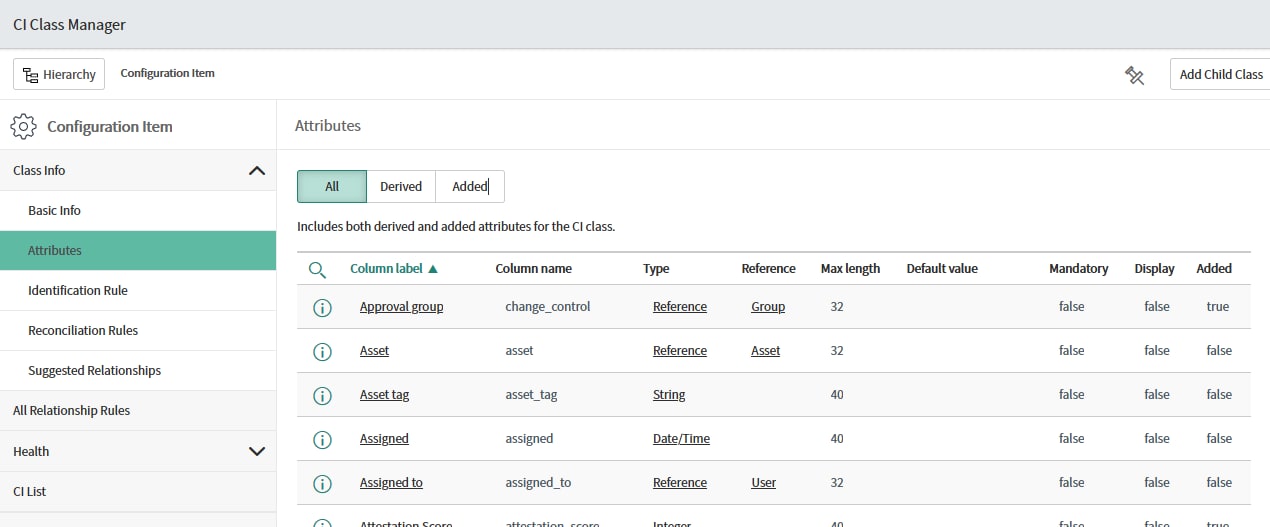
I usually go to "Configuration" > "CI Class Manager". Click on the "Hierarchy" button and "Configuration Item" from the menu.
To display all the fields, click on "Attributes".

The benefit of CI Class Manager is that I'll be able to also display all child tables on cmdb_ci tables as well as which fields were derived from parent table and which were defined in the table itself.