How to get a banner frame and gear icon (system settings) on my Instance?

- Mark as New
- Bookmark
- Subscribe
- Mute
- Subscribe to RSS Feed
- Permalink
- Report Inappropriate Content
04-05-2022 07:43 AM
Hello All,
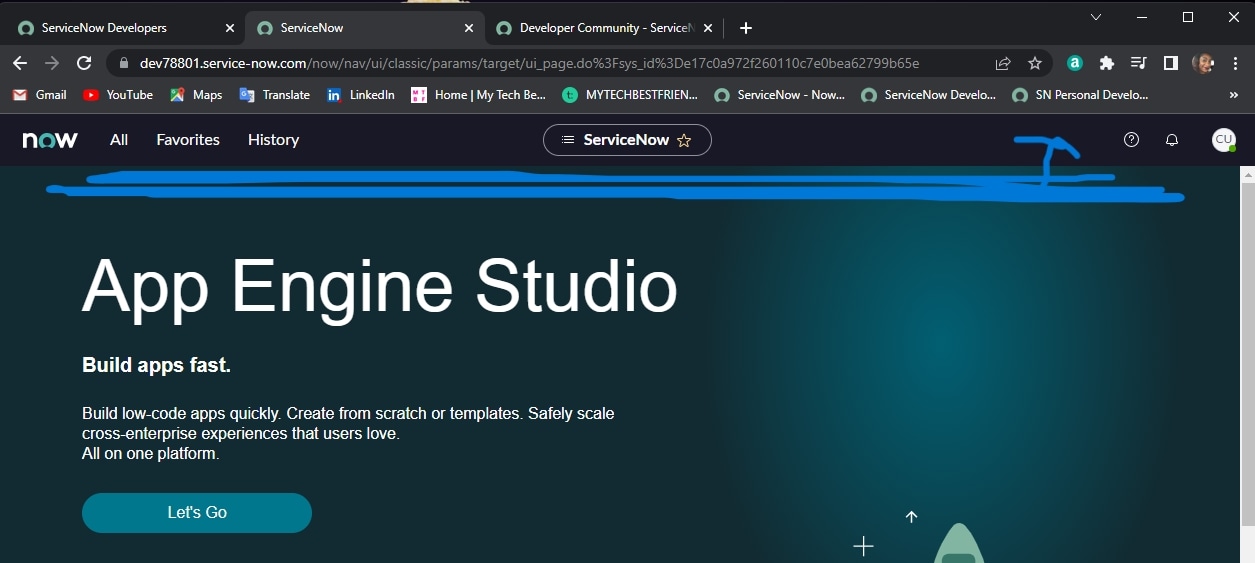
When I created my Developer account it gave me the "App Engine Creator" User Role and I created my instance. I've since changed my User Role to "Admin". While my Instance shows up as Admin, I don't have a banner at the top or the gear icon for System Settings. How do I get them?
Attached is a screenshot and thanks in advance.
- Labels:
-
Personal Developer Instance


- Mark as New
- Bookmark
- Subscribe
- Mute
- Subscribe to RSS Feed
- Permalink
- Report Inappropriate Content
04-05-2022 07:49 AM
Hi there,
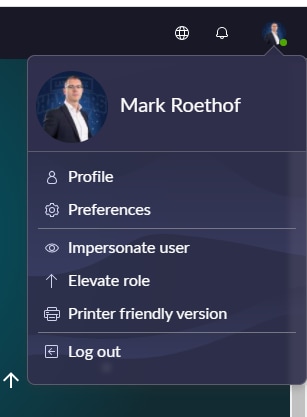
That's correct. That's with San Diego under your profile icon. So click your profile icon 🙂

If my answer helped you in any way, please then mark it as helpful.
Kind regards,
Mark
2020-2022 ServiceNow Community MVP
2020-2022 ServiceNow Developer MVP
---
LinkedIn
Community article, blog, video list
Kind regards,
Mark Roethof
Independent ServiceNow Consultant
10x ServiceNow MVP
---
~444 Articles, Blogs, Videos, Podcasts, Share projects - Experiences from the field
- Mark as New
- Bookmark
- Subscribe
- Mute
- Subscribe to RSS Feed
- Permalink
- Report Inappropriate Content
04-05-2022 08:01 AM
Thanks for your response Mark. Yes, I looked in Preferences and didn't see the tabs listed in Rome which is why I posted. I'm looking for the "Developer" tab which was under General/Theme/Accessibility/Lists/Forms and Notification. I only have Display/Accessibility and Notification.
- Mark as New
- Bookmark
- Subscribe
- Mute
- Subscribe to RSS Feed
- Permalink
- Report Inappropriate Content
04-05-2022 08:04 AM
There's no separate Developer tab in San Diego.
If my answer helped you in any way, please then mark it as helpful.
Kind regards,
Mark
2020-2022 ServiceNow Community MVP
2020-2022 ServiceNow Developer MVP
---
LinkedIn
Community article, blog, video list
Kind regards,
Mark Roethof
Independent ServiceNow Consultant
10x ServiceNow MVP
---
~444 Articles, Blogs, Videos, Podcasts, Share projects - Experiences from the field
- Mark as New
- Bookmark
- Subscribe
- Mute
- Subscribe to RSS Feed
- Permalink
- Report Inappropriate Content
04-05-2022 08:14 AM
Understood. Since there isn't a Developer tab, are "Show application picker in header" and "Show update set picker in header" located in another place? I didn't see them in Display/Accessibility/Notifications.