- Mark as New
- Bookmark
- Subscribe
- Mute
- Subscribe to RSS Feed
- Permalink
- Report Inappropriate Content
04-28-2018 08:56 AM
Hi All,
I have a requirement to display the values in drop down field: "CIs Assigned" based on the filed value of "Caller"
In detail, If Caller is "Zackary Mockus" the CIs assigned to him should be display under drop down field: "CIs Assigned"


So, the CIs: "MacBook Pro 17" and "Precision T5500 Workstation" should be displayed under the field: CIs Assigned below the -- None -- with the end value as "Create new CI"
So, the field: "CIs Assigned" drop-down values should be as below:
-- None --
MacBook Pro 17
Precision T5500 Workstation
Create new CI
Could you please help me on this!
Thanks
Solved! Go to Solution.
- Mark as New
- Bookmark
- Subscribe
- Mute
- Subscribe to RSS Feed
- Permalink
- Report Inappropriate Content
04-29-2018 05:46 AM
OK, I will do the job for you once. The Server Side Script could look like the following:
var MyCiHelper = Class.create();
MyCiHelper.prototype = Object.extendsObject(AbstractAjaxProcessor, {
	getCisAssignedTo: function (userId) {
		var ids = [], gr = new GlideRecord("cmdb_ci");
		gr.addQuery("assigned_to", userId);
		gr.query();
		while(gr.next()) {
			ids.push({id: gr.getUniqueValue(), name: gr.getValue("name")});
		}
		return ids;
	},
	getCisAssignedToAsJson: function () {
		return JSON.stringify(this.getCisAssignedTo(this.getParameter("sysparm_userId")));
	},
    type: "MyCiHelper"
});
Let use the "CIs Assigned" field have the name u_cis_assigned. Then the Client Script could be the following:
function onChange (control, oldValue, newValue) {
	"use strict";
	g_form.clearOptions("u_cis_assigned");
	g_form.addOption("u_cis_assigned", "", "-- None --");
	if (newValue === "") {
		return;
	}

	var ga = new GlideAjax("MyCiHelper");

	ga.addParam("sysparm_name", "getCisAssignedToAsJson");
	ga.addParam("sysparm_userId", newValue);
	ga.getXMLAnswer(function (answer) {
		try {
			answer = JSON.parse(answer);
		} catch(unused) { }
		if (answer != null && Array.isArray(answer)) {
			answer.forEach(function (item) {
				g_form.addOption("u_cis_assigned", item.id, item.name);
			});
		}
	});
}
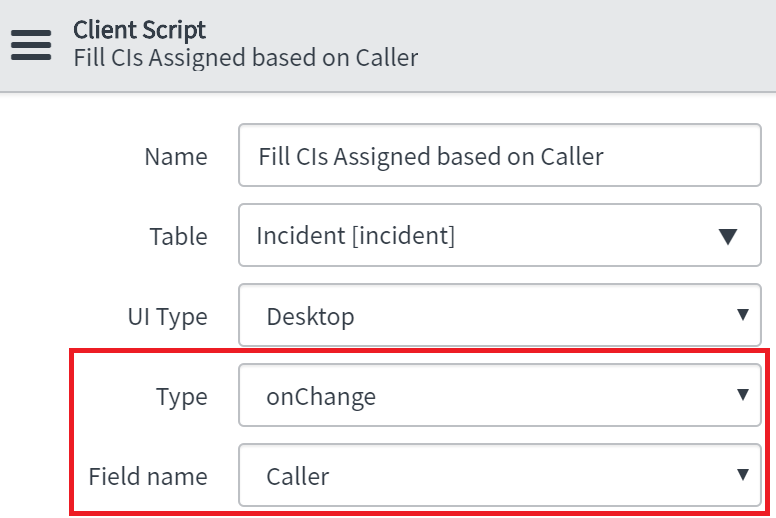
it should run onChange of Caller field (and on load the form too):

As the result, the choice list (after successful loading of CIs, assigned to the caller) will be look like you expect:

- Mark as New
- Bookmark
- Subscribe
- Mute
- Subscribe to RSS Feed
- Permalink
- Report Inappropriate Content
04-29-2018 05:46 AM
OK, I will do the job for you once. The Server Side Script could look like the following:
var MyCiHelper = Class.create();
MyCiHelper.prototype = Object.extendsObject(AbstractAjaxProcessor, {
	getCisAssignedTo: function (userId) {
		var ids = [], gr = new GlideRecord("cmdb_ci");
		gr.addQuery("assigned_to", userId);
		gr.query();
		while(gr.next()) {
			ids.push({id: gr.getUniqueValue(), name: gr.getValue("name")});
		}
		return ids;
	},
	getCisAssignedToAsJson: function () {
		return JSON.stringify(this.getCisAssignedTo(this.getParameter("sysparm_userId")));
	},
    type: "MyCiHelper"
});
Let use the "CIs Assigned" field have the name u_cis_assigned. Then the Client Script could be the following:
function onChange (control, oldValue, newValue) {
	"use strict";
	g_form.clearOptions("u_cis_assigned");
	g_form.addOption("u_cis_assigned", "", "-- None --");
	if (newValue === "") {
		return;
	}

	var ga = new GlideAjax("MyCiHelper");

	ga.addParam("sysparm_name", "getCisAssignedToAsJson");
	ga.addParam("sysparm_userId", newValue);
	ga.getXMLAnswer(function (answer) {
		try {
			answer = JSON.parse(answer);
		} catch(unused) { }
		if (answer != null && Array.isArray(answer)) {
			answer.forEach(function (item) {
				g_form.addOption("u_cis_assigned", item.id, item.name);
			});
		}
	});
}
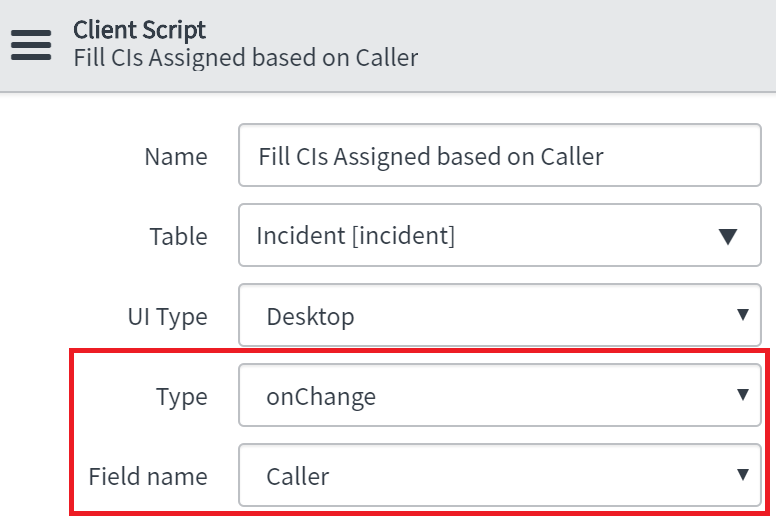
it should run onChange of Caller field (and on load the form too):
As the result, the choice list (after successful loading of CIs, assigned to the caller) will be look like you expect:
- Mark as New
- Bookmark
- Subscribe
- Mute
- Subscribe to RSS Feed
- Permalink
- Report Inappropriate Content
04-29-2018 08:40 AM
Thanks olegki for your help. It is working as expected.