- Mark as New
- Bookmark
- Subscribe
- Mute
- Subscribe to RSS Feed
- Permalink
- Report Inappropriate Content
09-19-2016 12:10 PM

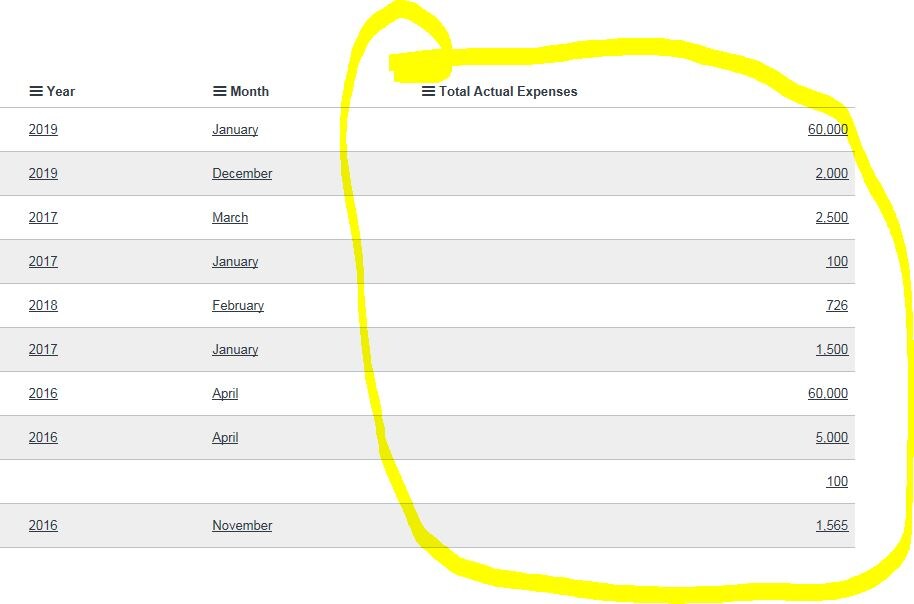
is it possible to left align integer fields in a list view?
Thanks in advance.
Solved! Go to Solution.

- Mark as New
- Bookmark
- Subscribe
- Mute
- Subscribe to RSS Feed
- Permalink
- Report Inappropriate Content
09-19-2016 10:21 PM
Hi Srnewbie,
Please check the screenshot below.
change the Field name . i have test it on my incident list. and it is working fine.

Regards,
Harshvardhan
PS: Hit like, Helpful or Correct depending on the impact of the response
- Mark as New
- Bookmark
- Subscribe
- Mute
- Subscribe to RSS Feed
- Permalink
- Report Inappropriate Content
12-04-2016 07:04 PM
- Mark as New
- Bookmark
- Subscribe
- Mute
- Subscribe to RSS Feed
- Permalink
- Report Inappropriate Content
12-05-2016 09:39 AM
please share the screenshot
Thanks,
Harshvardhan
- Mark as New
- Bookmark
- Subscribe
- Mute
- Subscribe to RSS Feed
- Permalink
- Report Inappropriate Content
12-05-2016 09:59 AM

- Mark as New
- Bookmark
- Subscribe
- Mute
- Subscribe to RSS Feed
- Permalink
- Report Inappropriate Content
12-06-2016 09:57 AM
Please correct me if i am wrong.
you have a field variance and it's integer type field where the value will be either in +ve or -ve. but you want to show color in only -ve value.
then above script should work.
Have you tried?
Thanks,
Harshvardhan
- Mark as New
- Bookmark
- Subscribe
- Mute
- Subscribe to RSS Feed
- Permalink
- Report Inappropriate Content
12-07-2016 12:52 PM
harshvardhansingh i tried and its not working