- Mark as New
- Bookmark
- Subscribe
- Mute
- Subscribe to RSS Feed
- Permalink
- Report Inappropriate Content
07-06-2020 03:49 AM
Hi,
I have a requirement to pass the current object from html to processing script.
Here is my code snippet:
HTML:
<g:evaluate var="jvar_taskobj" jelly="true" object="true">

			var base_table_name = RP.getWindowProperties().get('sysId');
			var gr = new GlideRecord("wm_task");
			gr.addQuery('sys_id',base_table_name);
			gr.query();
			gr.next();
			gr;
	</g:evaluate>
Processing script:
if ('false' == cancelled) {
var clone = new SMTask().cloneTask(taskobj);
(new StateFlow().processFlow(taskobj, '41dfa2e0d7630100fceaa6859e61035d', 'manual'));
gs.addInfoMessage(gs.getMessage("Cloned from {0}", task_number));
response.sendRedirect("wm_task.do?sys_id=" + clone);
}
How can I pass the current object in the above code "taskobj" is not working.
Thanks
Kevin
Solved! Go to Solution.


- Mark as New
- Bookmark
- Subscribe
- Mute
- Subscribe to RSS Feed
- Permalink
- Report Inappropriate Content
07-07-2020 02:59 AM
Hi,
I am referring to the <g:evaluate> tag
I could find in both the g:evaluate tags you are doing query of same table "wm_task" with same sys_id using RP.getWindowProperties().get('sysId')
I could see already hidden element "task_id" which stores the sys_id at the top.
So no need of new hidden element.
you can use that directly in processing script
Try this
if ('false' == cancelled) {
gs.info('Inside sysid is: ' + task_id);
var gr = new GlideRecord('wm_task');
gr.get(task_id);
var clone = new SMTask().cloneTask(gr);
(new StateFlow().processFlow(gr, '41dfa2e0d7630100fceaa6859e61035d', 'manual'));
gs.addInfoMessage(gs.getMessage("Cloned from {0}", task_number));
response.sendRedirect("wm_task.do?sys_id=" + clone);
}
Regards
Ankur
Ankur
✨ Certified Technical Architect || ✨ 10x ServiceNow MVP || ✨ ServiceNow Community Leader
- Mark as New
- Bookmark
- Subscribe
- Mute
- Subscribe to RSS Feed
- Permalink
- Report Inappropriate Content
07-07-2020 12:50 AM

- Mark as New
- Bookmark
- Subscribe
- Mute
- Subscribe to RSS Feed
- Permalink
- Report Inappropriate Content
07-07-2020 12:52 AM
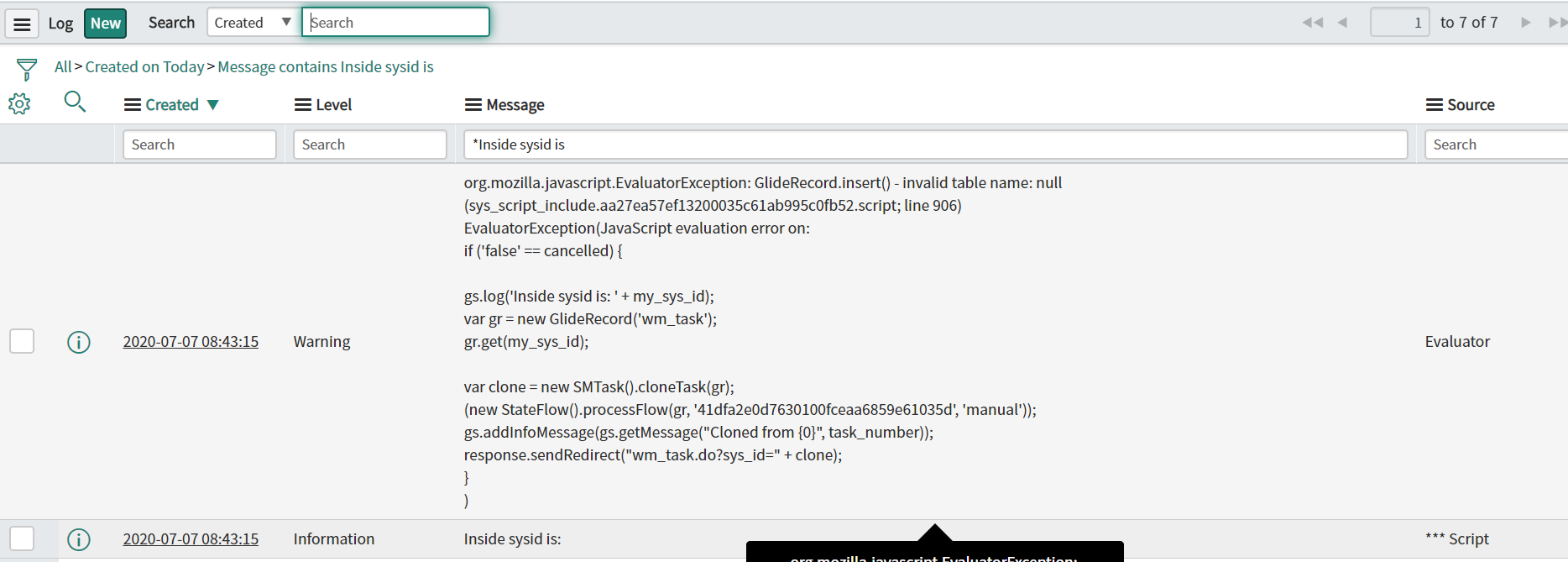
Don't know why hidden_sys_id is returning 'false'.
- Mark as New
- Bookmark
- Subscribe
- Mute
- Subscribe to RSS Feed
- Permalink
- Report Inappropriate Content
07-07-2020 01:33 AM
Hi Kevin,
please try this and it worked for me
HTML:
<input type="hidden" name="hidden_sys_id" id="hidden_sys_id" value="${jvar_taskobj.sys_id}"></input>

<input type="hidden" id="my_sys_id" name="my_sys_id" value=""/>
Client Script Section:
function submitCancel() {

    gel("my_sys_id").value = gel("hidden_sys_id").value;

    var c = gel('cancelled');
    c.value = "true";
    GlideDialogWindow.get().destroy();
    return false;
}
Processing Script:
if ('false' == cancelled) {

    gs.info('Inside sysid is: ' + my_sys_id);
    var gr = new GlideRecord('wm_task');
    gr.get(my_sys_id);

    var clone = new SMTask().cloneTask(gr);
    (new StateFlow().processFlow(gr, '41dfa2e0d7630100fceaa6859e61035d', 'manual'));
    gs.addInfoMessage(gs.getMessage("Cloned from {0}", task_number));
    response.sendRedirect("wm_task.do?sys_id=" + clone);
}
Regards
Ankur
Ankur
✨ Certified Technical Architect || ✨ 10x ServiceNow MVP || ✨ ServiceNow Community Leader
- Mark as New
- Bookmark
- Subscribe
- Mute
- Subscribe to RSS Feed
- Permalink
- Report Inappropriate Content
07-07-2020 01:46 AM

- Mark as New
- Bookmark
- Subscribe
- Mute
- Subscribe to RSS Feed
- Permalink
- Report Inappropriate Content
07-07-2020 02:13 AM
Hi Kevin,
Are you using the correct object for getting the sys_id?
I could see there are 2 objects which you want to use?
jvar_taskobj and jvar_taskid
Regards
Ankur
Ankur
✨ Certified Technical Architect || ✨ 10x ServiceNow MVP || ✨ ServiceNow Community Leader