- Mark as New
- Bookmark
- Subscribe
- Mute
- Subscribe to RSS Feed
- Permalink
- Report Inappropriate Content
02-23-2022 01:33 AM
Hi Community,
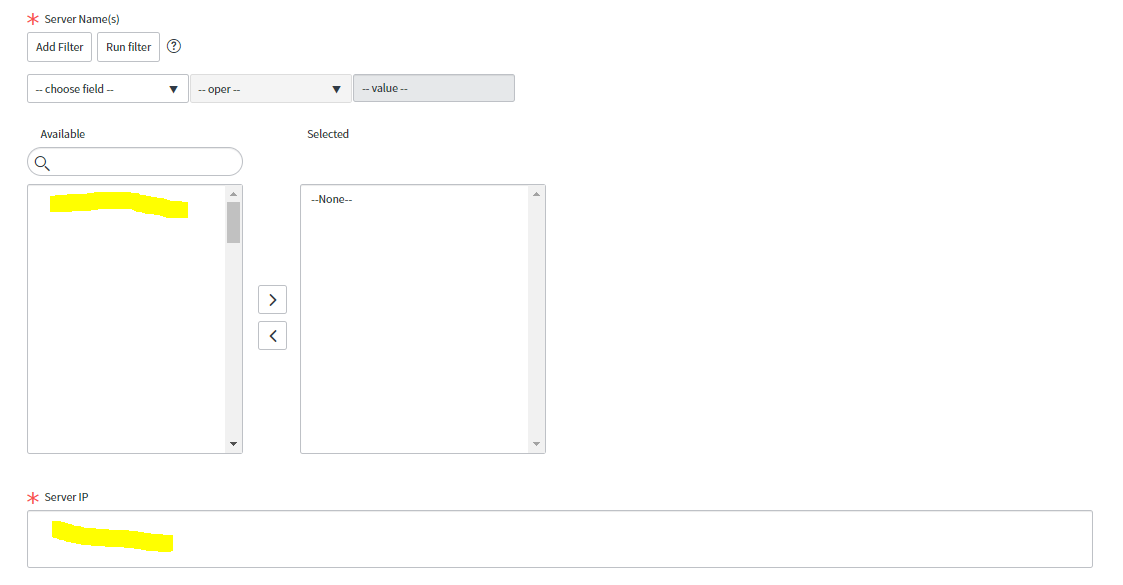
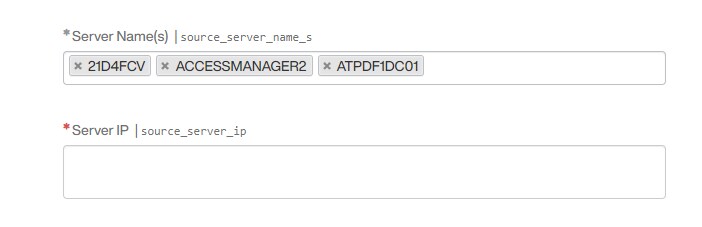
I am trying to populate multivalue text box values bassed on the list collecter values which is referenced to the cmdb_ci_server table, here if i select multiple server names then i should get respective server ips in the server ip filed.

Appricated for the quick response.
Thanks,
Shrinivasprasad
Solved! Go to Solution.
- Labels:
-
Scripting and Coding


- Mark as New
- Bookmark
- Subscribe
- Mute
- Subscribe to RSS Feed
- Permalink
- Report Inappropriate Content
02-23-2022 01:45 AM
Hi,
As mentioned you can use onChange + GlideAjax approach
sample working script here; enhance for your case
Populate Email Addresses of users selected in List Collector variable to Multi Line Text Variable
Regards
Ankur
Ankur
✨ Certified Technical Architect || ✨ 10x ServiceNow MVP || ✨ ServiceNow Community Leader
- Mark as New
- Bookmark
- Subscribe
- Mute
- Subscribe to RSS Feed
- Permalink
- Report Inappropriate Content
02-23-2022 02:05 AM


- Mark as New
- Bookmark
- Subscribe
- Mute
- Subscribe to RSS Feed
- Permalink
- Report Inappropriate Content
02-23-2022 01:45 AM
Hi,
As mentioned you can use onChange + GlideAjax approach
sample working script here; enhance for your case
Populate Email Addresses of users selected in List Collector variable to Multi Line Text Variable
Regards
Ankur
Ankur
✨ Certified Technical Architect || ✨ 10x ServiceNow MVP || ✨ ServiceNow Community Leader
- Mark as New
- Bookmark
- Subscribe
- Mute
- Subscribe to RSS Feed
- Permalink
- Report Inappropriate Content
02-23-2022 02:25 AM
Hi Ankur,
It is working fine now thanks.
var PopulateUserTimeZone = Class.create();
PopulateUserTimeZone.prototype = Object.extendsObject(AbstractAjaxProcessor, {
populateTZ: function() {
var userArr = this.getParameter('sysparm_cis').split(',');
var emailArr = [];
for(var i = 0; i < userArr.length; i++) {
var grUser = new GlideRecord('cmdb_ci_server');
if(grUser.get(userArr[i])) {
emailArr.push(grUser.getValue('ip_address'));
}
}
emailArr.join();
return emailArr.toString();
},
type: 'PopulateUserTimeZone'
});
- Mark as New
- Bookmark
- Subscribe
- Mute
- Subscribe to RSS Feed
- Permalink
- Report Inappropriate Content
02-25-2022 04:03 AM
Hi Ankur,
one more query, result is comming like below but i am expecting space after the comma
could you please suggest on this?

var PopulateUserTimeZone = Class.create();
PopulateUserTimeZone.prototype = Object.extendsObject(AbstractAjaxProcessor, {
populateTZ: function() {
var userArr = this.getParameter('sysparm_cis').split(',');
//var userArr1 =('userArr' +'\xa0\xa0\xa0\xa0\xa0\xa0\xa0');
var emailArr = [];
for(var i = 0; i < userArr.length; i++) {
var grUser = new GlideRecord('cmdb_ci_server');
if(grUser.get(userArr[i])) {
emailArr.push(grUser.getValue('ip_address'));
}
}
emailArr.join();
return emailArr.toString();
},
type: 'PopulateUserTimeZone'
});
- Mark as New
- Bookmark
- Subscribe
- Mute
- Subscribe to RSS Feed
- Permalink
- Report Inappropriate Content
02-26-2022 09:09 PM
Hi,
then do this
var PopulateUserTimeZone = Class.create();
PopulateUserTimeZone.prototype = Object.extendsObject(AbstractAjaxProcessor, {
populateTZ: function() {
var userArr = this.getParameter('sysparm_cis').split(',');
//var userArr1 =('userArr' +'\xa0\xa0\xa0\xa0\xa0\xa0\xa0');
var emailArr = [];
for(var i = 0; i < userArr.length; i++) {
var grUser = new GlideRecord('cmdb_ci_server');
if(grUser.get(userArr[i])) {
emailArr.push(grUser.getValue('ip_address'));
}
}
emailArr.join(', ');
return emailArr.toString();
},
type: 'PopulateUserTimeZone'
});
Regards
Ankur
Ankur
✨ Certified Technical Architect || ✨ 10x ServiceNow MVP || ✨ ServiceNow Community Leader