How to popup message or alert on Servicenow portal for Quantity drop-down field ?

- Mark as New
- Bookmark
- Subscribe
- Mute
- Subscribe to RSS Feed
- Permalink
- Report Inappropriate Content
07-19-2020 11:12 AM
Hi All,
I want to popup a message /alert if user is selecting more than 8 quantity in the below drop down field(snap 1).
Do I need to do the coding in HTML template or Client script or Server script ? I have find coding part for this field in HTML template (snap2)
Please let me know how I can popup message and stop user to select more than 8 number /qty ?
Snap1:

Snap2:

Thank you.
Regards,
Virendra

- Mark as New
- Bookmark
- Subscribe
- Mute
- Subscribe to RSS Feed
- Permalink
- Report Inappropriate Content
11-29-2020 12:50 PM
Hello:
I have a similar requirement and have copied your catalog client script and set isolate script to false. Unfortunately the line below does not return the quantity. Is there anything else I must do? Thank you.
var quantity = $j('#quantity').val();

- Mark as New
- Bookmark
- Subscribe
- Mute
- Subscribe to RSS Feed
- Permalink
- Report Inappropriate Content
11-29-2020 08:01 PM
Hi,
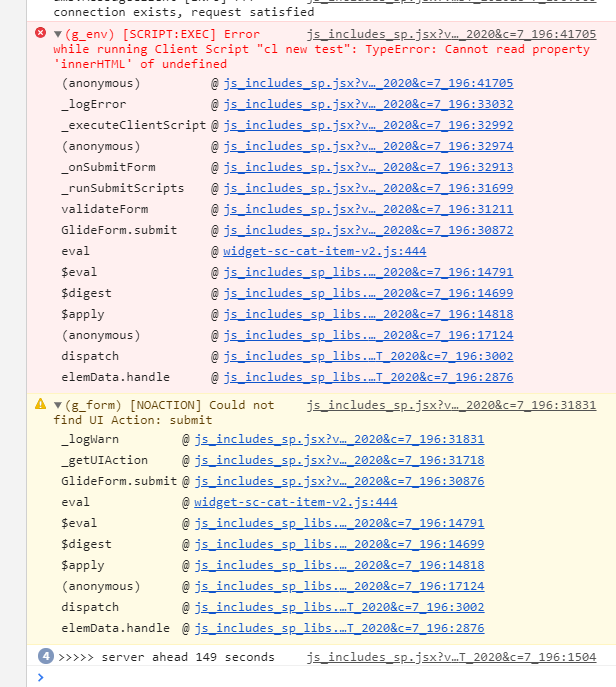
Any error in browser console?
Regards
Ankur
Ankur
✨ Certified Technical Architect || ✨ 10x ServiceNow MVP || ✨ ServiceNow Community Leader
- Mark as New
- Bookmark
- Subscribe
- Mute
- Subscribe to RSS Feed
- Permalink
- Report Inappropriate Content
11-29-2020 08:12 PM
Yes, when I click Add to Cart I receive the error is "There is a JavaScript error in your browser code."
I've taken a screen shot of the catalog client script, below in case that points to anything I am doing wrong. I know your post said "Note: this includes using DOM manipulation", I am new to working with the catalog and don't know if I need to do anything regarding the DOM. I am using the Orlando version. Thank you for any help. Christine

- Mark as New
- Bookmark
- Subscribe
- Mute
- Subscribe to RSS Feed
- Permalink
- Report Inappropriate Content
11-29-2020 08:49 PM
Hi,
I haven't tried it recently.
But what is the browser console error; please check that
Regards
Ankur
Ankur
✨ Certified Technical Architect || ✨ 10x ServiceNow MVP || ✨ ServiceNow Community Leader
- Mark as New
- Bookmark
- Subscribe
- Mute
- Subscribe to RSS Feed
- Permalink
- Report Inappropriate Content
11-29-2020 08:58 PM