- Mark as New
- Bookmark
- Subscribe
- Mute
- Subscribe to RSS Feed
- Permalink
- Report Inappropriate Content
09-20-2019 01:59 PM
what's up guys
How to set field dependency in a record producer.
I have two fields:
Business service
category
The category displayed depends on the business service selected.
This dependency is set in the incident form and works perfectly.
But I need that to work in the catalog too.

I found quite old articles and links in the community that don't seem to apply to current versions.
thanks for the help
Solved! Go to Solution.
- Mark as New
- Bookmark
- Subscribe
- Mute
- Subscribe to RSS Feed
- Permalink
- Report Inappropriate Content
09-20-2019 02:24 PM
Hi Samuel,
I just recent did something similar. In my case the secondary field is dependant upon which assignment group is selected in the primary field. 1st field is a reference and the 2nd is a lookup select box on the sys_choice table. In the type specification of the dependant field I specify sys_choice, the table name, lookup value field is value. In the reference qualifier I have:
javascript:'name=assignment_group^element=subcategory^language=en^inactive=false^dependent_value=' + current.variables.assignment_group
Attribute would be:
ref_qual_elements=assignment_group
Element will depend up what set of choices you'd want to display. Assignment_group is the primary field variable name.
Hope this helps,
Frank
- Mark as New
- Bookmark
- Subscribe
- Mute
- Subscribe to RSS Feed
- Permalink
- Report Inappropriate Content
09-20-2019 02:24 PM
Hi Samuel,
I just recent did something similar. In my case the secondary field is dependant upon which assignment group is selected in the primary field. 1st field is a reference and the 2nd is a lookup select box on the sys_choice table. In the type specification of the dependant field I specify sys_choice, the table name, lookup value field is value. In the reference qualifier I have:
javascript:'name=assignment_group^element=subcategory^language=en^inactive=false^dependent_value=' + current.variables.assignment_group
Attribute would be:
ref_qual_elements=assignment_group
Element will depend up what set of choices you'd want to display. Assignment_group is the primary field variable name.
Hope this helps,
Frank
- Mark as New
- Bookmark
- Subscribe
- Mute
- Subscribe to RSS Feed
- Permalink
- Report Inappropriate Content
09-24-2019 04:47 AM
Hi Frank,
Thanks for your reply, however I didn't find in the variable setting where I could set the reference qualifier.
My situation is as follows.
first field: A reference field (business service).
Second field: check box.
Type specifications;
choice table: sys_choice
choice field: label
(element = Category)
My second field needs to show the options that depend on the first selected field.
As I said, I didn't find where to set the reference qualifier.

can you help me?
- Mark as New
- Bookmark
- Subscribe
- Mute
- Subscribe to RSS Feed
- Permalink
- Report Inappropriate Content
06-30-2022 06:12 AM
Thanks Frank for your answer.
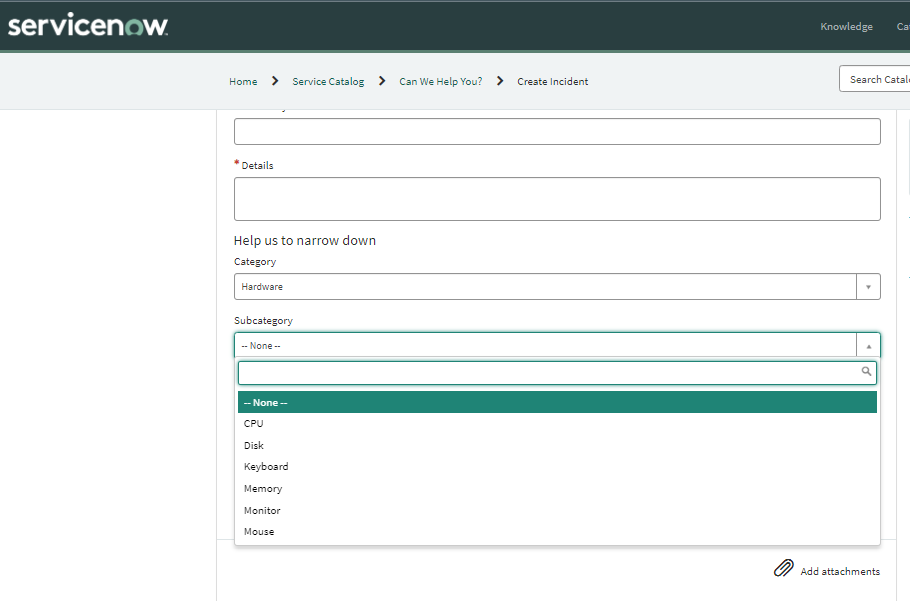
My Scenario: I have 2 fields in record producer 'Category(category) and Subcategory(Subcategory) in which 'Subcategory' is dependent on 'Category'.
Solution:
Category is mapped with Record Producer Table : Incident, Field: Category
Question: Category, Name: category
Type Specification: Lookup from Table: Incident and Look up value field: Category
Subcategory is mapped with Record Producer Table : Incident, Field: Subcategory
Question: Subcategory, Name: subcategory
Type Specification: Look up from Table: Choice[sys_choice]and Look up value field: Label
Reference Qualifier: javascript:'name=incident^element=subcategory^language=en^inactive=false^dependent_value=' + current.variables.category
Variable attributes: ref_qual_elements=category
This solution is not only for dependent and the same selected values will get stored and shown in incident in the instance.


If my solution is more related to your requirement please mark as 'helpful'
- Mark as New
- Bookmark
- Subscribe
- Mute
- Subscribe to RSS Feed
- Permalink
- Report Inappropriate Content
02-07-2023 02:00 AM