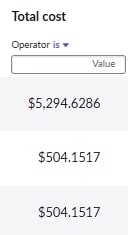
How to toggle currency in workspace related list?

- Mark as New
- Bookmark
- Subscribe
- Mute
- Subscribe to RSS Feed
- Permalink
- Report Inappropriate Content
09-02-2025 02:53 AM
In UI16, I can toggle to view between original currency and local currency. However, in workspace, I can only see my local currency. The original currency is EUR.


- Mark as New
- Bookmark
- Subscribe
- Mute
- Subscribe to RSS Feed
- Permalink
- Report Inappropriate Content
09-02-2025 03:30 AM
I am able to do so in configurable workspace.
Is your instance having multiple currencies or single currency?
Also try updating the workspace plugin.
If my response helped please mark it correct and close the thread so that it benefits future readers.
Ankur
✨ Certified Technical Architect || ✨ 10x ServiceNow MVP || ✨ ServiceNow Community Leader
- Mark as New
- Bookmark
- Subscribe
- Mute
- Subscribe to RSS Feed
- Permalink
- Report Inappropriate Content
10-28-2025 01:39 AM
Hi @Ankur Bawiskar ,
I’m experiencing the same issue. Our users reported that they were previously able to view multiple currencies on the Software Asset Workspace list (Other place like Workspace Form, ITIL Form and List are fine). However, after upgrading to the Yokohama release, this functionality seems to have been removed.
I reached out to the HI Support Team, and they mentioned that this behavior is part of the out-of-the-box design to support the PA Dashboard.
Is there any way we can achieve this?
Best Regards,
Khoi Nguyen
- Mark as New
- Bookmark
- Subscribe
- Mute
- Subscribe to RSS Feed
- Permalink
- Report Inappropriate Content
10-28-2025 01:43 AM
if ServiceNow responded that it's Out of the box then I don't think anything can be done.
Ankur
✨ Certified Technical Architect || ✨ 10x ServiceNow MVP || ✨ ServiceNow Community Leader
- Mark as New
- Bookmark
- Subscribe
- Mute
- Subscribe to RSS Feed
- Permalink
- Report Inappropriate Content
10-28-2025 01:53 AM
@Ankur Bawiskar
How about your solution?
It's a good thing if we can find a link between them.
Best Regards,
Khoi Nguyen