(Image Not Visible) does there exist any roles to view images?

- Mark as New
- Bookmark
- Subscribe
- Mute
- Subscribe to RSS Feed
- Permalink
- Report Inappropriate Content
03-16-2017 06:57 PM
Hi all,
I have a big problem.
Without admin, all users cannot view uploaded images (for example, logo).
Please see the 3 pictures below;
[Login Form]

[Homepage]

[Service Portal]

Recently we have configured ACLs, so maybe the ACL setting causes this problem....
(But Not all images aren't visible.)
Please give me your comment.
Best regards,
Tomoaki
- Mark as New
- Bookmark
- Subscribe
- Mute
- Subscribe to RSS Feed
- Permalink
- Report Inappropriate Content
03-16-2017 10:49 PM
It is only occurred when a user login for the first time.
- Mark as New
- Bookmark
- Subscribe
- Mute
- Subscribe to RSS Feed
- Permalink
- Report Inappropriate Content
03-21-2017 09:41 PM
We found the reason.
The logo picture which we uploaded is placed in one record of sys_properties.
Users without administrator have no right to read/write any records of sys_properties,
Hence logo is not visible without admin.
Are there anyone having same issue?

- Mark as New
- Bookmark
- Subscribe
- Mute
- Subscribe to RSS Feed
- Permalink
- Report Inappropriate Content
03-30-2017 01:33 PM
We are having the same issue - except it's always happening, not just the first login.
I think we'll log a ticket with HI as it seems to be an Istanbul specific issue.
Has anyone figured out how to fix - do we just give read access rights to the sys_properties table?
Thanks
Carl.

- Mark as New
- Bookmark
- Subscribe
- Mute
- Subscribe to RSS Feed
- Permalink
- Report Inappropriate Content
07-12-2017 10:42 PM
Hi Tomoaki,
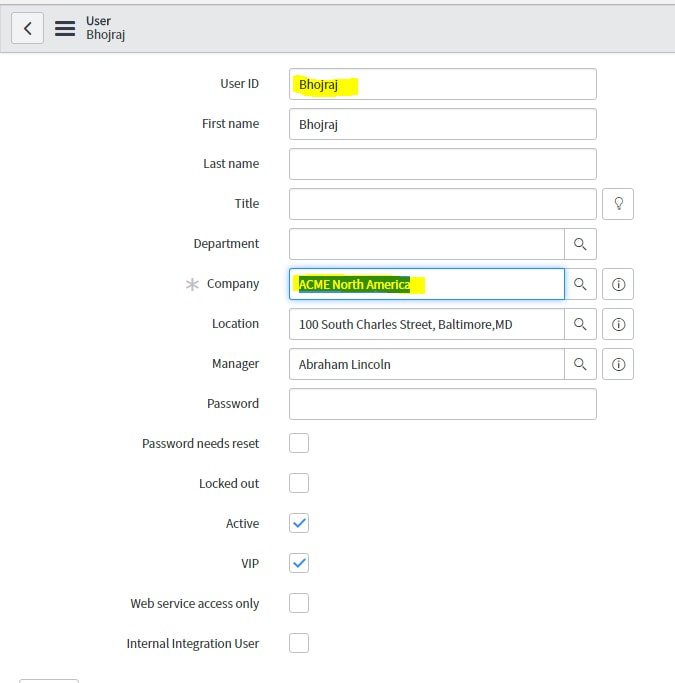
Please Find Attachment.
If the user have a Company and company has a specific logo then you see the image in the banner.
User : Bhojraj
Company : ACME North America

Go to -> core_company -> upload Banner image

Upload UI16 Banner Image from same page

Whenever you login with user whose company is ACME North America. you will see comapny image in the banner frame.

I hope it will help.
Thanks,
Bhojraj D.