- Mark as New
- Bookmark
- Subscribe
- Mute
- Subscribe to RSS Feed
- Permalink
- Report Inappropriate Content
08-05-2026 06:55 AM
Hello,
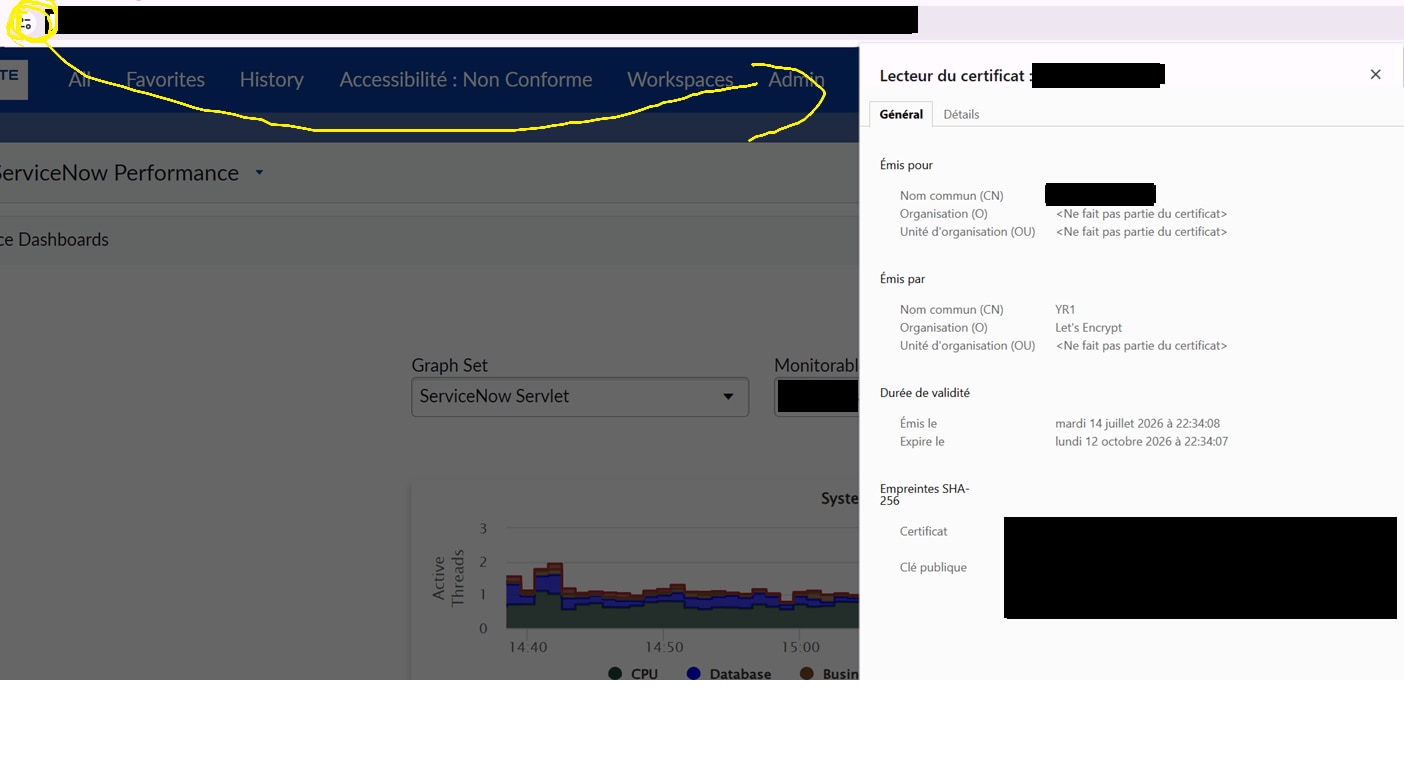
I have a question about the use of SSL/TLS certificate (download from the website - see my screenshots) because our customer use it to connect its application to our instances. This is not practical since the expiration happens every 3 months.
I think this is not a good practise but I'm not an expert of the certificate management, could you tell me if I'm right to think that ? and in that case, what is the best way to manage a secure connection to a third-party application ?
And if not, have you an idea about a program or a tool that can automatically export the certificate to a dedicated location ?
Thanks a lot for your answer !
Best regards,
Camille
Solved! Go to Solution.
- Mark as New
- Bookmark
- Subscribe
- Mute
- Subscribe to RSS Feed
- Permalink
- Report Inappropriate Content
08-05-2026 07:09 AM
Hi Camille,
The certificate shown in your screenshot is the HTTPS server certificate presented by the website. It is not an integration credential or a client certificate.
The approximately three-month validity is expected for a Let’s Encrypt certificate. Let’s Encrypt currently issues most certificates with a 90-day lifetime to encourage automated renewal and reduce the impact of compromised certificates.
The short validity period is therefore not a bad practice. The real concern is manually downloading and importing the website certificate into another application every time it changes.
Recommended approach:
1. Standard HTTPS integration
If the customer application connects to ServiceNow over HTTPS, it should:
- Trust the public Certificate Authority chain through its operating system, JVM, or application trust store.
- Validate the certificate chain.
- Validate the hostname.
- Avoid pinning the ServiceNow leaf certificate or certificate fingerprint.
When the website certificate is renewed, the integration should continue working because the new certificate is issued by a trusted public Certificate Authority.
The customer should not need to export and import the browser certificate every three months.
2. Authentication
The website TLS certificate only secures the communication channel and authenticates the server.
For API authentication, use a supported mechanism such as:
- OAuth 2.0
- Mutual TLS
- Basic Authentication only where required and appropriately secured
OAuth 2.0 is generally preferable for standard REST integrations.
3. Mutual TLS for inbound ServiceNow APIs
If the third-party application must authenticate itself to ServiceNow using a certificate, configure Certificate-based Authentication for inbound REST or SOAP APIs.
In this design:
- The third-party application presents its own client certificate.
- ServiceNow validates that client certificate.
- The browser certificate shown in your screenshot is not used as the client credential.
4. Mutual TLS for outbound ServiceNow integrations
If ServiceNow calls the third-party application and the endpoint requires mutual TLS:
- Store the client certificate and private key in a supported keystore in ServiceNow.
- Create an HTTPS Protocol Profile.
- Associate the protocol profile with the outbound REST or SOAP integration.
- Ensure ServiceNow also validates the third-party server certificate.
Never distribute or export a private key from the browser certificate.
5. Private or self-signed third-party certificates
If the external endpoint uses an enterprise CA or self-signed certificate that ServiceNow does not trust, import the appropriate issuing CA certificate as a Trust Store Certificate.
Do not disable hostname verification or certificate trust validation as a workaround.
6. Certificate monitoring and renewal
If the requirement is to monitor certificates and prevent expiration-related outages, use:
Certificate Inventory and Management
This capability can discover certificates, track expiration dates, create alerts, and support certificate renewal workflows.
For Let’s Encrypt certificates, the endpoint owner should use ACME-based automated renewal rather than manually exporting certificates from a browser.
7. If the third-party product requires certificate pinning
Ask the vendor whether it can trust the public CA chain instead of a specific leaf certificate.
Leaf-certificate pinning is operationally fragile because certificates are intentionally renewed and may also change during infrastructure maintenance.
If the vendor cannot remove this dependency, an OpenSSL, PowerShell, or enterprise certificate-management job can retrieve and export the current public certificate to a controlled location. However, this should be treated as a temporary workaround, not the preferred integration architecture.
Recommended architecture:
Standard integration:
Third-party application
-> HTTPS with hostname and CA validation
-> OAuth 2.0 authentication
-> ServiceNow API
Certificate-authenticated integration:
Third-party application
-> HTTPS with hostname and CA validation
-> Mutual TLS client certificate
-> ServiceNow API
Therefore, you are correct to question the manual certificate-download process. The problem is not the three-month certificate lifetime; the problem is designing the integration to depend on the exact website certificate.
Official references:
ServiceNow certificate overview:
https://www.servicenow.com/docs/bundle/zurich-platform-security/page/administer/general/concept/expl...
ServiceNow inbound certificate-based authentication:
https://www.servicenow.com/docs/r/zurich/platform-security/authentication/certificate-api-auth.html
ServiceNow outbound REST mutual authentication:
https://www.servicenow.com/docs/r/zurich/api-reference/web-services/c_OutboundRESTMutualAuthenticati...
ServiceNow Certificate Management:
https://www.servicenow.com/products/certificate-management.html
Hope this helps!
If this response helped, please mark it as Helpful.
If it resolves your issue, please Accept it as Solution.
Kind Regards,
Abhishek Pal
- Mark as New
- Bookmark
- Subscribe
- Mute
- Subscribe to RSS Feed
- Permalink
- Report Inappropriate Content
08-05-2026 07:09 AM
Hi Camille,
The certificate shown in your screenshot is the HTTPS server certificate presented by the website. It is not an integration credential or a client certificate.
The approximately three-month validity is expected for a Let’s Encrypt certificate. Let’s Encrypt currently issues most certificates with a 90-day lifetime to encourage automated renewal and reduce the impact of compromised certificates.
The short validity period is therefore not a bad practice. The real concern is manually downloading and importing the website certificate into another application every time it changes.
Recommended approach:
1. Standard HTTPS integration
If the customer application connects to ServiceNow over HTTPS, it should:
- Trust the public Certificate Authority chain through its operating system, JVM, or application trust store.
- Validate the certificate chain.
- Validate the hostname.
- Avoid pinning the ServiceNow leaf certificate or certificate fingerprint.
When the website certificate is renewed, the integration should continue working because the new certificate is issued by a trusted public Certificate Authority.
The customer should not need to export and import the browser certificate every three months.
2. Authentication
The website TLS certificate only secures the communication channel and authenticates the server.
For API authentication, use a supported mechanism such as:
- OAuth 2.0
- Mutual TLS
- Basic Authentication only where required and appropriately secured
OAuth 2.0 is generally preferable for standard REST integrations.
3. Mutual TLS for inbound ServiceNow APIs
If the third-party application must authenticate itself to ServiceNow using a certificate, configure Certificate-based Authentication for inbound REST or SOAP APIs.
In this design:
- The third-party application presents its own client certificate.
- ServiceNow validates that client certificate.
- The browser certificate shown in your screenshot is not used as the client credential.
4. Mutual TLS for outbound ServiceNow integrations
If ServiceNow calls the third-party application and the endpoint requires mutual TLS:
- Store the client certificate and private key in a supported keystore in ServiceNow.
- Create an HTTPS Protocol Profile.
- Associate the protocol profile with the outbound REST or SOAP integration.
- Ensure ServiceNow also validates the third-party server certificate.
Never distribute or export a private key from the browser certificate.
5. Private or self-signed third-party certificates
If the external endpoint uses an enterprise CA or self-signed certificate that ServiceNow does not trust, import the appropriate issuing CA certificate as a Trust Store Certificate.
Do not disable hostname verification or certificate trust validation as a workaround.
6. Certificate monitoring and renewal
If the requirement is to monitor certificates and prevent expiration-related outages, use:
Certificate Inventory and Management
This capability can discover certificates, track expiration dates, create alerts, and support certificate renewal workflows.
For Let’s Encrypt certificates, the endpoint owner should use ACME-based automated renewal rather than manually exporting certificates from a browser.
7. If the third-party product requires certificate pinning
Ask the vendor whether it can trust the public CA chain instead of a specific leaf certificate.
Leaf-certificate pinning is operationally fragile because certificates are intentionally renewed and may also change during infrastructure maintenance.
If the vendor cannot remove this dependency, an OpenSSL, PowerShell, or enterprise certificate-management job can retrieve and export the current public certificate to a controlled location. However, this should be treated as a temporary workaround, not the preferred integration architecture.
Recommended architecture:
Standard integration:
Third-party application
-> HTTPS with hostname and CA validation
-> OAuth 2.0 authentication
-> ServiceNow API
Certificate-authenticated integration:
Third-party application
-> HTTPS with hostname and CA validation
-> Mutual TLS client certificate
-> ServiceNow API
Therefore, you are correct to question the manual certificate-download process. The problem is not the three-month certificate lifetime; the problem is designing the integration to depend on the exact website certificate.
Official references:
ServiceNow certificate overview:
https://www.servicenow.com/docs/bundle/zurich-platform-security/page/administer/general/concept/expl...
ServiceNow inbound certificate-based authentication:
https://www.servicenow.com/docs/r/zurich/platform-security/authentication/certificate-api-auth.html
ServiceNow outbound REST mutual authentication:
https://www.servicenow.com/docs/r/zurich/api-reference/web-services/c_OutboundRESTMutualAuthenticati...
ServiceNow Certificate Management:
https://www.servicenow.com/products/certificate-management.html
Hope this helps!
If this response helped, please mark it as Helpful.
If it resolves your issue, please Accept it as Solution.
Kind Regards,
Abhishek Pal
- Mark as New
- Bookmark
- Subscribe
- Mute
- Subscribe to RSS Feed
- Permalink
- Report Inappropriate Content
08-05-2026 07:30 AM
Thank you, Abhishek! It’s a quick and very comprehensive response that you’re sending me!
I will now check with my client to change this development, in order to set up a secure connection.
Thank you again for your help,
My best regards,
Camille
- Mark as New
- Bookmark
- Subscribe
- Mute
- Subscribe to RSS Feed
- Permalink
- Report Inappropriate Content
08-05-2026 07:41 AM
Hi @CamilleSerruys ,
You’re very welcome. I’m glad the explanation was helpful.