- Mark as New
- Bookmark
- Subscribe
- Mute
- Subscribe to RSS Feed
- Permalink
- Report Inappropriate Content
04-26-2022 03:33 PM
Hi,
I'm having issues in a Business Rule I created to update a field called "u_pds_r_d_data_target". I'm using a Script Include, this one works fine on a Catalog Client Script, I already tested it, but I need it in a customized table.
(function executeRule(current, previous /*null when async*/) {


// Add your code here
	var ajax = new GlideAjax('beforeOneMonth'); //Call the Script include

	ajax.addParam('sysparm_name', 'monthBefore'); //Call the function
	ajax.addParam('sysparm_value', newValue); //Call the selected value of 'Date of Separation'


	ajax.getXML(doSomething); //Declare callback function

	function doSomething(response) {


	var answer = response.responseXML.documentElement.getAttribute("answer"); //Set the script include return value in 'answer' variable

	current.u_pds_r_d_data_target = answer; //Provide the variable name of 'Date of access removal' where the date will be set
		gs.addInfoMessage('Refreshed');

current.update();
}

})(current, previous);
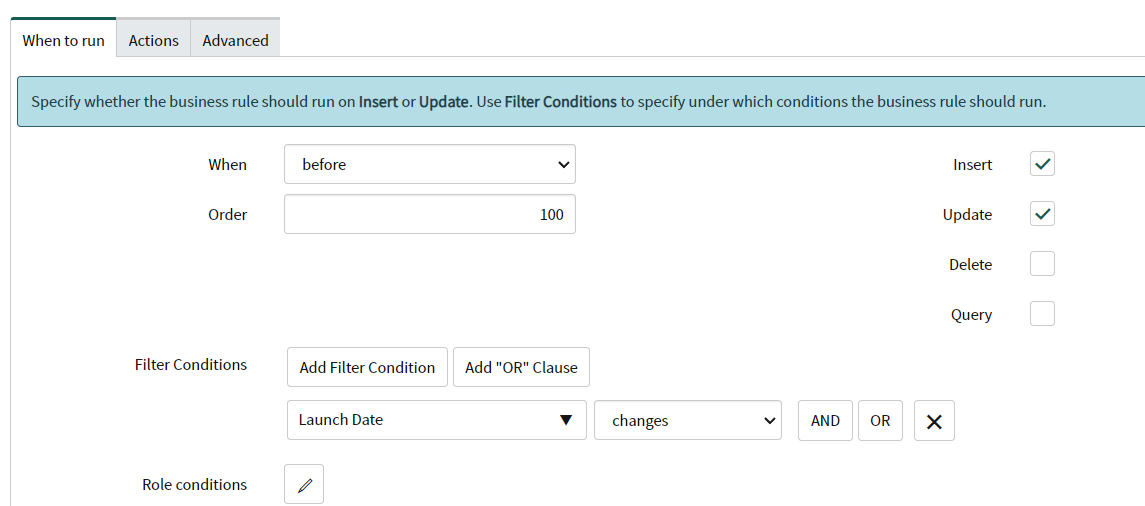
This is what I have in the When to run which I'm sure it is fine I as changed the script for something simple to update another field.

And this is the Script Include:
//I created this Script Include for UDI Team to calculate a month before the launch date
var beforeOneMonth = Class.create();

beforeOneMonth.prototype = Object.extendsObject(AbstractAjaxProcessor, {

  monthBefore: function() {

  var date = this.getParameter('sysparm_value');

  date = date.toString();

  var gdt = new GlideDateTime(date).getDate();

  gdt.addMonths(-1);

  var gdtStr = gdt.toString();

  return gdtStr;
  }

});
Can anyone help me to figure out this?
Thanks,
Solved! Go to Solution.
- Mark as New
- Bookmark
- Subscribe
- Mute
- Subscribe to RSS Feed
- Permalink
- Report Inappropriate Content
04-27-2022 11:03 AM
I figured this out. I passed the parameter within the function in the Script Include
I commented out the line I used to pass the parameter for Client Script and added the parameter within the function.
var BeforeOneMonth = Class.create();
BeforeOneMonth.prototype = {
    initialize: function() {},
    monthBefore: function(launchDate) {

      //  var date = this.getParameter('sysparm_value');

        launchDate = launchDate.toString();

        var gdt = new GlideDateTime(launchDate).getDate();

        gdt.addMonths(-1);

        var gdtStr = gdt.toString();

        return gdtStr;
    },
    type: 'BeforeOneMonth'
};- Mark as New
- Bookmark
- Subscribe
- Mute
- Subscribe to RSS Feed
- Permalink
- Report Inappropriate Content
04-27-2022 09:58 AM
Hi Hitoshi,
I tried both scripts and it didn't work. I'm not sure if the issue is in the second line in the BR or something in the Script Include. Could you help?
I deactivated my old Script Include and create a new one like the one you post.
This is how the script in the Business Rule.
(function executeRule(current, previous /*null when async*/) {

    var bom = new BeforeOneMonth(); //Call the Script include
    current.u_pds_r_d_data_target = bom.monthBefore(current.u_launch_date);  // replace with actual name of variable
      gs.addInfoMessage('Refreshed');
      current.update();
})(current, previous);- Mark as New
- Bookmark
- Subscribe
- Mute
- Subscribe to RSS Feed
- Permalink
- Report Inappropriate Content
04-27-2022 11:03 AM
I figured this out. I passed the parameter within the function in the Script Include
I commented out the line I used to pass the parameter for Client Script and added the parameter within the function.
var BeforeOneMonth = Class.create();
BeforeOneMonth.prototype = {
    initialize: function() {},
    monthBefore: function(launchDate) {

      //  var date = this.getParameter('sysparm_value');

        launchDate = launchDate.toString();

        var gdt = new GlideDateTime(launchDate).getDate();

        gdt.addMonths(-1);

        var gdtStr = gdt.toString();

        return gdtStr;
    },
    type: 'BeforeOneMonth'
};