Make fields from other table read only on a form.

- Mark as New
- Bookmark
- Subscribe
- Mute
- Subscribe to RSS Feed
- Permalink
- Report Inappropriate Content
07-09-2018 10:54 PM
I am on the rm_story form.
I have three fields here:
Product (Dictionary settings below)

Product owner:

Short description:

I use the following script to make all fields on the rm_story form read only in the on Load Client Script defined on the rm_story table.
var fields = g_form.getEditableFields();
for (var x = 0; x < fields.length; x++) {
g_form.setReadOnly(fields[x], true);
But the above said 3 fields are not set to read only. I know it is because these 3 fields are derived from other tables.
How to set such fields read only too while I set all fields in the form to be read only on Load?
And how to add an exception? (like) if I want the field 'Product alone to be editable and also set the Focus on that field on loading the form.
- Labels:
-
Scripting and Coding

- Mark as New
- Bookmark
- Subscribe
- Mute
- Subscribe to RSS Feed
- Permalink
- Report Inappropriate Content
07-09-2018 10:58 PM
Hi,
There is some OOTB onChange client script running because of which this is happenning. Search for that script. Making it inactive would make you achieve what you desire, but making changes in OOTB script may affect other tables too.
Mark Correct if it helps you.
Warm Regards,
Omkar Mone

www.dxsherpa.com
- Mark as New
- Bookmark
- Subscribe
- Mute
- Subscribe to RSS Feed
- Permalink
- Report Inappropriate Content
07-09-2018 11:05 PM
Product and Product owner are editable on the Product table (which is fine).
I just want them to be set to readOnly on the Story (rm_story) form.
Same with Short description.
How to do that?
I searched for the Client Scripts before posting this, and deactivated 3 of them. But this is showing as editable because it is derived from other tables and on those respective tables these are editable fields.

- Mark as New
- Bookmark
- Subscribe
- Mute
- Subscribe to RSS Feed
- Permalink
- Report Inappropriate Content
07-09-2018 11:21 PM
Hi Anish,
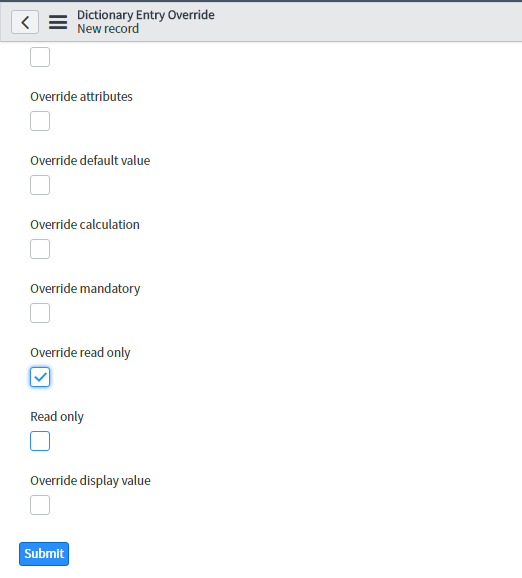
You can set read-only by Dictionary override for inherited/other fields, and changes will apply permanently.
The cons of using dictionary override is 'debugging' in case any issue occur.
If you want to apply read only for any specific role than I suggest write ACLs instead UI policy or dictionary override.

Please mark answer correct and helpful if it served your purpose.
Warm Regards,
Nikhil Dixit

www.dxsherpa.com
- Mark as New
- Bookmark
- Subscribe
- Mute
- Subscribe to RSS Feed
- Permalink
- Report Inappropriate Content
07-09-2018 11:28 PM
Thanks Nikhil.
Here is my requirement more in detail. Hope this clarifies:
On loading a Story form - all fields should be read only except Product owner (check the properties of Product owner in the screenshot).
So, as you can see in the script mentioned on the post, I am fetching all the editable fields on the form and making it read only.
On the same script I try setting the Product owner, a field from the cmbd_model table read only, but this is where the issue happens.
It does not set the field to Read Only.
Dictionary override is not an option because a field on Product table cannot be override for the Story table (only shows the table that Product extends in the Story choice list).