- Mark as New
- Bookmark
- Subscribe
- Mute
- Subscribe to RSS Feed
- Permalink
- Report Inappropriate Content
05-20-2022 02:53 PM
Hi All.
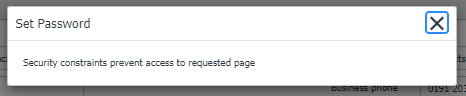
I am trying to make the Set Password UI Action button on the sys_user table available for users who have ITIL role. It was original set to admin in the Require Role section so I have added ITIL but I am getting the following message

Any ideas which ACL would I have to change for this?
Thanks
Solved! Go to Solution.

- Mark as New
- Bookmark
- Subscribe
- Mute
- Subscribe to RSS Feed
- Permalink
- Report Inappropriate Content
05-20-2022 03:40 PM
Hi, as this is a security\access issue your first steps in diagnosing your issue should be to enable security debug, impersonate an itil user , reproduce the issue and then review the debug logs.
https://docs.servicenow.com/en-US/bundle/sandiego-platform-administration/page/administer/contextual-security/concept/c_AccessControlRulesDebug.html
I would think that this ACL is the first you would need to look at
/nav_to.do?uri=sys_security_acl.do?sys_id=d5cf087521560110a866589604c20d30
So the next step would be to update this ACL to add itil role.
Or use 'Insert and stay' to copy/create a new ACL (without the role) and then update the new record to add ititl role.
My personal preference would be to create a new ACL as this should reduce the chances of an upgrade conflict.
You may also want to update or add a rule to allow your itil users to manage 'Password needs reset' field.
/nav_to.do?uri=sys_security_acl.do?sys_id=19cf087521560110a866589604c20d39

- Mark as New
- Bookmark
- Subscribe
- Mute
- Subscribe to RSS Feed
- Permalink
- Report Inappropriate Content
05-20-2022 03:38 PM
Hi,
ACL:
Table: sys_user
Field: user_password
Operation: Write
Regards.
JP
JP
- Mark as New
- Bookmark
- Subscribe
- Mute
- Subscribe to RSS Feed
- Permalink
- Report Inappropriate Content
05-20-2022 03:40 PM
Hi, as this is a security\access issue your first steps in diagnosing your issue should be to enable security debug, impersonate an itil user , reproduce the issue and then review the debug logs.
https://docs.servicenow.com/en-US/bundle/sandiego-platform-administration/page/administer/contextual-security/concept/c_AccessControlRulesDebug.html
I would think that this ACL is the first you would need to look at
/nav_to.do?uri=sys_security_acl.do?sys_id=d5cf087521560110a866589604c20d30
So the next step would be to update this ACL to add itil role.
Or use 'Insert and stay' to copy/create a new ACL (without the role) and then update the new record to add ititl role.
My personal preference would be to create a new ACL as this should reduce the chances of an upgrade conflict.
You may also want to update or add a rule to allow your itil users to manage 'Password needs reset' field.
/nav_to.do?uri=sys_security_acl.do?sys_id=19cf087521560110a866589604c20d39
- Mark as New
- Bookmark
- Subscribe
- Mute
- Subscribe to RSS Feed
- Permalink
- Report Inappropriate Content
05-22-2022 03:12 PM
Many Thanks Tony for the advise.
I have copied the ACL called 'generate_copy_password' with the operation of read and added the role of ITIL and it has worked.
I did have an issue as the save password button was not executing but I reviewed the debug logs as suggested and copied the ACL called 'PasswordPolicyUtil' operation of execute.
Thanks again