
- Mark as New
- Bookmark
- Subscribe
- Mute
- Subscribe to RSS Feed
- Permalink
- Report Inappropriate Content
08-15-2022 01:15 AM
I apologize as I am not sure how to word it out but basically.
I have this reference field which refers to different drinks in another table called "Drinks table".

My main requirement is to make a report of the popularity of each drink per month and base from other threads. I can access the MRVS answers in the sc_multi_row_question_answer table. So I did try it.
However I have noticed that the values that I am trying to make a report of only shows its reference value.

when it actuality I wanted to get the actual name that it is referring to.
My question is how to fetch/access/convert these values into its referred value? which are the name of the drinks that were chosen..
Solved! Go to Solution.
- Labels:
-
Studio

- Mark as New
- Bookmark
- Subscribe
- Mute
- Subscribe to RSS Feed
- Permalink
- Report Inappropriate Content
08-15-2022 03:15 AM
For MRVS table, bring "value" field as well in view fields
For your drinks table, bring sys_id and name field.
Now for joining the tables use:
mrqa_value = sci_sys_id
- Mark as New
- Bookmark
- Subscribe
- Mute
- Subscribe to RSS Feed
- Permalink
- Report Inappropriate Content
08-15-2022 02:41 AM
If you look closely, in the above article the common denominator between req item and MRVS record is the sys_id.
Similarly, once you create a database view for MRVS and your drinks table, common denominator would be your value in MRVS and sys_id of your drinks value record, and if you follow the same path, you will be able to see fields from drinks table corresponidng to the value in MRVS
- Mark as New
- Bookmark
- Subscribe
- Mute
- Subscribe to RSS Feed
- Permalink
- Report Inappropriate Content
08-15-2022 02:59 AM
I see, may I ask for help regarding setting it up if I did it correctly if its alright? I am very sorry as I am still new to SNow.
This is my current database view.

The table for drinks:

the u_name_1 refers to this specific field in the Drinks table

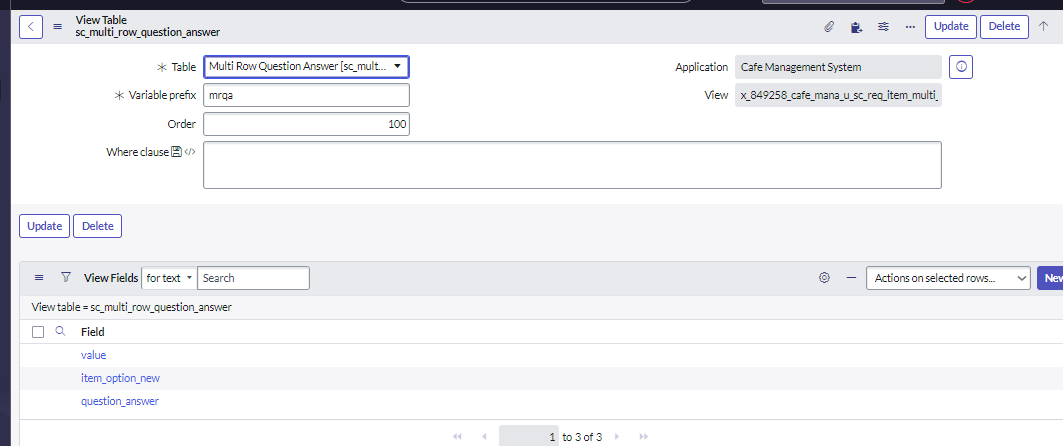
The table for sc_multi_row: (I have a question, since I only needed for it to show the proper value as you have mentioned, how may I set up the fields for this table in the database view?

- Mark as New
- Bookmark
- Subscribe
- Mute
- Subscribe to RSS Feed
- Permalink
- Report Inappropriate Content
08-15-2022 03:15 AM
For MRVS table, bring "value" field as well in view fields
For your drinks table, bring sys_id and name field.
Now for joining the tables use:
mrqa_value = sci_sys_id
- Mark as New
- Bookmark
- Subscribe
- Mute
- Subscribe to RSS Feed
- Permalink
- Report Inappropriate Content
08-15-2022 03:40 AM
Hello Aman,
Thank you, I think I have made it work.

Thank you Aman. Just a follow up question before I close the thread, if I were to filter them out based on the month it was ordered/created. How may I do that?
For reference this is the field in the MRVS that contains the date.


I'm guessing that I have to create another field in the database view but how do I implement it so it'll always be based on the current month?




- Mark as New
- Bookmark
- Subscribe
- Mute
- Subscribe to RSS Feed
- Permalink
- Report Inappropriate Content
08-15-2022 05:38 AM
You can use a filter on the report for this purpose, no need to change the database view logic, you can keep filter as :
Created - on - This Month
Feel free to mark correct, If I answered your query.
Will be helpful for future visitors looking for similar questions 🙂
