- Mark as New
- Bookmark
- Subscribe
- Mute
- Subscribe to RSS Feed
- Permalink
- Report Inappropriate Content
05-04-2017 06:14 AM
So I went to "Application Menus -> Service Desk -> My Work" and have edited the default filter in "Link Type" to add an additional filter to the "My Work" section:

But when I go to "My Work", the default filter doesn't include the "State is not Resolved" that I added:

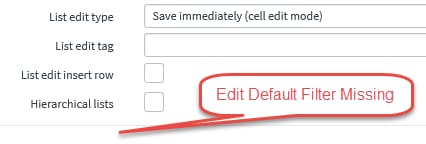
What do I have to do in order to get the Default Filter to actually change? If I configure the List Control, I also don't have the "Edit default filter" option even though it does show in the Form Layout:


We are using List v3, but I just don't get why changing the default filter isn't working for me.
Please mark this response as correct and/or helpful if it assisted you with your question.
Steven
Solved! Go to Solution.

- Mark as New
- Bookmark
- Subscribe
- Mute
- Subscribe to RSS Feed
- Permalink
- Report Inappropriate Content
05-04-2017 11:12 AM
Hi Steven,
I did the same and it worked for me as well once I refreshed the browser. Try it and if it still doesn't work, may be clearing the cache will.
To clear cache: type cache.do in the navigation filter and press enter OR https://instance-name.service-now.com/cache.do in the URL


- Mark as New
- Bookmark
- Subscribe
- Mute
- Subscribe to RSS Feed
- Permalink
- Report Inappropriate Content
05-04-2017 07:41 AM
Hi Steven,
As per your comments I updated the filter condition and it is working for me.
Screenshots below. Can you try doing a refresh instance?


Mark Correct if this solves your issue and also hit Like and Helpful if you find my response worthy based on the impact.
Thanks
Ankur
Ankur
✨ Certified Technical Architect || ✨ 10x ServiceNow MVP || ✨ ServiceNow Community Leader
- Mark as New
- Bookmark
- Subscribe
- Mute
- Subscribe to RSS Feed
- Permalink
- Report Inappropriate Content
05-04-2017 08:47 AM
Probably a dumb question, but how do you refresh your instance?
Please mark this response as correct and/or helpful if it assisted you with your question.
Steven
- Mark as New
- Bookmark
- Subscribe
- Mute
- Subscribe to RSS Feed
- Permalink
- Report Inappropriate Content
05-04-2017 10:09 AM
Hi Steven,
It's just use browser option or logout and login back to the instance.
Regards
Ankur
Ankur
✨ Certified Technical Architect || ✨ 10x ServiceNow MVP || ✨ ServiceNow Community Leader
- Mark as New
- Bookmark
- Subscribe
- Mute
- Subscribe to RSS Feed
- Permalink
- Report Inappropriate Content
05-04-2017 11:12 AM
Hi Steven,
I did the same and it worked for me as well once I refreshed the browser. Try it and if it still doesn't work, may be clearing the cache will.
To clear cache: type cache.do in the navigation filter and press enter OR https://instance-name.service-now.com/cache.do in the URL