- Mark as New
- Bookmark
- Subscribe
- Mute
- Subscribe to RSS Feed
- Permalink
- Report Inappropriate Content
04-25-2017 09:13 AM
All,
I have a requirement to add a cancel UI Action button to the RITM form that will open a window so that users can input cancel comments/reasons. Which I created and it works except for the Processing Script section of the UI Page.
I need the Processing Script to change the state & stage fields of the RITM and update the form. Which doesn't work at the moment. I have pasted my UI Page code below:
Any suggestions will help out. I haven't had to create many UI Pages within ServiceNow so I am a little stuck...
UI Page
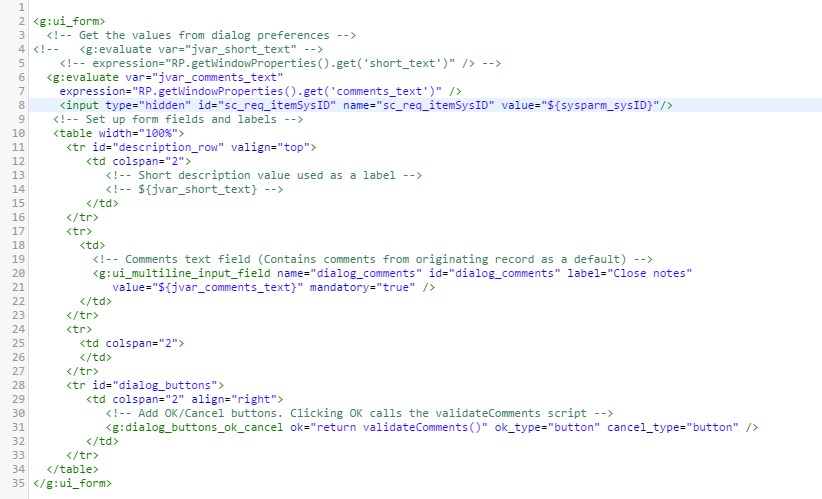
HTML Section:

Client Script Section:

Processing Script Section:

Solved! Go to Solution.
- Labels:
-
Scripting and Coding
- Mark as New
- Bookmark
- Subscribe
- Mute
- Subscribe to RSS Feed
- Permalink
- Report Inappropriate Content
05-08-2017 08:12 AM
Adding Script Include for anyone that runs past this post
Scrip Include:
Make sure you mark client callable
var cancelComments = Class.create();
cancelComments.prototype = Object.extendsObject(AbstractAjaxProcessor, {
cancelRITMComments: function(){
var sc_req_item_sys_id = this.getParameter('sysparm_sys_id');
var close_comments = this.getParameter('sysparm_close_comments');
var gr = new GlideRecord("sc_req_item");
if (gr.get(sc_req_item_sys_id)) {
gr.state = 4;
gr.close_notes = close_comments;
gr.stage = 'Request Cancelled';
gr.update();
}
return true;
},
_privateFunction: function(){ // this function is not client callable
}
});
UI Page Client Script (update):
function validateComments() {
//This script is called when the user clicks "OK" in the dialog window
//Make sure there are comments to submit
var comments = gel("dialog_comments").value;
comments = trim(comments);
if (comments == "") {
//If comments are empty, alert the user and stop submission
alert("Please enter your comments before submitting.");
return false;
}
var ritm_sys_id = gel("sc_req_item_sys_id").value;
var ajaxHelper = new GlideAjax('cancelComments');
ajaxHelper.addParam('sysparm_name', 'cancelRITMComments');
ajaxHelper.addParam('sysparm_sys_id', ritm_sys_id);
ajaxHelper.addParam('sysparm_close_comments', comments);
ajaxHelper.getXMLAnswer(function(){
GlideDialogWindow.get().destroy();
});
HTML Section of UI Page (update):
<g:evaluate var="jvar_ritm_sys_id" expression="RP.getWindowProperties().get('sys_id')" />
<input type="hidden" name="sc_req_item_sys_id" id="sc_req_item_sys_id" value="${jvar_ritm_sys_id}"/>
<input type="hidden" name="selection_result" id="selection_result" value=""/>
- Mark as New
- Bookmark
- Subscribe
- Mute
- Subscribe to RSS Feed
- Permalink
- Report Inappropriate Content
05-08-2017 07:56 AM
Hi Chuck,
I had to create a script include and then call it from the Client Script Section of the UI Page. I was able to get things working once I did that.
Thanks for your replies and suggestions.
- Mark as New
- Bookmark
- Subscribe
- Mute
- Subscribe to RSS Feed
- Permalink
- Report Inappropriate Content
05-08-2017 08:12 AM
Adding Script Include for anyone that runs past this post
Scrip Include:
Make sure you mark client callable
var cancelComments = Class.create();
cancelComments.prototype = Object.extendsObject(AbstractAjaxProcessor, {
cancelRITMComments: function(){
var sc_req_item_sys_id = this.getParameter('sysparm_sys_id');
var close_comments = this.getParameter('sysparm_close_comments');
var gr = new GlideRecord("sc_req_item");
if (gr.get(sc_req_item_sys_id)) {
gr.state = 4;
gr.close_notes = close_comments;
gr.stage = 'Request Cancelled';
gr.update();
}
return true;
},
_privateFunction: function(){ // this function is not client callable
}
});
UI Page Client Script (update):
function validateComments() {
//This script is called when the user clicks "OK" in the dialog window
//Make sure there are comments to submit
var comments = gel("dialog_comments").value;
comments = trim(comments);
if (comments == "") {
//If comments are empty, alert the user and stop submission
alert("Please enter your comments before submitting.");
return false;
}
var ritm_sys_id = gel("sc_req_item_sys_id").value;
var ajaxHelper = new GlideAjax('cancelComments');
ajaxHelper.addParam('sysparm_name', 'cancelRITMComments');
ajaxHelper.addParam('sysparm_sys_id', ritm_sys_id);
ajaxHelper.addParam('sysparm_close_comments', comments);
ajaxHelper.getXMLAnswer(function(){
GlideDialogWindow.get().destroy();
});
HTML Section of UI Page (update):
<g:evaluate var="jvar_ritm_sys_id" expression="RP.getWindowProperties().get('sys_id')" />
<input type="hidden" name="sc_req_item_sys_id" id="sc_req_item_sys_id" value="${jvar_ritm_sys_id}"/>
<input type="hidden" name="selection_result" id="selection_result" value=""/>