Not able to import date in my target table using import set

- Mark as New
- Bookmark
- Subscribe
- Mute
- Subscribe to RSS Feed
- Permalink
- Report Inappropriate Content
03-21-2023 11:45 PM

- Mark as New
- Bookmark
- Subscribe
- Mute
- Subscribe to RSS Feed
- Permalink
- Report Inappropriate Content
03-22-2023 12:40 AM
Is the source table field type "date"? If not you'll have to write a source script in the field map record to convert the string data to date type.
If I could help you with my response you can mark it as helpful and correct as it benefits future viewers
Thanks,
Sai Kumar B
Community Rising Star 2023 & 2022
- Mark as New
- Bookmark
- Subscribe
- Mute
- Subscribe to RSS Feed
- Permalink
- Report Inappropriate Content
03-22-2023 12:42 AM
Hi @--oooo-- ,
Can you share more data regarding this
Screenshots of the transform map, field mappings and transform scripts if any would be helpful
Regards,
Teja
- Mark as New
- Bookmark
- Subscribe
- Mute
- Subscribe to RSS Feed
- Permalink
- Report Inappropriate Content
03-22-2023 01:06 AM - edited 03-22-2023 01:10 AM
Hello @Teja11 ,
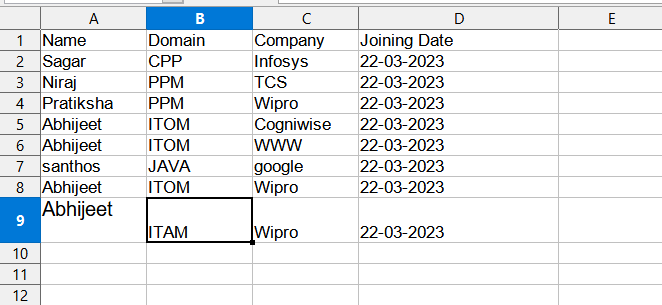
I did not have any transform script I tried to change the date format from the filed map but I am not able to change it. I have attached my excel sheet screenshot, filed map screenshot, transform map, and target table form. please check it once .
Thank You.
- Mark as New
- Bookmark
- Subscribe
- Mute
- Subscribe to RSS Feed
- Permalink
- Report Inappropriate Content
03-22-2023 01:30 AM
Check the field types in both source table and target table.
Maybe one field is DateTime and other one is Date type.
Regards,
Teja