- Mark as New
- Bookmark
- Subscribe
- Mute
- Subscribe to RSS Feed
- Permalink
- Report Inappropriate Content
09-17-2019 08:35 AM
Creating a form with an independent Application and I'm getting the following error.

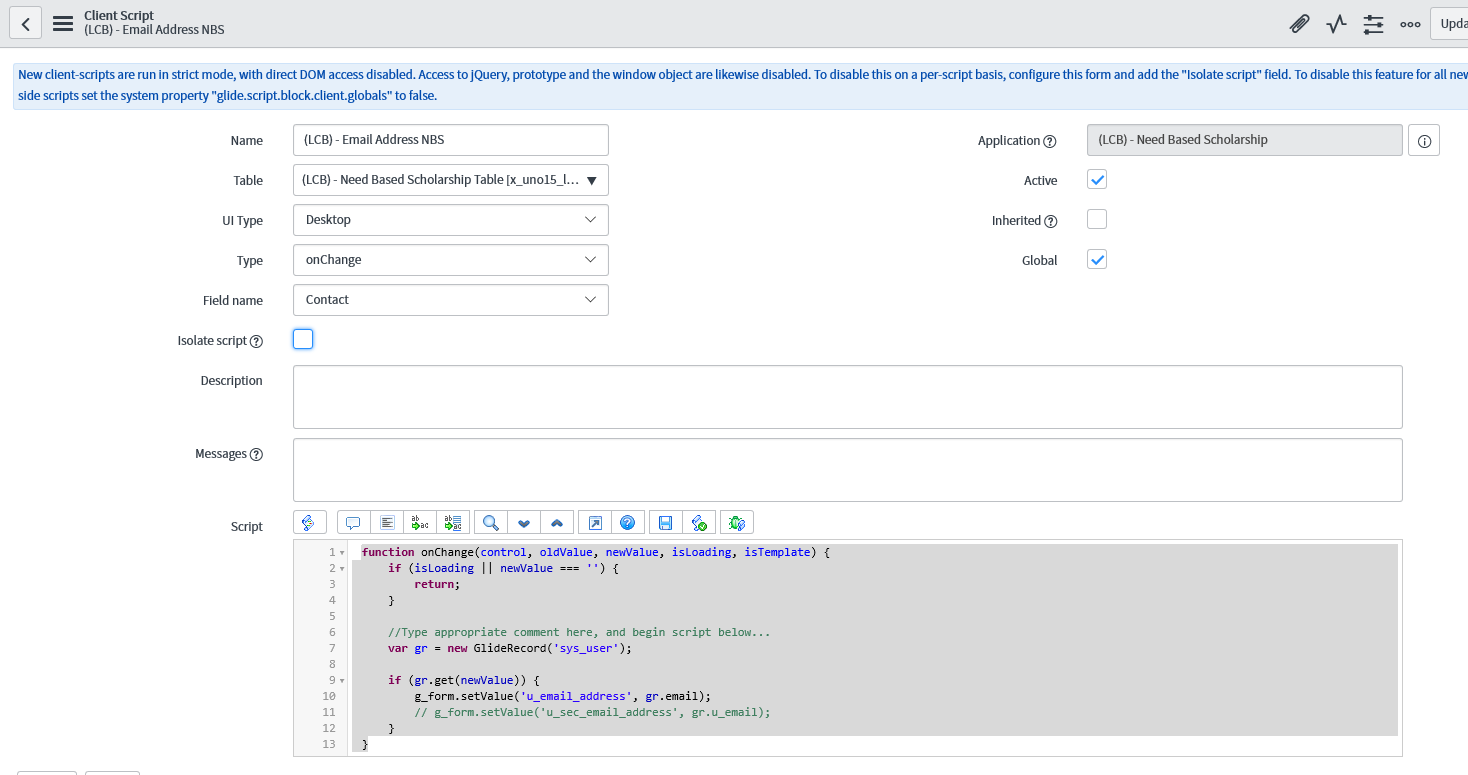
I have the following onChange client script.
function onChange(control, oldValue, newValue, isLoading, isTemplate) {
if (isLoading || newValue === '') {
return;
}
//Type appropriate comment here, and begin script below...
var gr = new GlideRecord('sys_user');
if (gr.get(newValue)) {
g_form.setValue('u_email_address', gr.email);
// g_form.setValue('u_sec_email_address', gr.u_email);
}
}
I have also gone and created under the sys_properties.list a new

What am I missing? Obviously, I have other forms that work when the application is Global. I have also toggled the "Isolate script" without success.

Thanks.
Jason
Solved! Go to Solution.
- Labels:
-
Scripting and Coding

- Mark as New
- Bookmark
- Subscribe
- Mute
- Subscribe to RSS Feed
- Permalink
- Report Inappropriate Content
09-17-2019 09:28 AM
Try this
function onChange(control, oldValue, newValue, isLoading, isTemplate) {
if (isLoading || newValue === '') {
return;
}

var requestedfor = g_form.getReference('caller_id', getDetails); //Callback

function getDetails(requestedfor) {
if (requestedfor)
g_form.setValue('u_email_address', requestedfor.email);
g_form.setValue('u_x_ucid', requestedfor.u_ucid);
}


//Type appropriate comment here, and begin script below...
//var gr = new GlideRecord('sys_user');

//if (gr.get(newValue)) {
// g_form.setValue('u_email_address', gr.email);
// g_form.setValue('u_sec_email_address', gr.u_email);

}
Please mark my response as correct and helpful if it helped solved your question.
-Thanks
- Mark as New
- Bookmark
- Subscribe
- Mute
- Subscribe to RSS Feed
- Permalink
- Report Inappropriate Content
09-17-2019 09:48 AM
Final code that worked.
function onChange(control, oldValue, newValue, isLoading, isTemplate) {
if (isLoading || newValue === '') {
return;
}
var callerid = g_form.getReference('u_contact', getDetails); //Callback
function getDetails(callerid) {
//if (callerid)
g_form.setValue('u_email_address', callerid.email);
g_form.setValue('u_x_ucid', callerid.u_ucid);
}
}
- Mark as New
- Bookmark
- Subscribe
- Mute
- Subscribe to RSS Feed
- Permalink
- Report Inappropriate Content
09-17-2019 09:59 AM
Did you mark your own response as correct??
Try following for it work onLoad too
function onChange(control, oldValue, newValue, isLoading, isTemplate) {
if ( newValue === '') {
return;
}

var callerid = g_form.getReference('u_contact', getDetails); //Callback

function getDetails(callerid) {
//if (callerid)
g_form.setValue('u_email_address', callerid.email);
g_form.setValue('u_x_ucid', callerid.u_ucid);
}

}
Please mark my response as correct and helpful if it helped solved your question.
-Thanks
- Mark as New
- Bookmark
- Subscribe
- Mute
- Subscribe to RSS Feed
- Permalink
- Report Inappropriate Content
09-17-2019 10:18 AM
Yeah. Accidentally. Sorry