- Mark as New
- Bookmark
- Subscribe
- Mute
- Subscribe to RSS Feed
- Permalink
- Report Inappropriate Content
04-24-2017 07:32 AM
Hi All,
I am having an onSubmit Catalog Client Script on Service portal to prevent it from Submitting without Subcategory2 value, But it is not working.
And also I have tried the same using GlideAjax, that is also failing...
Please find my code below,
Title: Catalog Client Script
function onSubmit() {
function onSubmit() {
//Type appropriate comment here, and begin script below
var form = typeof g_sc_form != "undefined" ? g_sc_form : g_form;
var subCat1Value = g_form.getValue('u_subcategory');
var subCat2Value = form.getValue('u_subcategory_2');
var gp = new GlideRecord('sys_choice');
gp.addQuery('name', 'change_request');
gp.addQuery('dependent_value', subCat1Value);
gp.addQuery('element', 'u_subcategory_2');
gp.addQuery('inactive', 'false');
gp.query(function(gp) {
if(!gp.hasNext()){
return true;
}
if(gp.hasNext() && subCat2Value == 'none'){
alert('Please select atleast one value from Subcagtegory 2');
return false; // The code automatically get submitted without a Subcategory2 value after getting above mentioned alert
}
} );
}
}
} );
}
Can anyone help me..
Thanks In advance.
Solved! Go to Solution.
- Mark as New
- Bookmark
- Subscribe
- Mute
- Subscribe to RSS Feed
- Permalink
- Report Inappropriate Content
04-26-2017 02:53 AM
The following code has worked for me...
function onSubmit() {
//Type appropriate comment here, and begin script below
if (!window) {
if (g_scratchpad.isFormValid) {
return true;
}
var form = typeof g_sc_form != "undefined" ? g_sc_form : g_form;
var subCat1Value = g_form.getValue('u_subcategory');
var subCat2Value = form.getValue('u_subcategory_2');
var gp = new GlideRecord('sys_choice');
gp.addQuery('name', 'change_request');
gp.addQuery('dependent_value', subCat1Value);
gp.addQuery('element', 'u_subcategory_2');
gp.addQuery('inactive', 'false');
gp.query(function(gp) {
if(gp.getRowCount() >= 1 && subCat2Value == 'none'){
alert('Please select atleast one value from Subcagtegory 2');
return false;
}
g_scratchpad.isFormValid = true;
g_form.submit();
});
return false;
}
}
- Mark as New
- Bookmark
- Subscribe
- Mute
- Subscribe to RSS Feed
- Permalink
- Report Inappropriate Content
04-24-2017 07:33 AM

- Mark as New
- Bookmark
- Subscribe
- Mute
- Subscribe to RSS Feed
- Permalink
- Report Inappropriate Content
04-24-2017 07:43 AM
By seeing the code i can see on small mistake, marked in Bold.
function onSubmit() {
//Type appropriate comment here, and begin script below
var form = typeof g_sc_form != "undefined" ? g_sc_form : g_form;
var subCat1Value = g_form.getValue('u_subcategory');
var subCat2Value = g_form.getValue('u_subcategory_2');
var gp = new GlideRecord('sys_choice');
gp.addQuery('name', 'change_request');
gp.addQuery('dependent_value', subCat1Value);
gp.addQuery('element', 'u_subcategory_2');
gp.addQuery('inactive', 'false');
gp.query(function(gp) {
if(!gp.hasNext()){
return true;
}
if(gp.hasNext() && subCat2Value == 'none'){
alert('Please select atleast one value from Subcagtegory 2');
return false; // The code automatically get submitted without a Subcategory2 value after getting above mentioned alert
}
} );
}
}
} );
}
- Mark as New
- Bookmark
- Subscribe
- Mute
- Subscribe to RSS Feed
- Permalink
- Report Inappropriate Content
04-24-2017 07:41 AM
Hi Regina Bautista,
Thanks for your response,
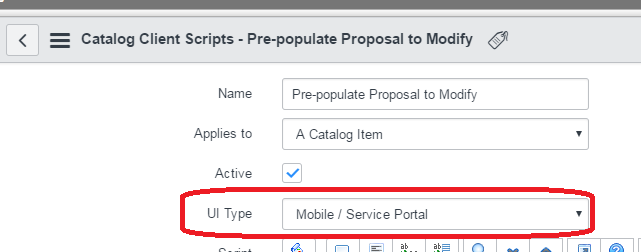
Yeah, I am using Istanbul and The UI type is set to Both only,
- Mark as New
- Bookmark
- Subscribe
- Mute
- Subscribe to RSS Feed
- Permalink
- Report Inappropriate Content
04-24-2017 07:43 AM
Hi Silva,
Use Synchronous Glide Ajax it will work.
Synchronous glide Ajax:
http://wiki.servicenow.com/index.php?title=GlideAjax#gsc.tab=0
go to 2.1.2