- Mark as New
- Bookmark
- Subscribe
- Mute
- Subscribe to RSS Feed
- Permalink
- Report Inappropriate Content
09-25-2026 10:55 AM
My parent Archive Rule is failing to run referenced 'child' Archive Rules.
The goal for this archival is to archive [incident_alert] and [incident_alert_task] records when an [incident] record matching the criteria in the parent rule is found. Since the Related Records for Archive Rules cannot dot walk, and [incident_alert_task] references [incident_alert] and not [incident], I cannot add [incident_alert_task] records as Related Records of the parent rule like I can for [incident_alert] records which directly reference [incident] records.
After extensive online research, I gathered that the solution was to create 'child' rules and reference those in the "Referenced table rule" field of Related Records. With that, I created two new child rules. Here is my structure:
Archive Rule 1: "Incident - Inactive and closed 7 or more years ago" (Active)
Archive Related Record:
- Action: Archive
- Reference: incident_alert.source_incident
- Reference table: Incident Communication Plan [incident_alert]
- Reference element: source_incident
- Reference table rule: Incidents Cascade - [incident_alert]
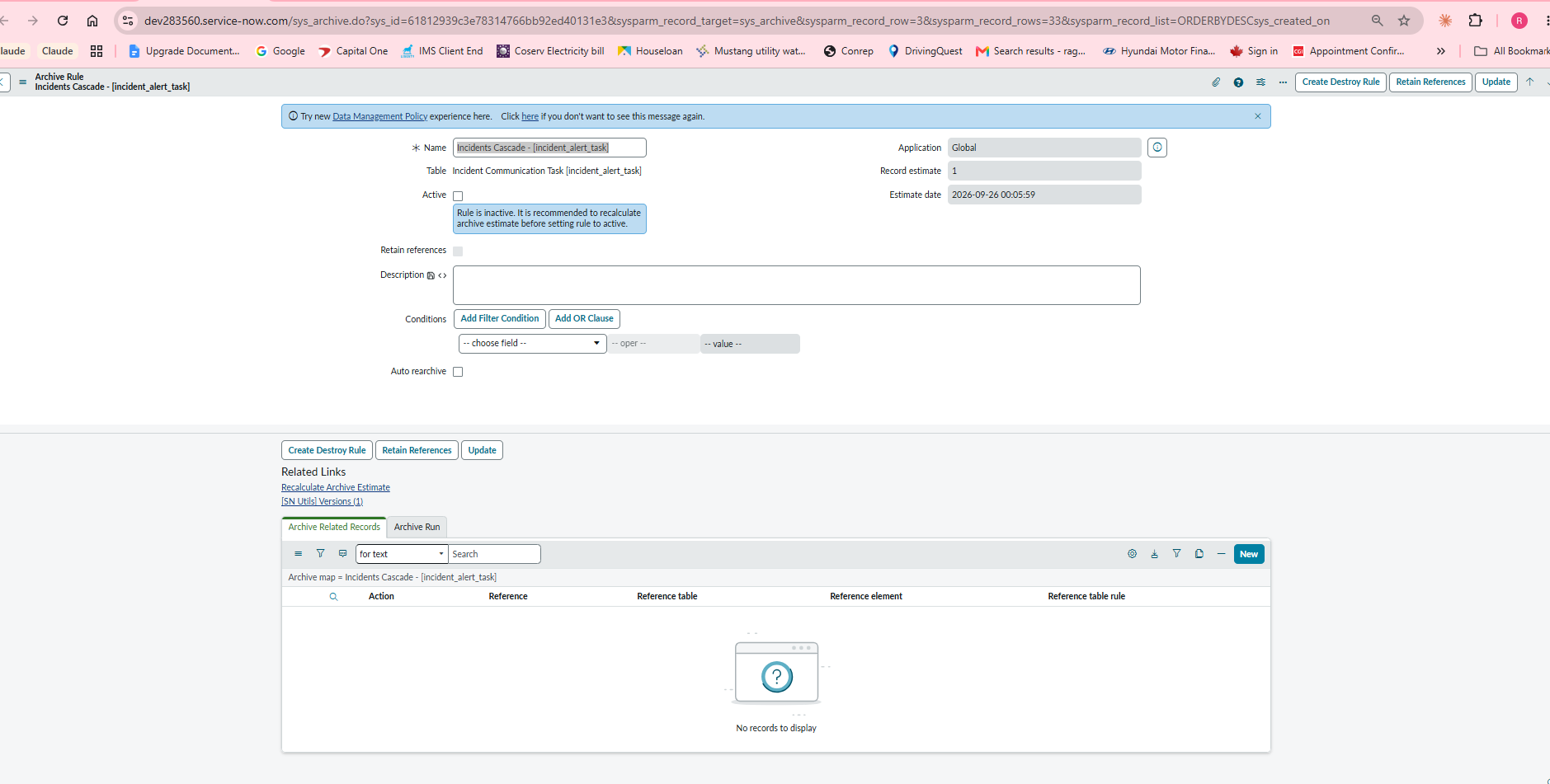
Archive Rule 2: "Incidents Cascade - [incident_alert]" (Inactive)
Archive Related Record:
- Action: Archive
- Reference: incident_alert_task.comm_plan
- Reference table: Incident Communication Task [incident_alert_task]
- Reference element: comm_plan
- Reference table rule: Incidents Cascade - [incident_alert_task]
Archive Rule 3: "Incidents Cascade - [incident_alert_task]" (Inactive)
No Related Records
I have also tried chaining these through the Parent fields and have activated rules 2 and 3 with the criteria being "sys_id is not empty", but they never ran with any combination of the two. Since rule 2 is never ran, rule 3 is never ran. None of the (sparse) examples of this configuration that I've come across have been able to solve my dilemma.
Is this a misunderstanding or misconfiguration on my part or a bug?
Solved! Go to Solution.
- Mark as New
- Bookmark
- Subscribe
- Mute
- Subscribe to RSS Feed
- Permalink
- Report Inappropriate Content
09-26-2026 08:40 AM
Hello @mdcyb
This looks like a configuration Issue not a bug. I was able to replicate this scenario in my PDI and was able to sucessfully archive incident--->incident_alert--->incident_alert_task tables
I created 3 rules just like you did mention on your post (refer main screenshot attached)
Archive Rule 1: "TEST - INC0000060" (Active)
Archive Related Record:
- Action: Archive
- Reference: incident_alert.source_incident
- Reference table: Incident Communication Plan [incident_alert]
- Reference element: source_incident
Reference table rule: Incidents Cascade - [incident_alert]
Refer Screenshot1 Attached.
Archive Rule 2: "Incidents Cascade - [incident_alert]" (Inactive)
Archive Related Record:
- Action: Archive
- Reference: incident_alert_task.incident_alert <----- I think this were your configuration mistake
- Reference table: Incident Communication Task [incident_alert_task]
- Reference element: incident_alert<-----I think this were your configuration mistake
- Reference table rule: Incidents Cascade - [incident_alert_task]
Refer Screenshot2 Attached
Archive Rule 3: "Incidents Cascade - [incident_alert_task]" (Inactive)
No Related Records
Refer Screenshot3 Attached
Also Refer Final result screenshot Attached
Please click "Helpful" and "Solution Accepted" if my reply helped you
Regards
Raghavendra G
- Mark as New
- Bookmark
- Subscribe
- Mute
- Subscribe to RSS Feed
- Permalink
- Report Inappropriate Content
09-26-2026 08:40 AM
Hello @mdcyb
This looks like a configuration Issue not a bug. I was able to replicate this scenario in my PDI and was able to sucessfully archive incident--->incident_alert--->incident_alert_task tables
I created 3 rules just like you did mention on your post (refer main screenshot attached)
Archive Rule 1: "TEST - INC0000060" (Active)
Archive Related Record:
- Action: Archive
- Reference: incident_alert.source_incident
- Reference table: Incident Communication Plan [incident_alert]
- Reference element: source_incident
Reference table rule: Incidents Cascade - [incident_alert]
Refer Screenshot1 Attached.
Archive Rule 2: "Incidents Cascade - [incident_alert]" (Inactive)
Archive Related Record:
- Action: Archive
- Reference: incident_alert_task.incident_alert <----- I think this were your configuration mistake
- Reference table: Incident Communication Task [incident_alert_task]
- Reference element: incident_alert<-----I think this were your configuration mistake
- Reference table rule: Incidents Cascade - [incident_alert_task]
Refer Screenshot2 Attached
Archive Rule 3: "Incidents Cascade - [incident_alert_task]" (Inactive)
No Related Records
Refer Screenshot3 Attached
Also Refer Final result screenshot Attached
Please click "Helpful" and "Solution Accepted" if my reply helped you
Regards
Raghavendra G
- Mark as New
- Bookmark
- Subscribe
- Mute
- Subscribe to RSS Feed
- Permalink
- Report Inappropriate Content
09-28-2026 05:30 AM
Thank you so much for taking the time to test this!
I created fresh Archive Rules for the first two, and it correctly archived all 3 records. The third actually isn't necessary, but thank you for testing that as well!
I did as you suggested and swapped the child rule to incident_alert_task.incident_alert, and it worked! Since this is my first time working with the incident_alert table, I used comm_plan since someone configured the table to show comm_plan.source_incident as a visible column, so I assumed that was what was used.
Thank you so much again! 😘
- Mark as New
- Bookmark
- Subscribe
- Mute
- Subscribe to RSS Feed
- Permalink
- Report Inappropriate Content
09-29-2026 11:52 AM
Glad it worked! Happy to help 🙂