- Mark as New
- Bookmark
- Subscribe
- Mute
- Subscribe to RSS Feed
- Permalink
- Report Inappropriate Content
05-29-2022 04:43 PM
Hi,
I have a custom table with a field called Resolved_time. I want the field to show the date and time of the system just like the Updated field when the record is submitted. Also, I want the format to look like the Updated field. How do I populate the date and time into this custom field?
Solved! Go to Solution.


- Mark as New
- Bookmark
- Subscribe
- Mute
- Subscribe to RSS Feed
- Permalink
- Report Inappropriate Content
05-29-2022 06:15 PM
Hi Pat,
Create a before business rule and set the script as follows:
if (current.u_resolved_time.nil())  // 'u_resolve_time' is a name of the custom field in the custom table
    current.u_resolved_time = gs.nowDateTime();
Full steps.
1. In custom table, create field "Resolved Time" with name 'u_resolved_time" of type "Date/Time"

2. Create a Business Rule.
- From Application Navigator, go to "System Definition" > "Business Rules"
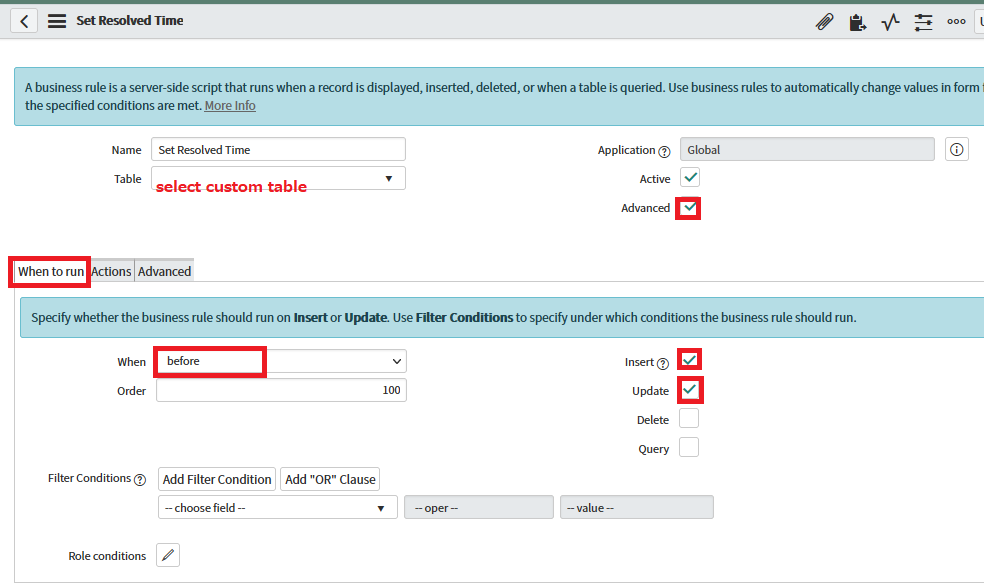
- Select custom table in "Table" field. Select "When to run" tab and set "When" to "before" and check "Insert" and "Update"
- Check "Advanced" and select "Advanced" tab. Enter script and save.


- Mark as New
- Bookmark
- Subscribe
- Mute
- Subscribe to RSS Feed
- Permalink
- Report Inappropriate Content
05-29-2022 05:43 PM
Take a look at the Incident form and its Resolved field. Also look at the business rule mark_resolved. That will show you how to do what you want.
Rather than just tell you how to do it, I'd rather tell how to figure these things out. ServiceNow has a lot of OOB code that does most things developers would need to do.
-Roger
- Mark as New
- Bookmark
- Subscribe
- Mute
- Subscribe to RSS Feed
- Permalink
- Report Inappropriate Content
05-29-2022 06:15 PM
Hi Pat,
Create a before business rule and set the script as follows:
if (current.u_resolved_time.nil())  // 'u_resolve_time' is a name of the custom field in the custom table
    current.u_resolved_time = gs.nowDateTime();
Full steps.
1. In custom table, create field "Resolved Time" with name 'u_resolved_time" of type "Date/Time"
2. Create a Business Rule.
- From Application Navigator, go to "System Definition" > "Business Rules"
- Select custom table in "Table" field. Select "When to run" tab and set "When" to "before" and check "Insert" and "Update"
- Check "Advanced" and select "Advanced" tab. Enter script and save.


- Mark as New
- Bookmark
- Subscribe
- Mute
- Subscribe to RSS Feed
- Permalink
- Report Inappropriate Content
05-29-2022 08:50 PM
Hi,
Can you explain the business requirement for that field?
Regards
Ankur
Ankur
✨ Certified Technical Architect || ✨ 10x ServiceNow MVP || ✨ ServiceNow Community Leader