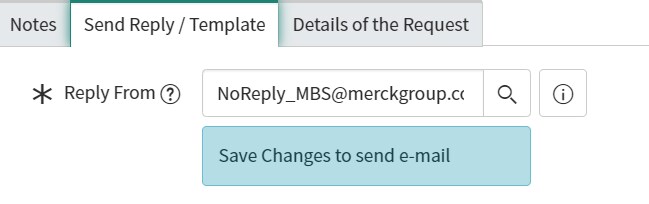
Populating email in reply from field when type of user is internal

- Mark as New
- Bookmark
- Subscribe
- Mute
- Subscribe to RSS Feed
- Permalink
- Report Inappropriate Content
08-07-2024 05:46 AM
Hi,
I am trying to Populate email id under reply from field only when type of user is internal else It should not be populated.
How can I achieve this?
Also I want to change by default value of email id populated under reply form field when type of user is internal.
Thanks in advance!
- Mark as New
- Bookmark
- Subscribe
- Mute
- Subscribe to RSS Feed
- Permalink
- Report Inappropriate Content
08-07-2024 06:12 AM
Hi @shubhamverm3478 ,
You need to write a after BR,
Script:
if(current.user == 'internal'){
current.reply_from = 'abc@g.com';
}else{
current.reply_from = '';
}
Thanks
Please mark answer correct/helpful based on impact
- Mark as New
- Bookmark
- Subscribe
- Mute
- Subscribe to RSS Feed
- Permalink
- Report Inappropriate Content
08-19-2024 11:00 AM
Hi Deborah,
Script is working fine.When in first time I am selecting type of user as internal its populating email.However in next attempt when I am selecting another user type email value is still present ,despite it should display null value.How can I achieve this?
- Mark as New
- Bookmark
- Subscribe
- Mute
- Subscribe to RSS Feed
- Permalink
- Report Inappropriate Content
08-07-2024 06:17 AM
To achieve this requirement in ServiceNow, you can use client scripts to dynamically populate the "Reply From" field based on the type of user.
Create a Client Script
- Navigate to Client Scripts:
- Go to All > System Definition > Client Scripts.
- Click New to create a new client script.
- Configure the Client Script:
- Name: Provide a name for the client script.
- Table: Select the table you want this script to apply to, such as incident or task.
- Type: Select onChange.
- Field Name: Select the field that determines the user type, e.g., type_of_user.
- Script Logic:
- Use the script to check the user type and populate or clear the "Reply From" email field accordingly.
Here is an example script:
(function executeRule(current, previous /*null when async*/) {
    // Field names
    var userTypeField = 'type_of_user';
    var replyFromField = 'reply_from_email';

    // Internal email address
    var internalEmail = 'internal@example.com';

    // Function to set or clear the reply from email
    function setReplyFromEmail() {
        var userType = g_form.getValue(userTypeField);

        if (userType === 'internal') {
            g_form.setValue(replyFromField, internalEmail);
        } else {
            g_form.clearValue(replyFromField);
        }
    }

    // Call the function when the script is loaded or the user type changes
    setReplyFromEmail();

    // Add an event listener for the user type field to handle changes
    g_form.getControl(userTypeField).onchange = setReplyFromEmail;
})(current, previous);
Set Default Values
To set default values for the "Reply From" email field based on the user type:
- Add an onLoad Client Script:
- Create another client script with the type onLoad.
- Use this script to check the user type when the form is loaded and set the default value if the user is internal.
Here's an example onLoad client script:
(function() {
    // Field names
    var userTypeField = 'type_of_user';
    var replyFromField = 'reply_from_email';

    // Internal email address
    var internalEmail = 'internal@example.com';

    // Function to set or clear the reply from email
    function setReplyFromEmail() {
        var userType = g_form.getValue(userTypeField);

        if (userType === 'internal') {
            g_form.setValue(replyFromField, internalEmail);
        } else {
            g_form.clearValue(replyFromField);
        }
    }

    // Call the function when the form is loaded
    setReplyFromEmail();
})();
I hope my answer helps you to resolve your issue, if yes mark my answer helpful and correct.
THANK YOU
rajesh chopade
- Mark as New
- Bookmark
- Subscribe
- Mute
- Subscribe to RSS Feed
- Permalink
- Report Inappropriate Content
08-07-2024 10:57 AM
Hi,
I tried using this script below
Its not working .I have attached screenshots of workspace url,reply from field,reply form email field,type of user field.Please let me know if any changes are required.