- Mark as New
- Bookmark
- Subscribe
- Mute
- Subscribe to RSS Feed
- Permalink
- Report Inappropriate Content
06-11-2026 08:36 AM - edited 06-11-2026 09:03 AM
Hi,
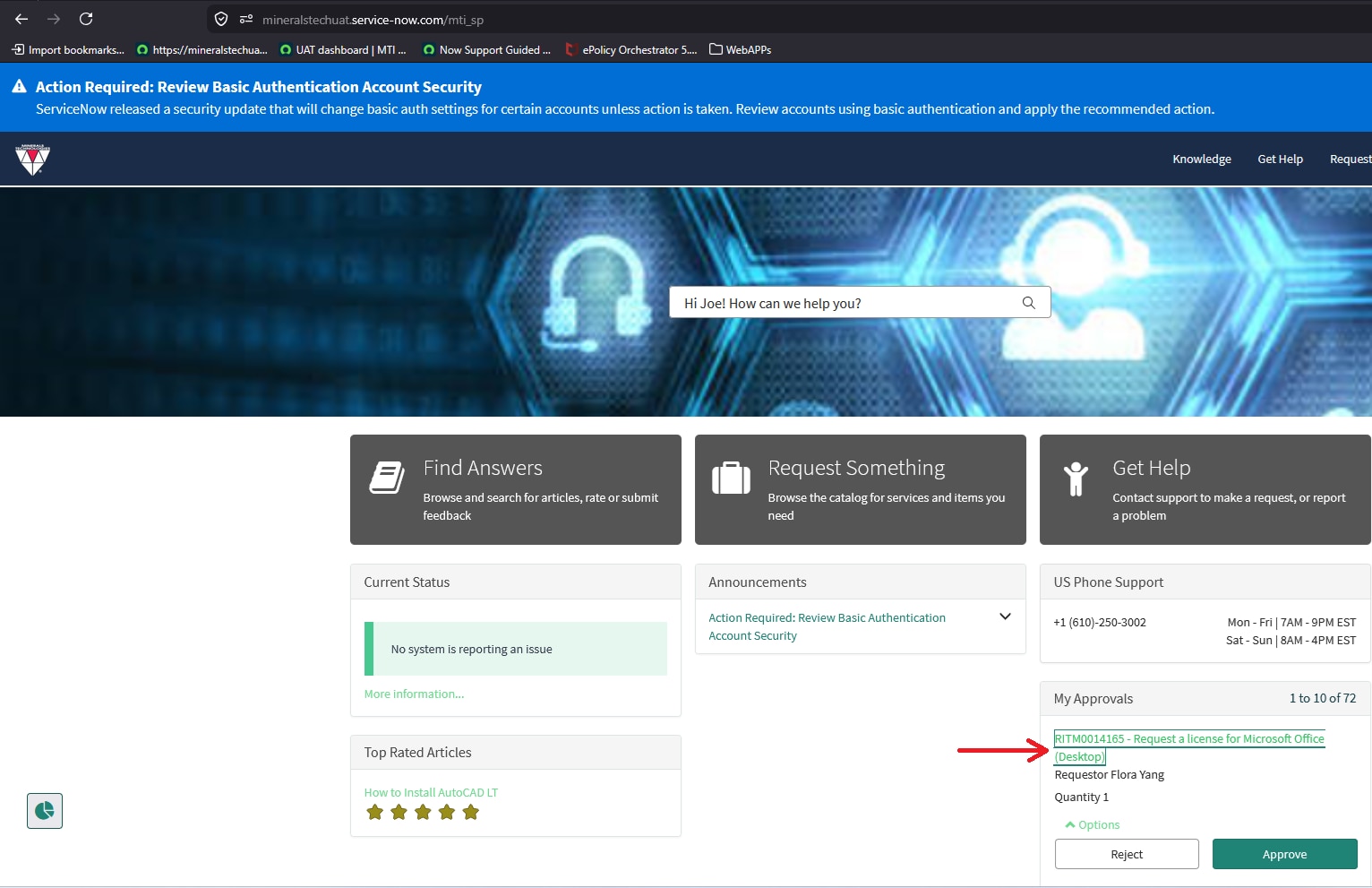
I am trying to create a notification for approvers about pending approvals to act on in my UAT instance before syncing it to my production instance. The body of the notification shows the RITM number along with the approve and reject, both of which are hyperlinks. (See FRST REM APRVL REQ-1) When I preview the notification, I see the RITM number, approve, and reject as hyperlinks. These links should redirect the customer to the approver form in the service portal, but when I click them, I get "Record Not Found" instead. (See FRST REM APRVL REQ-2) But when I impersonate the approver, navigate to the service portal, and open the approval form, I do see the approval request, but the SYS ID is different. (See FRST REM APRVL REQ-3 -- FRST REM APRVL REQ-4)
Below are the three types of JavaScript I tried, and both gave me the same results:
Version 1:
(function runMailScript(current, template, email, email_action, event) {

	// Generate the full URL for the RITM record
	var ritmLink = gs.getProperty('glide.servlet.uri') + 'mti_sp?id=approval&table=sysapproval_approver&sys_id=' + current.sys_id;

    // Create HTML links for Approve and Reject
    var approveLink = '<a href="' + ritmLink + '&state=approved">Approve</a>';
    var rejectLink = '<a href="' + ritmLink + '&state=rejected">Reject</a>';

	// Create the HTML link for the RITM number
    var linkHtml = '<a href="' + ritmLink + '">' + current.number + '</a>';

    template.print(sn_i18n.Message.getMessage("global",
        "{html0}{ritmNumber} {html1}{html2}needs your aapproval.{html3}{approve} | {reject}{html6}", {
            ritmNumber: linkHtml,
            html0: '<div style="font-size: 16px;" ><span style="font-weight: 700; color: #181A1F;">',
            html1: '</span>',
            html2: '<span style="font-weight: 400;">',
            html3: '</span></div>',
            approve: approveLink,
            reject: rejectLink,
            html6: '</span></div>'
        }));

})(current, template, email, email_action, event);
Version 2:
(function runMailScript(current, template, email, email_action, event) {

	// Generate the full URL for the RITM record
	var ritmLink = gs.getProperty('glide.servlet.uri') + 'mti_sp?id=approval&table=sysapproval_approver&sys_id=' + current.sys_id;

    // Create HTML links for Approve and Reject
    var approveLink = '<a href="' + ritmLink + '&state=approved">Approve</a>';
    var rejectLink = '<a href="' + ritmLink + '&state=rejected">Reject</a>';

	// Create the HTML link for the RITM number
    var linkHtml = '<a href="' + ritmLink + '">' + current.number + '</a>';

    template.print(sn_i18n.Message.getMessage("global",
        "{html0}{ritmNumber} {html1}{html2}needs your aapproval.{html3}{approve} | {reject}{html6}", {
            ritmNumber: linkHtml,
            html0: '<div style="font-size: 16px;" ><span style="font-weight: 700; color: #181A1F;">',
            html1: '</span>',
            html2: '<span style="font-weight: 400;">',
            html3: '</span></div>',
            approve: approveLink,
            reject: rejectLink,
            html6: '</span></div>'
        }));

})(current, template, email, email_action, event);
Version 3:
(function runMailScript(current, template, email, email_action, event) {

	// 1. Query for the actual approal record tied to this RITM/Task
	var approvalGr = new GlideRecord('sysapproval_approver');
	approvalGr.addQuery('sysapproval', current.sys_id); // Links to the RITM or Approval target
	approvalGr.query();

	var approvalSysID = current.sys_id.toString();

	// 2. Generate the base Service Portal approval URL
	var baseUrl = gs.getProperty('glide.servlet.uri') + 'mti_sp?id=approval&table=sysapproval_approver&sys_id=' + approvalSysID;

	// 3. Create clickable HTML links
	var approveLink = '<a href="' + baseUrl + '&state=approved">Approve</a>';
	var rejectLink = '<a href="' + baseUrl + '&state=rejected">Reject</a>';
	var linkHtml = '<a href="' + baseUrl + '">' + current.number + '</a>';

	// 4. Print the final translated message
	template.print(sn_i18n.Message.getMessage("global", "{html0}{ritmNumber} {html1}{html2}needs your approval.{html3}{approve} | {reject}{html6}", {
		ritmNumber: linkHtml,
		html0: '<div style="font-size: 16px;" ><span style="font=weight: 700; color: #181A1F;">',
		html1: '</span>',
		html2: '<span style="font=weight: 400;">',
		html3: '</span></div>',
		approve: approveLink,
		reject: rejectLink,
		html6: '</span></div>'
		//
	}));
	//

})(current, template, email, email_action, event);
Solved! Go to Solution.
- Mark as New
- Bookmark
- Subscribe
- Mute
- Subscribe to RSS Feed
- Permalink
- Report Inappropriate Content
06-11-2026 09:14 AM
Hi @BenFan ,
Change the logic to get the approval id
(function runMailScript(current, template, email, email_action, event) {

    // 1. Query for the actual approal record tied to this RITM/Task

    var approvalGr = new GlideRecord("sysapproval_approver");
    approvalGr.addEncodedQuery("approver=" + gs.getUserID() + "^sysapproval=" + current.sys_id);
    approvalGr.query();
    if (approvalGr.next()) {
        var approvalSysID = approvalGr.getValue("sys_id")
    }

    // 2. Generate the base Service Portal approval URL
    var baseUrl = gs.getProperty('glide.servlet.uri') + 'mti_sp?id=approval&table=sysapproval_approver&sys_id=' + approvalSysID;

    // 3. Create clickable HTML links
    var approveLink = '<a href="' + baseUrl + '&state=approved">Approve</a>';
    var rejectLink = '<a href="' + baseUrl + '&state=rejected">Reject</a>';
    var linkHtml = '<a href="' + baseUrl + '">' + current.number + '</a>';

    // 4. Print the final translated message
    template.print(sn_i18n.Message.getMessage("global", "{html0}{ritmNumber} {html1}{html2}needs your approval.{html3}{approve} | {reject}{html6}", {
        ritmNumber: linkHtml,
        html0: '<div style="font-size: 16px;" ><span style="font=weight: 700; color: #181A1F;">',
        html1: '</span>',
        html2: '<span style="font=weight: 400;">',
        html3: '</span></div>',
        approve: approveLink,
        reject: rejectLink,
        html6: '</span></div>'
        //
    }));
    //

})(current, template, email, email_action, event);
If my response helped, please mark it as helpful and accept the solution.
Thanks,
Teja
- Mark as New
- Bookmark
- Subscribe
- Mute
- Subscribe to RSS Feed
- Permalink
- Report Inappropriate Content
06-11-2026 09:14 AM
Hi @BenFan ,
Change the logic to get the approval id
(function runMailScript(current, template, email, email_action, event) {

    // 1. Query for the actual approal record tied to this RITM/Task

    var approvalGr = new GlideRecord("sysapproval_approver");
    approvalGr.addEncodedQuery("approver=" + gs.getUserID() + "^sysapproval=" + current.sys_id);
    approvalGr.query();
    if (approvalGr.next()) {
        var approvalSysID = approvalGr.getValue("sys_id")
    }

    // 2. Generate the base Service Portal approval URL
    var baseUrl = gs.getProperty('glide.servlet.uri') + 'mti_sp?id=approval&table=sysapproval_approver&sys_id=' + approvalSysID;

    // 3. Create clickable HTML links
    var approveLink = '<a href="' + baseUrl + '&state=approved">Approve</a>';
    var rejectLink = '<a href="' + baseUrl + '&state=rejected">Reject</a>';
    var linkHtml = '<a href="' + baseUrl + '">' + current.number + '</a>';

    // 4. Print the final translated message
    template.print(sn_i18n.Message.getMessage("global", "{html0}{ritmNumber} {html1}{html2}needs your approval.{html3}{approve} | {reject}{html6}", {
        ritmNumber: linkHtml,
        html0: '<div style="font-size: 16px;" ><span style="font=weight: 700; color: #181A1F;">',
        html1: '</span>',
        html2: '<span style="font=weight: 400;">',
        html3: '</span></div>',
        approve: approveLink,
        reject: rejectLink,
        html6: '</span></div>'
        //
    }));
    //

})(current, template, email, email_action, event);
If my response helped, please mark it as helpful and accept the solution.
Thanks,
Teja
- Mark as New
- Bookmark
- Subscribe
- Mute
- Subscribe to RSS Feed
- Permalink
- Report Inappropriate Content
06-11-2026 09:26 AM
Let me try this script out, and I'll get back to you.
- Mark as New
- Bookmark
- Subscribe
- Mute
- Subscribe to RSS Feed
- Permalink
- Report Inappropriate Content
06-11-2026 09:46 AM
- Mark as New
- Bookmark
- Subscribe
- Mute
- Subscribe to RSS Feed
- Permalink
- Report Inappropriate Content
06-11-2026 09:50 AM
Hi @BenFan ,
Can you please accept the solution if that helped.