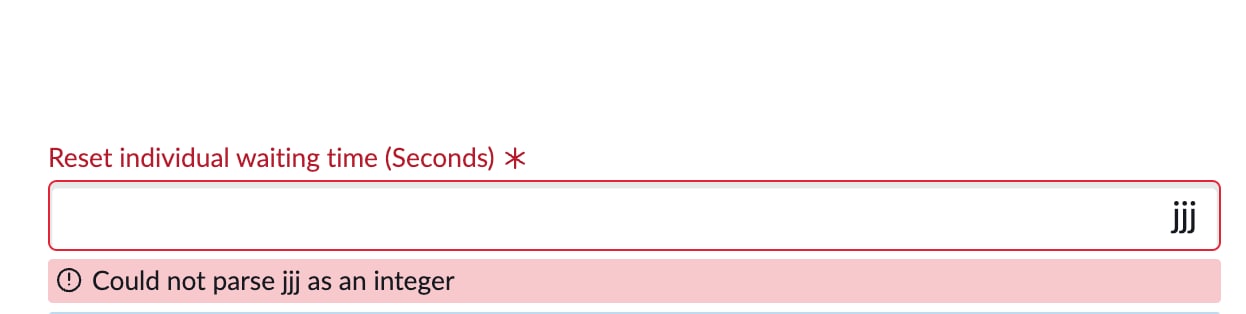
Remove or edite the default error message


- Mark as New
- Bookmark
- Subscribe
- Mute
- Subscribe to RSS Feed
- Permalink
- Report Inappropriate Content
08-24-2025 04:40 AM

- Mark as New
- Bookmark
- Subscribe
- Mute
- Subscribe to RSS Feed
- Permalink
- Report Inappropriate Content
08-24-2025 06:20 AM
The default error ( “Could not parse xxx as an integer” ) is coming from ServiceNow’s internal field type validation because your field is defined as Integer in the dictionary. That system validation always runs before/alongside your client script, and unfortunately you cannot "turn it off" for that field type.
Script Modified :
function onChange(control, oldValue, newValue, isLoading, isTemplate) {
if (isLoading || newValue === '') {
return;
}
if (isNaN(newValue)) {
g_form.showFieldMsg('max_waiting_time',
'Maximum waiting time should be a number (in seconds).', 'error');
} else {
g_form.hideFieldMsg('max_waiting_time');
}
}
- Mark as New
- Bookmark
- Subscribe
- Mute
- Subscribe to RSS Feed
- Permalink
- Report Inappropriate Content
08-24-2025 06:57 AM
it didn't work
what works is this
But the could not parse message appear as a flicker in the ui before the second one replaces it
- Mark as New
- Bookmark
- Subscribe
- Mute
- Subscribe to RSS Feed
- Permalink
- Report Inappropriate Content
08-24-2025 06:03 PM
Fix Options
Option 1: Direct Message (Recommended)
function onChange(control, oldValue, newValue, isLoading, isTemplate) {
    if (isLoading || newValue === '') return;
    if (!Number(newValue)) {
        g_form.showErrorBox('max_waiting_time', 'Maximum waiting time must be a valid number');
    }
}

Option 2: Proper getMessage Usage
function onChange(control, oldValue, newValue, isLoading, isTemplate) {
    if (isLoading || newValue === '') return;
    if (!Number(newValue)) {
        getMessage('max_waiting_time_error', function(msg) {
            g_form.showErrorBox('max_waiting_time', msg);
        });
    }
}

Then create sys_ui_message record:

Key: max_waiting_time_error
Message: Maximum waiting time must be a valid number
