Script Include for Array to add options to Choice List field

- Mark as New
- Bookmark
- Subscribe
- Mute
- Subscribe to RSS Feed
- Permalink
- Report Inappropriate Content
12-07-2022 06:32 AM
Hello,
I was reading some other posts about having a Script Include to pass an array to a client script and add the options into a choice list field. I want to try this first in the Catalog Item and then apply it to a Catalog Task as there is where I need to populate the drop-down or choice list field.
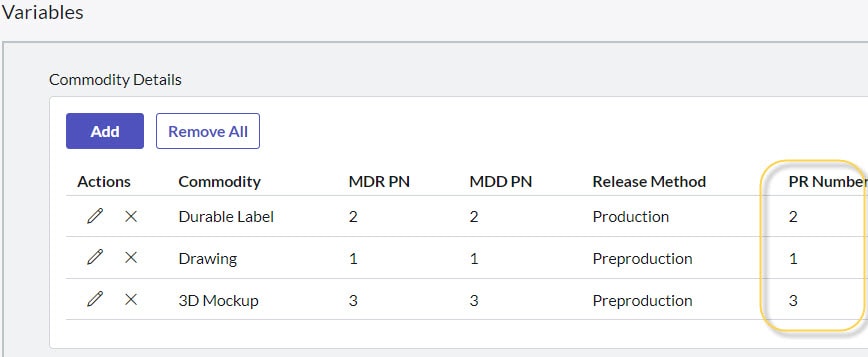
I have a variable set (MRVS) where I have a column named Part Number so the number of part numbers are entered by the end user, so it can be more than 1.
I have the following client script where I can get the values from the variable set, but I can't populate the choice list with those values.
I'm pretty much new in Script Include so I really appreciate any help.
function onSubmit() {
   //Type appropriate comment here, and begin script below
    var jsonStr = g_form.getValue('commodity_details');
   	    var objList = JSON.parse(jsonStr);

   	    var part_numbers_array = [];


   	    for (var i = 0; i < objList.length; i++) {
   	        part_numbers_array.push(objList[i].pr_number.toString());
   	    g_form.addOption('u_eu_mdr_part_numbers', part_numbers_array, part_numbers_array);
  	    g_form.setValue('description', part_numbers_array);
   	    }

	 alert(part_numbers_array);
}

- Mark as New
- Bookmark
- Subscribe
- Mute
- Subscribe to RSS Feed
- Permalink
- Report Inappropriate Content
12-13-2022 11:41 AM - edited 12-13-2022 11:44 AM
If your Task No variable is plain text, and so is the task number field on the new custom table, then your reference qualifier would be like this:
javascript:'task_number=' + current.variables.v_task_no;
where task_number is the name of the custom table field, and v_task_no is the variable name (and : is actually a colon character that this editor keeps replacing)
- Mark as New
- Bookmark
- Subscribe
- Mute
- Subscribe to RSS Feed
- Permalink
- Report Inappropriate Content
02-23-2025 10:15 PM
Can this also work with Form components on Configurable Workspaces?