- Mark as New
- Bookmark
- Subscribe
- Mute
- Subscribe to RSS Feed
- Permalink
- Report Inappropriate Content
07-18-2025 12:59 AM - edited 07-18-2025 01:34 AM
Hi Community,
Good day,
I was going through Service Portal training and in the lab instance while working I need some help in understanding on thing.
In the ITSM Dashboard page , below CSS script is being added.
/* Removes white space between Header and Container 1 */
section.page, main.body {
padding-top: 0px !important;
}
/* Style the Page */
section.page {
background-color: black;
}
/* Style Heading 1 */
h1 {
color: white;
}
/* Borders */
.blueTopBorder {
border-top: 10px solid blue;
margin-top: 20px;
}
.blueBottomBorder {
border-bottom: 10px solid blue;
margin-bottom: 20px;
}
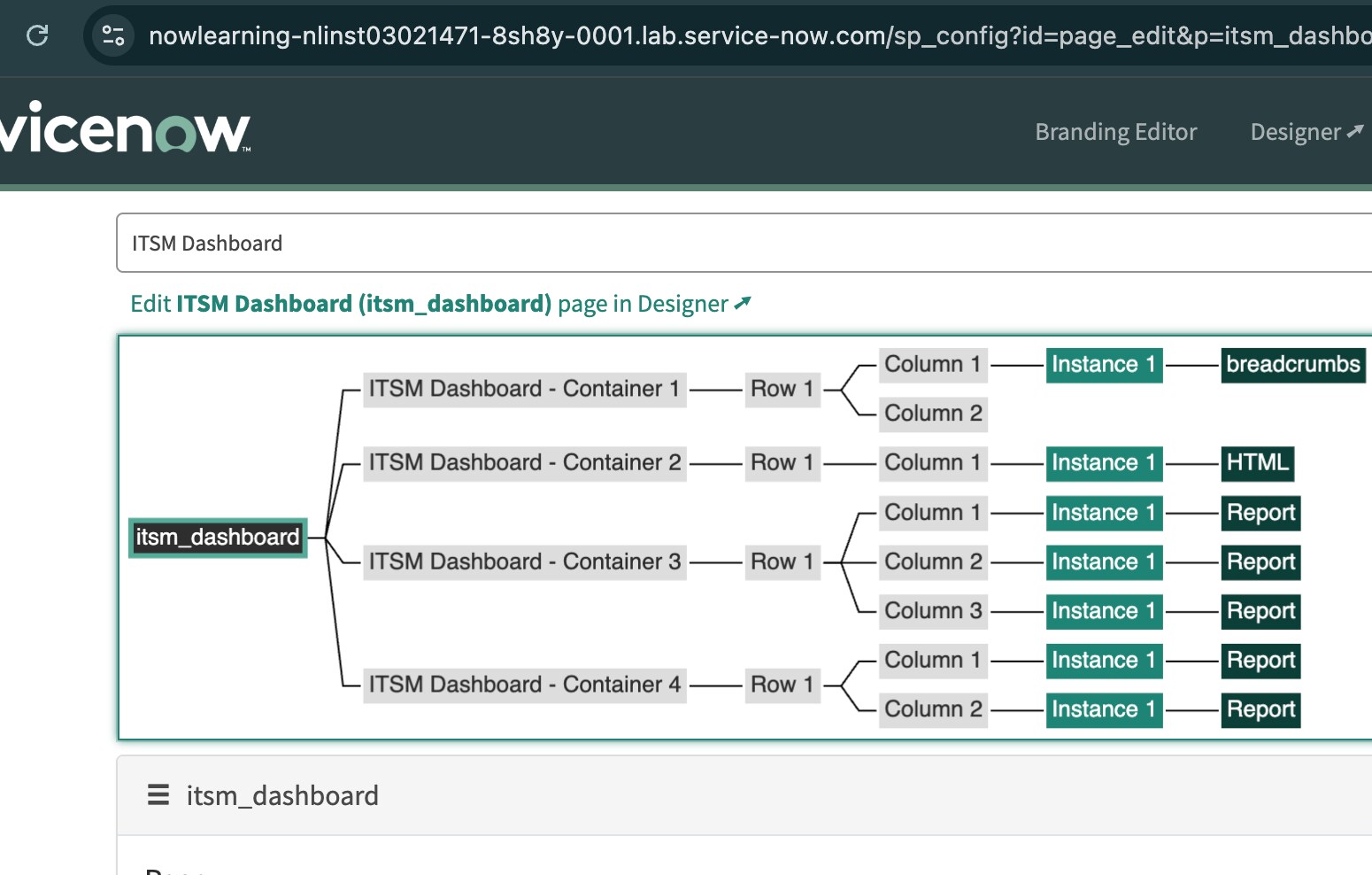
blueBottomBorder and blueTopBorder has been called in the Container2 > Row 1 and Container 4>Row 1. I understand this. But , how this section.page, main.body and section.page is working. These are not called anywhere in any of the widget.
I am new to Portal and wants to understand. So, please help me .
Attached all the screenshot for reference.
Solved! Go to Solution.
- Mark as New
- Bookmark
- Subscribe
- Mute
- Subscribe to RSS Feed
- Permalink
- Report Inappropriate Content
07-18-2025 01:46 AM
Hi @Drishti ,
You're wondering, Where and how are section.page and main.body working if I didn’t explicitly use them in any row or widget?
These are structural elements auto-rendered by ServiceNow’s Service Portal framework.
When a Service Portal page is rendered in the browser, the actual HTML looks roughly like this:
<body class="body">
  <section class="page">
    <!-- All Containers and Rows get inserted here -->
  </section>
</body>
So:
- section.page is the main wrapper section for your page.
- main.body (sometimes it's actually body.body, depends on the portal version) targets the <body> tag.
- These are not assigned manually like row CSS classes.
- They are automatically present on every Service Portal page.
- You target them with CSS to style the entire page — like background color or top padding.
As per your screenshots the structure is:
Page: itsm_dashboard
├── Container 1
│   └── Row 1
├── Container 2
│   └── Row 1 (with .blueTopBorder .blueBottomBorder)
├── Container 3
│   └── Row 1
├── Container 4
    └── Row 1 (with .blueBottomBorder)
Even though you didn’t assign anything to section.page, this entire structure is wrapped inside it automatically. That’s why your CSS targeting section.page is working — it’s affecting the full page layout.
An advice from me as you are learning
You can always inspect your page in the browser (right-click → Inspect) to see these auto-generated tags like <section class="page">.
Keep custom styling in mind: try to centralize styles into your theme or a shared CSS Include if you're styling many pages.
Don’t worry about not seeing section.page in the designer — that’s expected. Think of it like the outer box that holds your containers.
If my response helped please mark it correct or Helpful.
- Mark as New
- Bookmark
- Subscribe
- Mute
- Subscribe to RSS Feed
- Permalink
- Report Inappropriate Content
07-18-2025 01:46 AM
Hi @Drishti ,
You're wondering, Where and how are section.page and main.body working if I didn’t explicitly use them in any row or widget?
These are structural elements auto-rendered by ServiceNow’s Service Portal framework.
When a Service Portal page is rendered in the browser, the actual HTML looks roughly like this:
<body class="body">
  <section class="page">
    <!-- All Containers and Rows get inserted here -->
  </section>
</body>
So:
- section.page is the main wrapper section for your page.
- main.body (sometimes it's actually body.body, depends on the portal version) targets the <body> tag.
- These are not assigned manually like row CSS classes.
- They are automatically present on every Service Portal page.
- You target them with CSS to style the entire page — like background color or top padding.
As per your screenshots the structure is:
Page: itsm_dashboard
├── Container 1
│   └── Row 1
├── Container 2
│   └── Row 1 (with .blueTopBorder .blueBottomBorder)
├── Container 3
│   └── Row 1
├── Container 4
    └── Row 1 (with .blueBottomBorder)
Even though you didn’t assign anything to section.page, this entire structure is wrapped inside it automatically. That’s why your CSS targeting section.page is working — it’s affecting the full page layout.
An advice from me as you are learning
You can always inspect your page in the browser (right-click → Inspect) to see these auto-generated tags like <section class="page">.
Keep custom styling in mind: try to centralize styles into your theme or a shared CSS Include if you're styling many pages.
Don’t worry about not seeing section.page in the designer — that’s expected. Think of it like the outer box that holds your containers.
If my response helped please mark it correct or Helpful.
- Mark as New
- Bookmark
- Subscribe
- Mute
- Subscribe to RSS Feed
- Permalink
- Report Inappropriate Content
07-18-2025 07:11 AM