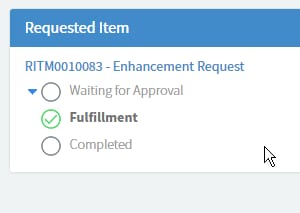
Service Portal displaying Requested Item

- Mark as New
- Bookmark
- Subscribe
- Mute
- Subscribe to RSS Feed
- Permalink
- Report Inappropriate Content
08-25-2016 12:33 AM
Hi all,
Trying to make it a bit easier for navigation between REQ/RITM for the end users via the Service Portal.
Our users seem to have some dificulty finding their RITM details when they head into a REQ. so I would like to edit the requested Items widget that displays this info.
How it is by default:

How I would like it: (edited with Chromes Inspect feature)

my javascript is non existent (looking to work on it I swear), so not sure where I should be making the changes? Below is the server script (default Requested Items widget). I have created a copy of the widget.
// populate the 'data' variable provided by caller
(function() {
var gr = new GlideRecord("sc_req_item"); // does ACL checking for us
gr.addQuery("request", $sp.getParameter("sys_id"));
options.secondary_fields = options.secondary_fields || "";
options.secondary_fields = options.secondary_fields.split(",");
if (options.order_direction == "asc")
gr.orderBy(options.order_by);
else
gr.orderByDesc(options.order_by);
if (options.maximum_entries > 0)
gr.setLimit(options.maximum_entries);
gr.query();
data.actions = [];
data.list = [];
while (gr.next()) {
if (!gr.canRead())
continue;
if (gr.getRowCount() == 1)
data.conversation_title = gr.request.getDisplayValue() + " - " + gr.getValue("short_description");
var record = {};
record.sys_id = gr.sys_id.getDisplayValue();
if (options.image_field) {
record.image_field = gr.getDisplayValue(options.image_field);
if (!record.image_field)
record.image_field = "/noimage.pngx";
}
if (options.display_field)
record.display_field = gr.getDisplayValue(options.display_field);
record.secondary_fields = [];
options.secondary_fields.forEach(function(f) {
record.secondary_fields.push(getField(gr, f));
});
if (options.sp_page_dv)
record.url = "?id="+options.sp_page_dv+"&table="+options.table+"&sys_id="+record.sys_id+"&view=sp";
else
record.url = "";
record.stage = gr.getValue("stage");
// get appropriate Stage choices for this requested item
var cl = new GlideChoiceList();
GlideController.putGlobal("answer", cl);
GlideController.putGlobal("current", gr);
sc_req_item_stageGetChoices();
record.cl = JSON.parse(cl.toJSON());
data.list.push(record);
}
if (gr.getRowCount() > 1)
data.conversation_title = gr.request.getDisplayValue() + " - " + gr.getRowCount() + " items";
function getField(gr, name) {
var f = {};
f.display_value = gr.getDisplayValue(name);
f.value = gr.getValue(name);
var ge = gr.getElement(name);
f.type = ge.getED().getInternalType()
f.label = ge.getLabel();
return f;
}
})();
- Mark as New
- Bookmark
- Subscribe
- Mute
- Subscribe to RSS Feed
- Permalink
- Report Inappropriate Content
08-25-2016 04:10 PM
Hi,
Any one have any ideas?
- Mark as New
- Bookmark
- Subscribe
- Mute
- Subscribe to RSS Feed
- Permalink
- Report Inappropriate Content
09-15-2016 04:08 AM

- Mark as New
- Bookmark
- Subscribe
- Mute
- Subscribe to RSS Feed
- Permalink
- Report Inappropriate Content
09-26-2016 08:02 AM
Hi Lars, Please could you share your enhancement it's way more understandable with your modifications
- Mark as New
- Bookmark
- Subscribe
- Mute
- Subscribe to RSS Feed
- Permalink
- Report Inappropriate Content
09-26-2016 11:14 PM
Hi, this is my altered code in the HTML Template, where I add the extra icon to show the current active state
Notice that I also remove the "Request Approved" stage as this has always been bothering us. If you still want it, just remove stage.value !='request_approved' from the ng-if statements in line 5, 8, 11 and 25sstage.value !='request_approvetage.value !='request_approved'
<div ng-if="item.cl.length > 0" ng-show="!item.expand" class="requested-items-flex-container">
   <div class="flex-item" ng-click="toggle($event, item)"><img src="images/filter_hide16.gifx" /></div>
   <div class="flex-item">
           <span ng-repeat="stage in item.cl">
               <span ng-if="stage.value == item.stage && item.active=='true' && stage.value !='request_approved'">
                   <img src="/images/heisenberg_icons/stage_icons/icon-arrow-right.png" data-toggle="tooltip" data-placement="top" ng-attr-title="{{stage.label}}" />
               </span>
               <span ng-if="stage.value !='request_approved' && (indexByKeyValue(item.cl,'value',item.stage) > $index || item.active=='false')">
                   <img src="/images/sp-icon-check-circle.png" data-toggle="tooltip" data-placement="top" ng-attr-title="{{stage.label}}" />
               </span>
               <span ng-if="stage.value !='request_approved' && (indexByKeyValue(item.cl,'value',item.stage) < $index)">
                   <img src="/images/sp-icon-empty-circle.png" data-toggle="tooltip" data-placement="top" ng-attr-title="{{stage.label}}" />
               </span>
           </span>
   </div>
</div>


<div ng-if="item.cl.length > 0" ng-show="item.expand" class="requested-items-flex-container">
   <div class="flex-item" ng-click="toggle($event, item)"><img src="images/filter_reveal16.gifx" /></div>
   <div class="flex-item">
       <div ng-repeat="stage in item.cl">
           <div ng-if="stage.value !='request_approved'">
               <div ng-if="stage.value == item.stage && item.active=='true'" class="stage-on">
                   <img src="/images/heisenberg_icons/stage_icons/icon-arrow-right.png" />
                   {{stage.label}}
               </div>
               <div ng-if="indexByKeyValue(item.cl,'value',item.stage) > $index || item.active=='false'" class="stage-on">
                   <img src="/images/sp-icon-check-circle.png" />
                   {{stage.label}}
               </div>
               <div ng-if="indexByKeyValue(item.cl,'value',item.stage) < $index" class="stage-off text-muted">
                   <img src="/images/sp-icon-empty-circle.png" />
                   {{stage.label}}
               </div>
           <div>
       </div>
   </div>
</div>
In line 48 of the server script i have added an extra line to know if the request item is active or not
record.active = gr.active.toString();
In the Client Script the following function is added to let me know the order of the stages
$scope.indexByKeyValue = function(arraytosearch, key, valuetosearch) {
   for (var i = 0; i < arraytosearch.length; i++) {
   if (arraytosearch[i][key] == valuetosearch) {
   return i;
   }
   }
   return null;
}