- Mark as New
- Bookmark
- Subscribe
- Mute
- Subscribe to RSS Feed
- Permalink
- Report Inappropriate Content
05-02-2016 07:41 AM
Dear All,
I have a "table name" type field whose base table is alm_asset. According to my requirement it should show all extended tables except one/two. Also it shows table name in bracket i.e. dropdown value are in format ... Hardware[alm_hardware] etc, which we don't want.
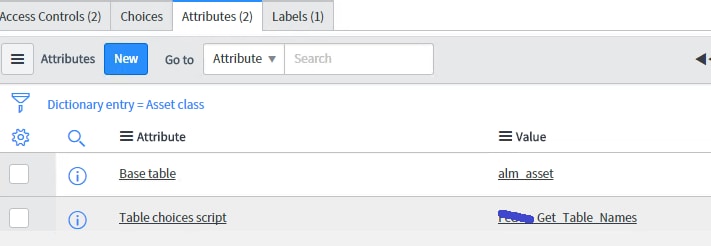
To implement this I have added tableschoicescript attribute in the field and hardcoded extended table names there..
But problem is that I want first option to be "--None--" but in the field by default some other value is coming from script include (one of the table name) when I open the form .It is proper if I click the dropdown.
I wrote a client script to to add "--None--" in index 0..but nothing is helping..
Can somebody suggest me way to achieve this..Please check screenshots for reference.
Thanks in advance!


Solved! Go to Solution.
- Labels:
-
User Interface (UI)

- Mark as New
- Bookmark
- Subscribe
- Mute
- Subscribe to RSS Feed
- Permalink
- Report Inappropriate Content
05-02-2016 11:53 PM
I haven't used that Attribute before so I am not sure how to do it at source (Script include)
But DOM manipulation is unnecessary and you can add a onload script for this.
g_form.addOption('u_table_choice_example','','-- None --',0);
g_form.setValue('u_table_choice_example','');
- Mark as New
- Bookmark
- Subscribe
- Mute
- Subscribe to RSS Feed
- Permalink
- Report Inappropriate Content
05-02-2016 11:53 PM
I haven't used that Attribute before so I am not sure how to do it at source (Script include)
But DOM manipulation is unnecessary and you can add a onload script for this.
g_form.addOption('u_table_choice_example','','-- None --',0);
g_form.setValue('u_table_choice_example','');
- Mark as New
- Bookmark
- Subscribe
- Mute
- Subscribe to RSS Feed
- Permalink
- Report Inappropriate Content
05-03-2016 12:01 AM
That works Kalai ,Thanks again for your help
- Mark as New
- Bookmark
- Subscribe
- Mute
- Subscribe to RSS Feed
- Permalink
- Report Inappropriate Content
05-05-2016 05:14 AM

- Mark as New
- Bookmark
- Subscribe
- Mute
- Subscribe to RSS Feed
- Permalink
- Report Inappropriate Content
05-05-2016 06:07 AM
Fixed this Kalai.....
- Mark as New
- Bookmark
- Subscribe
- Mute
- Subscribe to RSS Feed
- Permalink
- Report Inappropriate Content
03-25-2017 11:17 PM
This helped me to resolve an issue this was pending from long
Thanks,
Astha