- Mark as New
- Bookmark
- Subscribe
- Mute
- Subscribe to RSS Feed
- Permalink
- Report Inappropriate Content
08-06-2019 05:19 AM
Dear SN-Dev Community,
first i`d like to thank you! - I`m very new to SN. And I just started to work as Developer.
Your answers helpt me alot in the last few month. With your help I was able to create a UI-Action to Export some Data without a rightclick (Customerneeds 😃 )
Now my Customer needs an indicator to see if a row has beed exported. Therefore I`d like to Update the Case-State. But I am open to other suggestions like a new "exported" true/false field.
Both ("exported-flag" and Download of the Excel itself) have to be on the same UI-Button.
I tryed https://www.servicenowguru.com/system-ui/ui-actions-system-ui/client-server-code-ui-action/ but was not able to solve my issue.
Could you please help out?
Here is my Export UI-Action:
function downloadExcel(){
var checked = g_list.getChecked(); // get's the sys_id of the checked records
var query = "sys_idIN" + checked.toString();
var rows = checked.split(",").length; // rows to be sent to the export function
var view = "default"; // set this to default for columns present in default view for list layout
// set this to empty if you want all the columns present in the list layout including the customized ones.
var dialog = new GwtPollDialog('sn_customerservice_case', query, rows, view, 'unload_excel_xlsx');
dialog.execute();
}

Solved! Go to Solution.


- Mark as New
- Bookmark
- Subscribe
- Mute
- Subscribe to RSS Feed
- Permalink
- Report Inappropriate Content
08-06-2019 05:33 AM
Hi Stephan,
create new boolean field Exported of type True/False
in the UI action code use this script to update the Flag as true;
also the UI action should be selected only for non-exported records so update UI action condition as
!current.u_exported
UI Action script code
function downloadExcel(){
var checked = g_list.getChecked(); // get's the sys_id of the checked records
var query = "sys_idIN" + checked.toString();
var rows = checked.split(",").length; // rows to be sent to the export function

// this code you can move to script include and go GlideAjax as well
var gr = new GlideRecord('sn_customerservice_case');
gr.addQuery('sys_id', 'IN', rows);
gr.query();
while(gr.next()){
gr.u_exported = true;
gr.update();
}

var view = "default"; // set this to default for columns present in default view for list layout
// set this to empty if you want all the columns present in the list layout including the customized ones.
var dialog = new GwtPollDialog('sn_customerservice_case', query, rows, view, 'unload_excel_xlsx');
dialog.execute();


}
Mark Correct if this solves your issue and also mark Helpful if you find my response worthy based on the impact.
Thanks
Ankur
Ankur
✨ Certified Technical Architect || ✨ 10x ServiceNow MVP || ✨ ServiceNow Community Leader
- Mark as New
- Bookmark
- Subscribe
- Mute
- Subscribe to RSS Feed
- Permalink
- Report Inappropriate Content
06-24-2020 12:23 AM
Hi Harun,
the line "gr.exported" is a custom column. Maybe you should remove this. Try the one setting the state or delete those rows:
while(gr.next()){
gr.state = 6;
gr.update();
Also (i guess you have it done, but for completness): have you clickt the rows to be exported?
Best Stephan
- Mark as New
- Bookmark
- Subscribe
- Mute
- Subscribe to RSS Feed
- Permalink
- Report Inappropriate Content
06-24-2020 03:38 AM
Hey Stephen,
Yes the exported is a custom column(true/false) in my app which I basically want to change if the script runs.
Because I want to mark if the record was exported when this UI Action was executed, and that would in turn remove it from the list as this list only shows records that were not exported yet.
Yes I have ticked the records which I wanted to export to Excel but nothing happened. Also thats how the getChecked() method works, it only retrieves the ticked records (from my understanding at least)
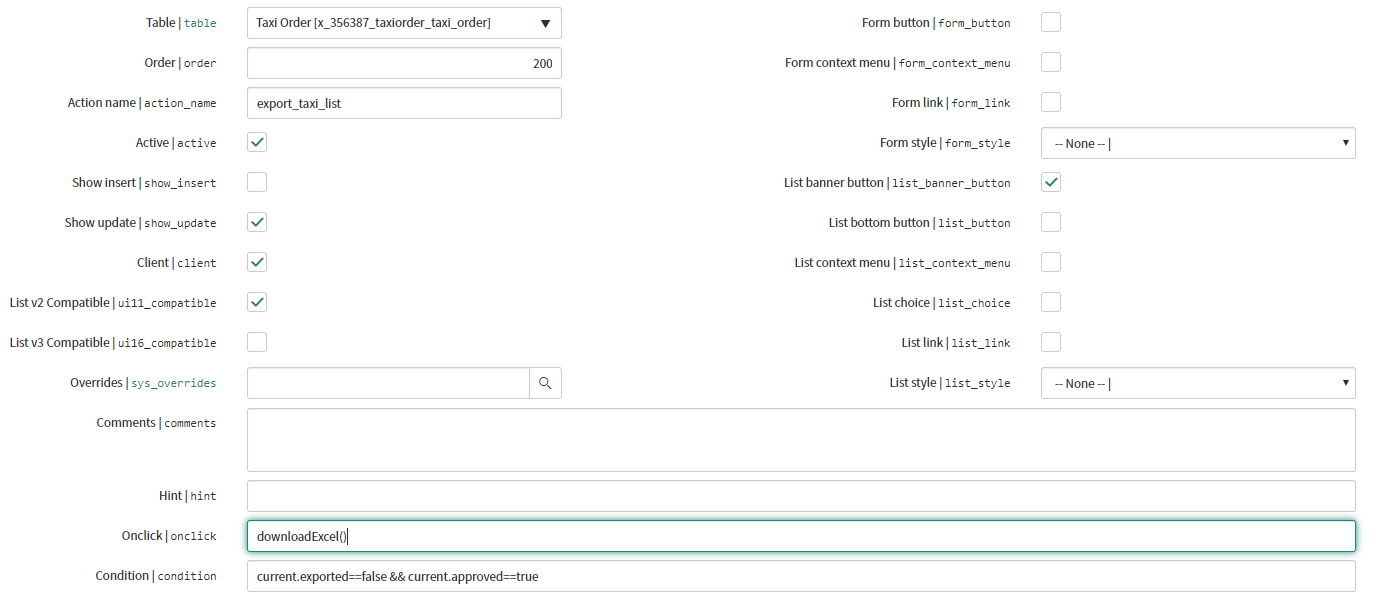
This is how the UI Action is configured

- Mark as New
- Bookmark
- Subscribe
- Mute
- Subscribe to RSS Feed
- Permalink
- Report Inappropriate Content
07-16-2020 01:10 AM

- Mark as New
- Bookmark
- Subscribe
- Mute
- Subscribe to RSS Feed
- Permalink
- Report Inappropriate Content
07-16-2020 01:25 AM
Hi, yes I have resolved this issue with the help from Ankur here.
https://community.servicenow.com/community?id=community_question&sys_id=9ab23c28dbce14107d3e02d5ca96198a
By the way this GwTPollMethod only works if your UI Action is set as a List Context Menu (i have that and List Banner Button ticked).
And make sure you call "downloadExcel()" function in onClick.
- Mark as New
- Bookmark
- Subscribe
- Mute
- Subscribe to RSS Feed
- Permalink
- Report Inappropriate Content
11-09-2021 04:31 AM
@Stephen S.