
- Mark as New
- Bookmark
- Subscribe
- Mute
- Subscribe to RSS Feed
- Permalink
- Report Inappropriate Content
03-16-2022 11:51 AM
Hello,
I am trying to apply custom branding to our Virtual Agent. I've watched several videos/read numerous threads on how to do so. I followed these steps:
1. Go to Conversational Interfaces -- Settings - Branding - Add new.
From here, i added my desired branding. the branding key is called ally_bot
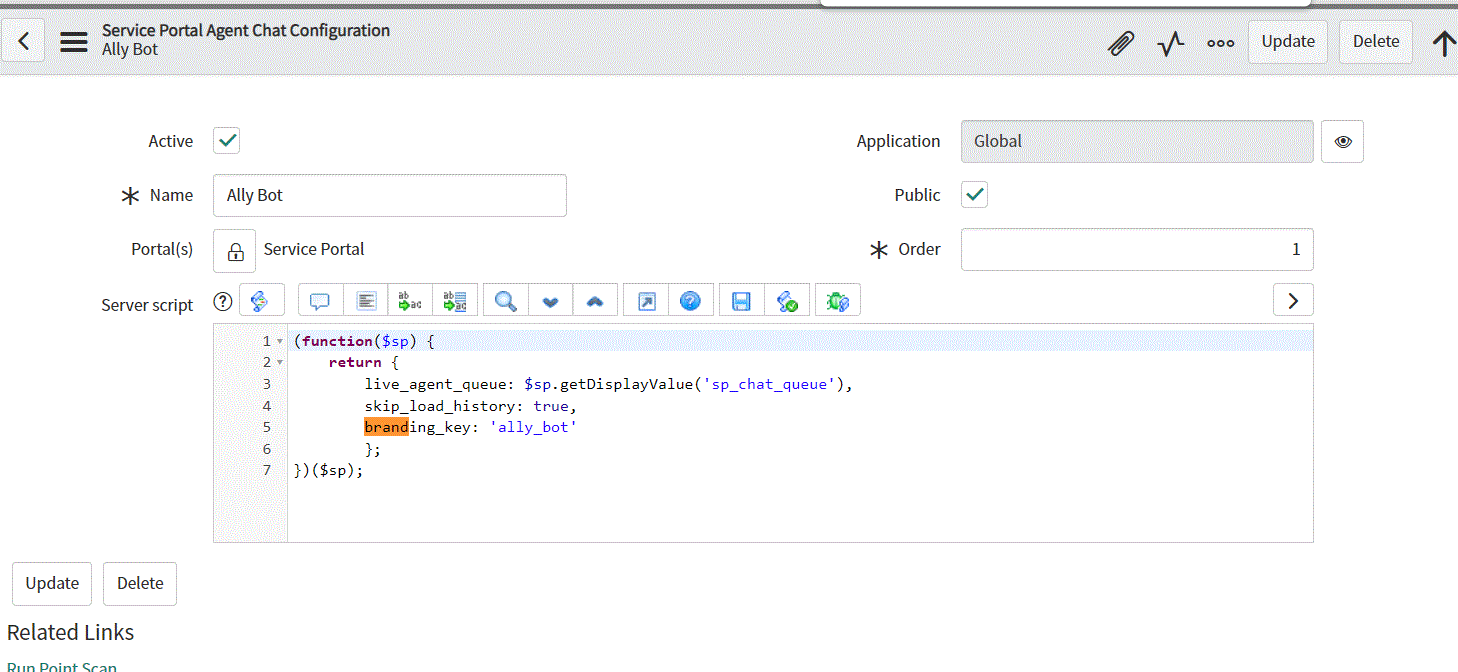
2. Go to Service Portal Agent Chat Configurations
3. open my service portal record here, and add the following (see screenshot)
I then save and test the Virtual Agent, but the branding updates have not been applied. it still is the stock branding.
Any help would be greatly appreciated. thanks!

Solved! Go to Solution.


- Mark as New
- Bookmark
- Subscribe
- Mute
- Subscribe to RSS Feed
- Permalink
- Report Inappropriate Content
03-16-2022 01:45 PM
This is the legacy Service Portal widget:

Ideally, you would not use this one anymore. Not with adding it to Portal pages, not with embedding it to a header or footer (what seems to be your case). So remove the embedding from the header or footer.
Ideally, you would use Agent Chat configuration only.
If my answer helped you in any way, please then mark it as helpful.
Kind regards,
Mark
2020-2022 ServiceNow Community MVP
2020-2022 ServiceNow Developer MVP
---
- Mark as New
- Bookmark
- Subscribe
- Mute
- Subscribe to RSS Feed
- Permalink
- Report Inappropriate Content
03-16-2022 12:56 PM
Hi Mark,
Thanks.. I see that the footer is there. I don't think I see anything pointing to legacy.. let me know what you think. Thanks again..
To set it up, I cloned a stock footer -Here's that configuration:

In the Themes Using Footer, here is the setup:

- Mark as New
- Bookmark
- Subscribe
- Mute
- Subscribe to RSS Feed
- Permalink
- Report Inappropriate Content
03-16-2022 01:24 PM
I think this is your issue, sn-va-sp-widget is the legacy Service Portal widget.




If my answer helped you in any way, please then mark it as helpful.
Kind regards,
Mark
2020-2022 ServiceNow Community MVP
2020-2022 ServiceNow Developer MVP
---

- Mark as New
- Bookmark
- Subscribe
- Mute
- Subscribe to RSS Feed
- Permalink
- Report Inappropriate Content
03-16-2022 01:41 PM
Interesting, that's the only VA widget I can find in my instance. do you know how I get the non-legacy widget? Thanks again!
- Mark as New
- Bookmark
- Subscribe
- Mute
- Subscribe to RSS Feed
- Permalink
- Report Inappropriate Content
03-16-2022 01:45 PM
This is the legacy Service Portal widget:
Ideally, you would not use this one anymore. Not with adding it to Portal pages, not with embedding it to a header or footer (what seems to be your case). So remove the embedding from the header or footer.
Ideally, you would use Agent Chat configuration only.
If my answer helped you in any way, please then mark it as helpful.
Kind regards,
Mark
2020-2022 ServiceNow Community MVP
2020-2022 ServiceNow Developer MVP
---
- Mark as New
- Bookmark
- Subscribe
- Mute
- Subscribe to RSS Feed
- Permalink
- Report Inappropriate Content
03-16-2022 02:01 PM
AWESOME! I removed the footer and my customizations are there!!!!!! SO yeah, you can do it directly from Agent Chat now.. thank you so much.
