- Mark as New
- Bookmark
- Subscribe
- Mute
- Subscribe to RSS Feed
- Permalink
- Report Inappropriate Content
05-30-2022 08:47 AM
- Mark as New
- Bookmark
- Subscribe
- Mute
- Subscribe to RSS Feed
- Permalink
- Report Inappropriate Content
05-30-2022 08:49 AM
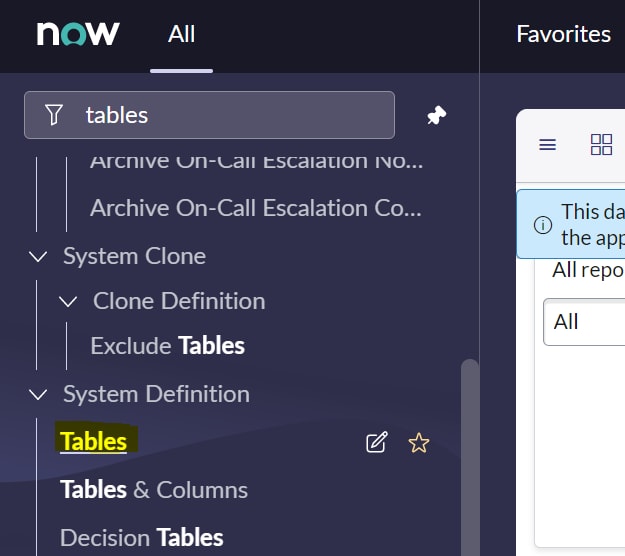
Type "Tables" and open the module "Tables" under system definition application menu.
Or simply type sys_db_object.LIST and press enter. This will open the list of all tables present in the instance in a separate tab.
- Mark as New
- Bookmark
- Subscribe
- Mute
- Subscribe to RSS Feed
- Permalink
- Report Inappropriate Content
05-30-2022 08:49 AM
Type "Tables" and open the module "Tables" under system definition application menu.
Or simply type sys_db_object.LIST and press enter. This will open the list of all tables present in the instance in a separate tab.
- Mark as New
- Bookmark
- Subscribe
- Mute
- Subscribe to RSS Feed
- Permalink
- Report Inappropriate Content
11-30-2023 05:23 AM
Good morning.
I have a follow-up question.
I navigate to Reports -> Create New. From there, I select Table as the Source Type. In the drop down below that, I select the table that I want.
When I type "sys_db_object.LIST", it does indeed present me with a list of all tables (5000+ tables); however, the table I see in Reports -> Create New, as I noted above, is not present in this list.
Can you think of a reason I cannot see my table in this case?
Thank you.
Dennis
- Mark as New
- Bookmark
- Subscribe
- Mute
- Subscribe to RSS Feed
- Permalink
- Report Inappropriate Content
08-23-2024 10:16 AM
It might be an acl issue? where there is a restriction on certain tables to not be reportable or a missing role?
- Mark as New
- Bookmark
- Subscribe
- Mute
- Subscribe to RSS Feed
- Permalink
- Report Inappropriate Content
05-30-2022 08:57 AM