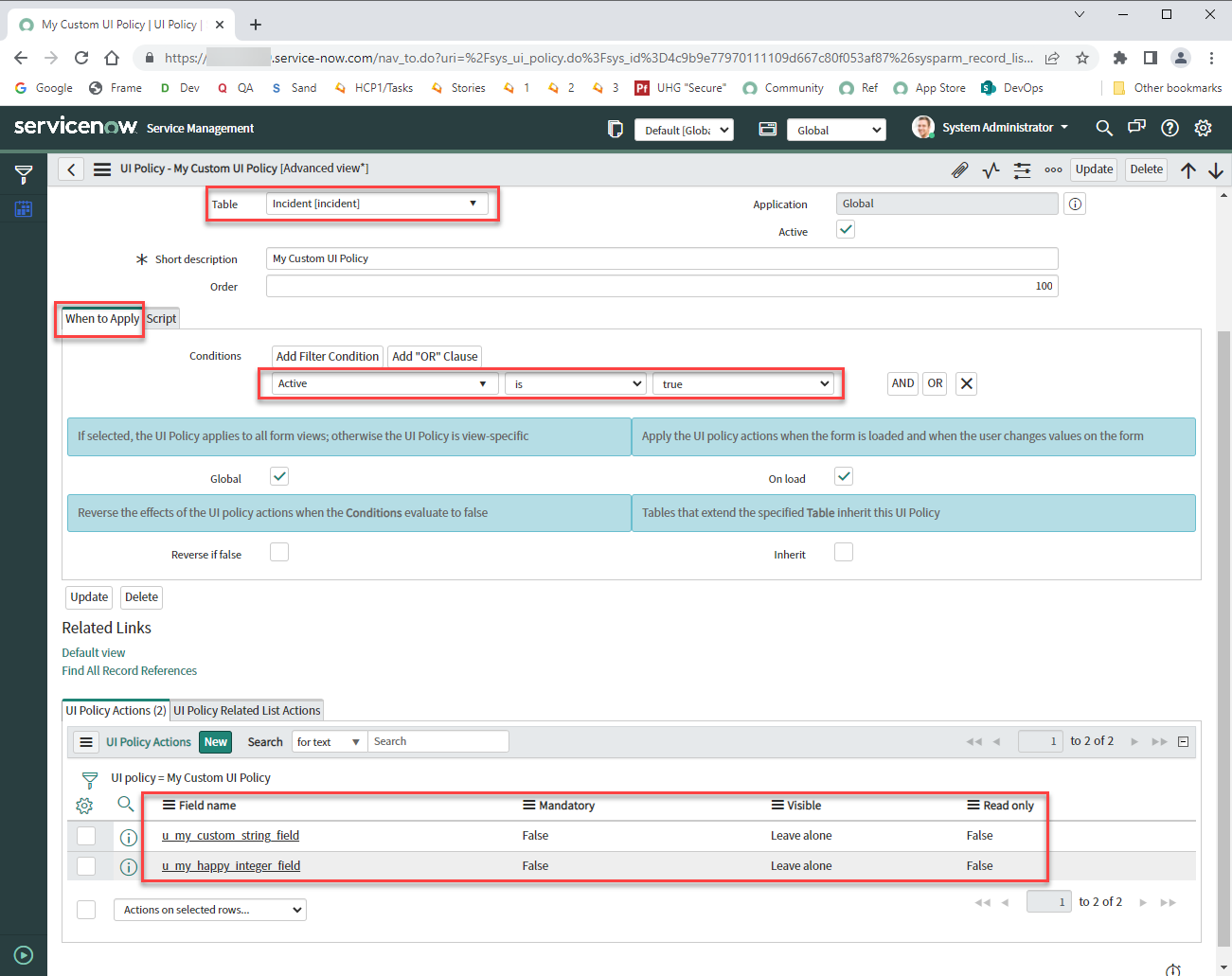
Which one will runs first UI Policy action or UI Policy script

- Mark as New
- Bookmark
- Subscribe
- Mute
- Subscribe to RSS Feed
- Permalink
- Report Inappropriate Content
07-17-2019 10:44 AM
I believe UI Policy Scripts run first am i right????

- Mark as New
- Bookmark
- Subscribe
- Mute
- Subscribe to RSS Feed
- Permalink
- Report Inappropriate Content
05-27-2021 08:13 AM
Earlier UI Policy executed before UI Actions but according to the new Quebec release
A UI Policy's Actions execute before the UI Policy's Scripts.

- Mark as New
- Bookmark
- Subscribe
- Mute
- Subscribe to RSS Feed
- Permalink
- Report Inappropriate Content
08-11-2021 08:14 AM
According to "the new Quebec release" WHERE?
Please provide a link to your source. Thank you.
- Mark as New
- Bookmark
- Subscribe
- Mute
- Subscribe to RSS Feed
- Permalink
- Report Inappropriate Content
09-15-2021 03:21 AM
UI policy Action executes first, UI policy Script executes next.


- Mark as New
- Bookmark
- Subscribe
- Mute
- Subscribe to RSS Feed
- Permalink
- Report Inappropriate Content
08-05-2022 01:36 PM
Hi all 🙂
I know this post is old, but there's a lot of replies and there's still some people questioning things, so I'll try and provide my 2 cents from the testing I've done.
This is current as of Tokyo and still seems to be the way I've always thought it executed, but it's:
- Client Script
- UI Policy Condition evaluated
- UI Policy Advanced Script executed
- UI Policy Actions (related list) executed
This was tested using a very simple process, such as using an alert in the client script, a UI Policy with no condition at all, an alert in the UI Policy advanced script, and then setting a field to mandatory via the UI Policy Actions related list.
The client script alert showed first, then UI Policy condition was evaluated, the UI Policy advanced script for true executed which showed its alert, then the field become mandatory per the settings in the UI Policy Actions related list.
The bolded part above is relevant to this specific post, although I did cover more, I wanted to bring the focus back to the bolded part for this thread.
So
The above execution process I've mentioned has been that way for years and years.
Thank you!
Please mark reply as Helpful/Correct, if applicable. Thanks!
Please consider marking my reply as Helpful and/or Accept Solution, if applicable. Thanks!
- Mark as New
- Bookmark
- Subscribe
- Mute
- Subscribe to RSS Feed
- Permalink
- Report Inappropriate Content
08-08-2022 05:51 AM
Step 1. Configure UI Actions to set some custom fields to NOT MANDATORY AND NOT READ ONLY.
(...Using brand new custom form fields so we know that no other logic is affecting them...)

Step 2. Configure Script block to set those same fields to MANDATORY and READ ONLY.

Step 3. Verify that the script ran successfully and see the results.

Fields end up being set to MANDATORY and READ ONLY. That tells us that the UI Actions happened first, and THEN the Script ran and changed the settings to whatever it wanted.
Conclusion: UI Actions Run before Script.