- Mark as New
- Bookmark
- Subscribe
- Mute
- Subscribe to RSS Feed
- Permalink
- Report Inappropriate Content
06-05-2014 01:56 AM
Hi All,
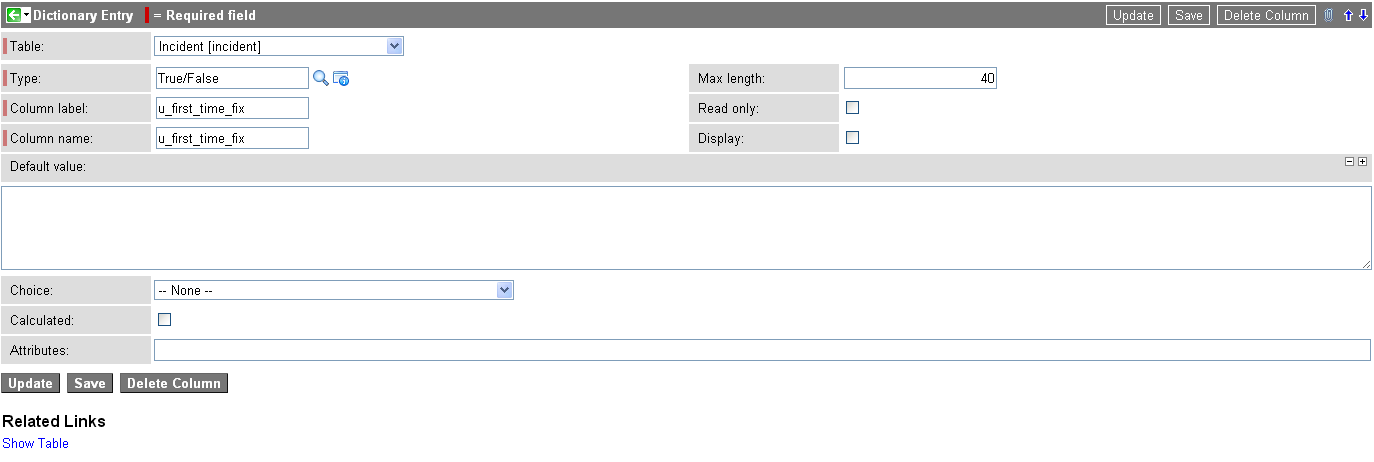
A while ago our 'First Time Fix' Column label was deleted from our incident table. I have since returned it however it is now displayed as u_first_time_fix on the form and I am unable to edit it. If I try to edit the dictionary entry it defaults back every time i save the new entry. Is there a way I can change this name without losing the current data on it as we have 4 months worth of stats on that button. (clicked when Service Desk fixes fault).
Thanks for all the help


Solved! Go to Solution.


- Mark as New
- Bookmark
- Subscribe
- Mute
- Subscribe to RSS Feed
- Permalink
- Report Inappropriate Content
06-05-2014 03:05 AM
Try this too
1. Navigate to System Update Sets > Local Update Sets
2. In 'Customer Update List' I sorded by date
3. Looking under the Type column check for the 'Field Label' record and opened it
4. Under 'Related Links' ->selected 'Show Related Record'
5. Now try to changed the label
6. Click 'Update'
~Pradeep Sharma
- Mark as New
- Bookmark
- Subscribe
- Mute
- Subscribe to RSS Feed
- Permalink
- Report Inappropriate Content
06-05-2014 03:03 AM
Unfortunately a clone was done yesterday so the Dev instance has the same issue as live.

- Mark as New
- Bookmark
- Subscribe
- Mute
- Subscribe to RSS Feed
- Permalink
- Report Inappropriate Content
06-05-2014 03:16 AM
If you notice, sys_documentation table is audited.
So you should be able to find the deleted Label from DeleteRecords table.
Type 'Deleted' in left navigation pane or open 'sys_audit_delete' table
- Mark as New
- Bookmark
- Subscribe
- Mute
- Subscribe to RSS Feed
- Permalink
- Report Inappropriate Content
06-05-2014 03:23 AM
I was able to replicate this issue on demo instance Demo011
There is a table called u_test.
There is a field u_good.I deleted the Label and I was able to replicate your issue. Now I used below script to solve the issue.
var gr = new GlideRecord('sys_documentation');

gr.initialize();

gr.setWorkflow(false);

gr.autoSysFields(false);

gr.name = 'u_test';

gr.label = 'Good';

gr.element = 'u_good';

gr.insert();
The label was restored. Are you sure you already followed these steps?
- Mark as New
- Bookmark
- Subscribe
- Mute
- Subscribe to RSS Feed
- Permalink
- Report Inappropriate Content
06-09-2016 04:45 AM
Hi I have also faced the same problem. But i have deleted the dictionary entry record from table. I am able to see the record in language file but its showing in deleted application file.
I am not able to restore the deleted application file and also not able to create the new dictionary entry with same column label.
Its a major issue for me. Please respond asap.
Thanks in Advance,
- Mark as New
- Bookmark
- Subscribe
- Mute
- Subscribe to RSS Feed
- Permalink
- Report Inappropriate Content
06-05-2014 03:24 AM
Hi All,
I managed to recover the settings from an update set that was commited on the 2nd Feb which seems to have worked. Thank you both very much for your help.