- Mark as New
- Bookmark
- Subscribe
- Mute
- Subscribe to RSS Feed
- Permalink
- Report Inappropriate Content
07-08-2018 09:26 PM
Hi Team,
We question I'm hoping someone can assist with. My current workflow moves to 'end' when the approvals are either accepted or rejected. I'm wanting to add additional functionality to the 'rejected' path that waits for the status of an HR Case to change, then checks the status value, and if a particular value start the workflow again, if another value end the workflow.
Check basically should do the below:
If it's 'a' perform action 'A' - if it's 'not a' perform action 'B'.
Currently I have used a 'Wait for Condition' however this only works for a 'true' value, it doesn't allow the adding of a 'false' value, as per the documentation. I don't want to run a scheduled job every 'x' minutes to kick the workflow as it needs to occur when the status is changed.
Anyone know an easy way I can achieve the above?
Thanks
Carl.
Solved! Go to Solution.
- Labels:
-
Scripting and Coding


- Mark as New
- Bookmark
- Subscribe
- Mute
- Subscribe to RSS Feed
- Permalink
- Report Inappropriate Content
07-08-2018 10:37 PM
Hi Carl,
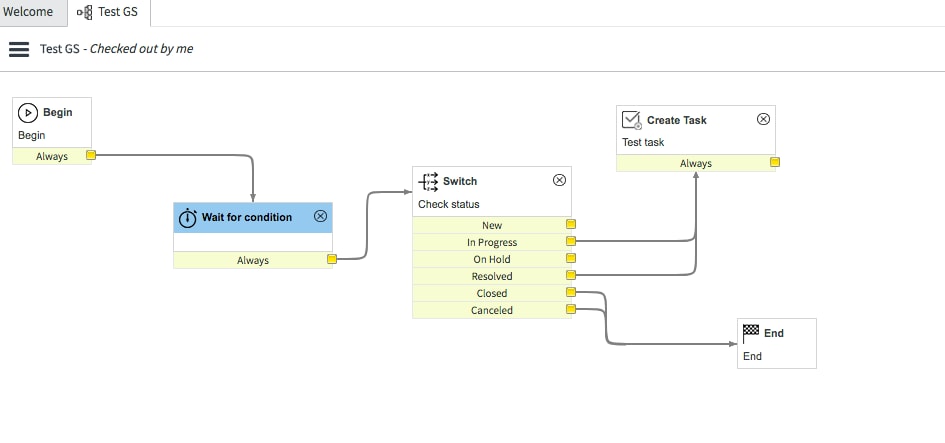
I think in this case you need to create an additional activity "Switch" along with the "Wait for condition". Wait for condition will wait for the value to be changed and "Switch" activity will route to the task you need to do. You can try as in the screenshot:

- Mark as New
- Bookmark
- Subscribe
- Mute
- Subscribe to RSS Feed
- Permalink
- Report Inappropriate Content
07-08-2018 10:37 PM
Hi Carl,
I think in this case you need to create an additional activity "Switch" along with the "Wait for condition". Wait for condition will wait for the value to be changed and "Switch" activity will route to the task you need to do. You can try as in the screenshot:
- Mark as New
- Bookmark
- Subscribe
- Mute
- Subscribe to RSS Feed
- Permalink
- Report Inappropriate Content
07-08-2018 10:42 PM
yea that could work, I will try this tomorrow and see if I can get it working. I could use a condition that will always be true (it will only be called when the record is updated) and then the script to check only for status updates, then goto the script.
Will let you know how I get on.
- Mark as New
- Bookmark
- Subscribe
- Mute
- Subscribe to RSS Feed
- Permalink
- Report Inappropriate Content
07-09-2018 03:52 PM
Hi Gaurav,
I have tested this and it works well - it now waits until the state 'is not new' and then depending on the state it has when it's updated, the 'switch' will take the correct path.
Note that the 'Wait for condition' definitely ONLY allow a 'true' result, it doesn't allow for dealing with a 'false' or any other condition at all.
Thanks for your help.
Cheers Carl.
- Mark as New
- Bookmark
- Subscribe
- Mute
- Subscribe to RSS Feed
- Permalink
- Report Inappropriate Content
07-08-2018 09:46 PM


- Mark as New
- Bookmark
- Subscribe
- Mute
- Subscribe to RSS Feed
- Permalink
- Report Inappropriate Content
07-08-2018 09:56 PM
Hi Raju,
Yes I tried that, as with my answer to Gaurav this doesn't seem to allow using the additional condition - from the documentation it seems it may not be possible.
However it could have been my script I suppose.... I'm hoping someone can confirm if the documentation is correct that it only allows a 'true' condition for it to complete.