- Mark as New
- Bookmark
- Subscribe
- Mute
- Subscribe to RSS Feed
- Permalink
- Report Inappropriate Content
01-15-2026 12:50 AM
Hi Channel,
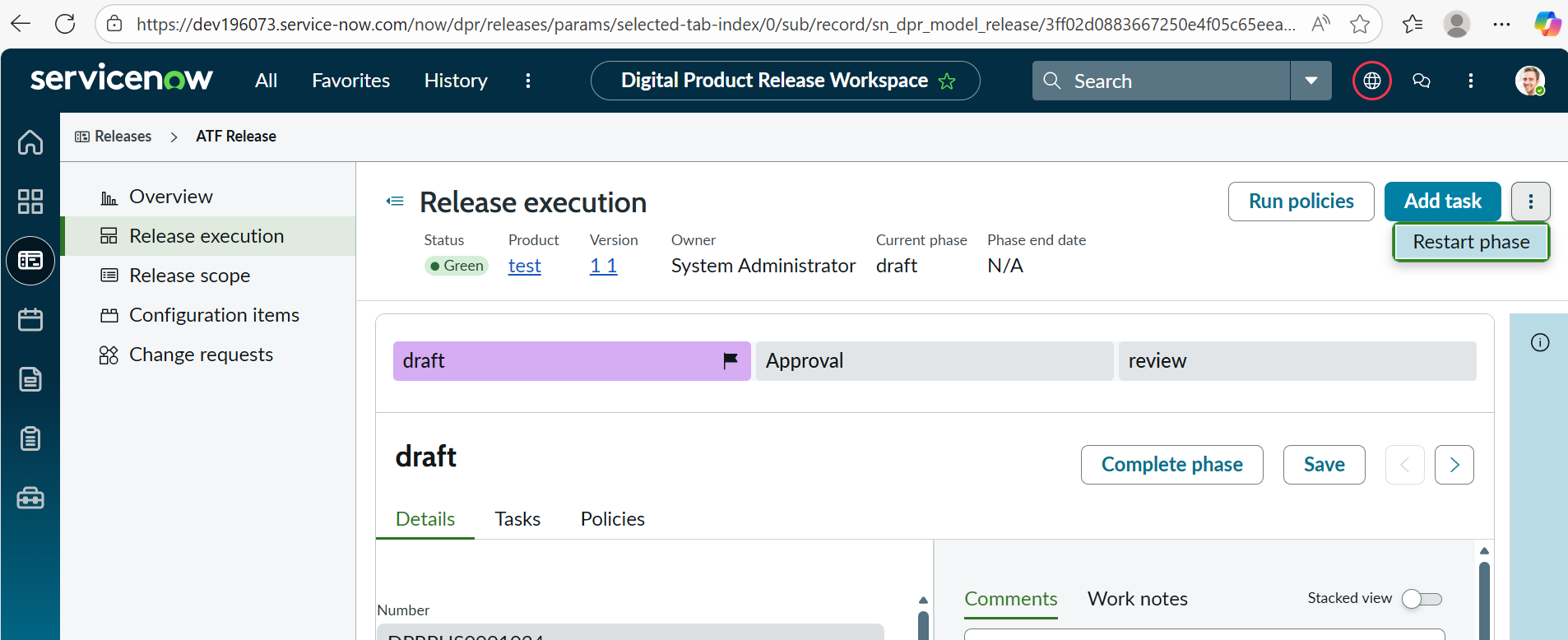
please guide me where is "Restart phase" action on DPR workspace can be found. This action changes the pending phase task status to closed complete , i want to figure out where this logic is written so that i can update it to be closed cancelled.
Please note , i have searched in all the normal UX page form/list/action assignment configurations.
Attached the screenshot of the button and workspace.
Regards,
Nishant
Solved! Go to Solution.

- Mark as New
- Bookmark
- Subscribe
- Mute
- Subscribe to RSS Feed
- Permalink
- Report Inappropriate Content
01-19-2026 11:20 PM
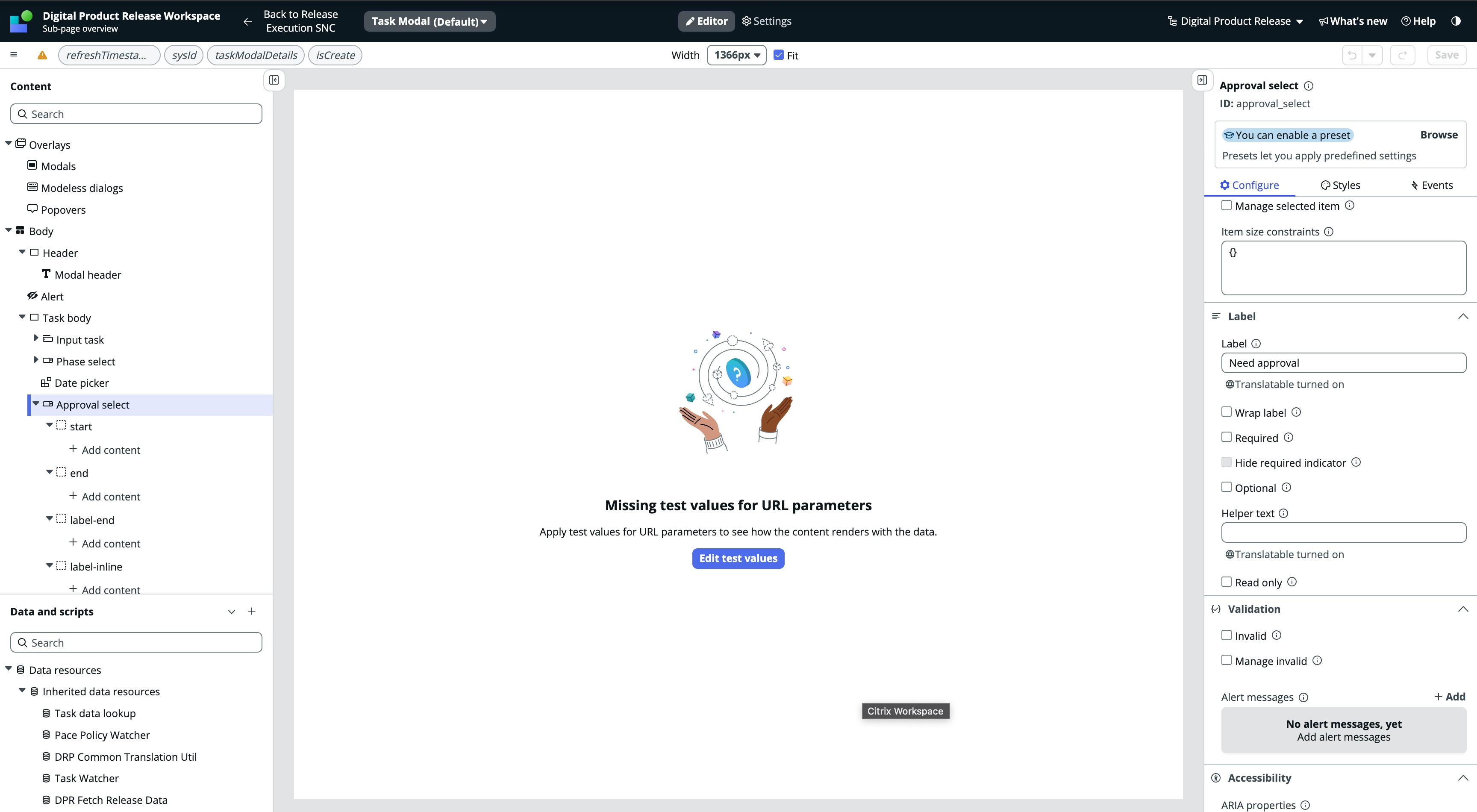
@NishantR You can select Read-only property (right panel) for 'Approval select' component (left panel). See screenshot for reference.
Go to this page in UIB -> /now/builder/ui/edit/experience/fe72c9ef43012110509fb18afab8f2b6/d4e4608e53413110bf7eddeeff7b120a/77d4208e53413110bf7eddeeff7b12aa/params/is-headless-viewport/true/parent-screen-id/8e99e66f43e2211092fef6be5bb8f2a3/parent-element-id/viewport_mkl
Note: This would cause customization, meaning that update xml will be created preventing future updates to this modal.
- Mark as New
- Bookmark
- Subscribe
- Mute
- Subscribe to RSS Feed
- Permalink
- Report Inappropriate Content
01-20-2026 04:54 AM
@NishantR That might be bit complex change, but you can start by analysing "Load cards" client script in Release execution page -> /now/builder/ui/edit/experience/fe72c9ef43012110509fb18afab8f2b6/8699e66f43e2211092fef6be5bb8f2ca/8e99e66f43e2211092fef6be5bb8f2a3/params/is-headless-viewport/true/parent-screen-id/44c7e2a743e2211092fef6be5bb8f288/parent-element-id/viewport_vyr
All the data is processed in from this client script include -> sys_ux_client_script_include.do?sys_id=72feeb68531f6110bc5bddeeff7b127a
Check 'getKanbanCardsMetadata' and other functions within the client script include.
Analysing the flow of code, playing around it and tweaking things can help with understanding how things are wired up to present the data on UI.
- Mark as New
- Bookmark
- Subscribe
- Mute
- Subscribe to RSS Feed
- Permalink
- Report Inappropriate Content
01-20-2026 04:54 AM
@NishantR That might be bit complex change, but you can start by analysing "Load cards" client script in Release execution page -> /now/builder/ui/edit/experience/fe72c9ef43012110509fb18afab8f2b6/8699e66f43e2211092fef6be5bb8f2ca/8e99e66f43e2211092fef6be5bb8f2a3/params/is-headless-viewport/true/parent-screen-id/44c7e2a743e2211092fef6be5bb8f288/parent-element-id/viewport_vyr
All the data is processed in from this client script include -> sys_ux_client_script_include.do?sys_id=72feeb68531f6110bc5bddeeff7b127a
Check 'getKanbanCardsMetadata' and other functions within the client script include.
Analysing the flow of code, playing around it and tweaking things can help with understanding how things are wired up to present the data on UI.
- Mark as New
- Bookmark
- Subscribe
- Mute
- Subscribe to RSS Feed
- Permalink
- Report Inappropriate Content
01-20-2026 05:05 AM
@Sai Teja1 thank you very much for continuous support. I will take it forward from here on.
Regards,