
- Mark as New
- Bookmark
- Subscribe
- Mute
- Subscribe to RSS Feed
- Permalink
- Report Inappropriate Content
10-27-2021 03:51 AM
I am trying to evaluate the effort to migrate from the service portal to the employee center.
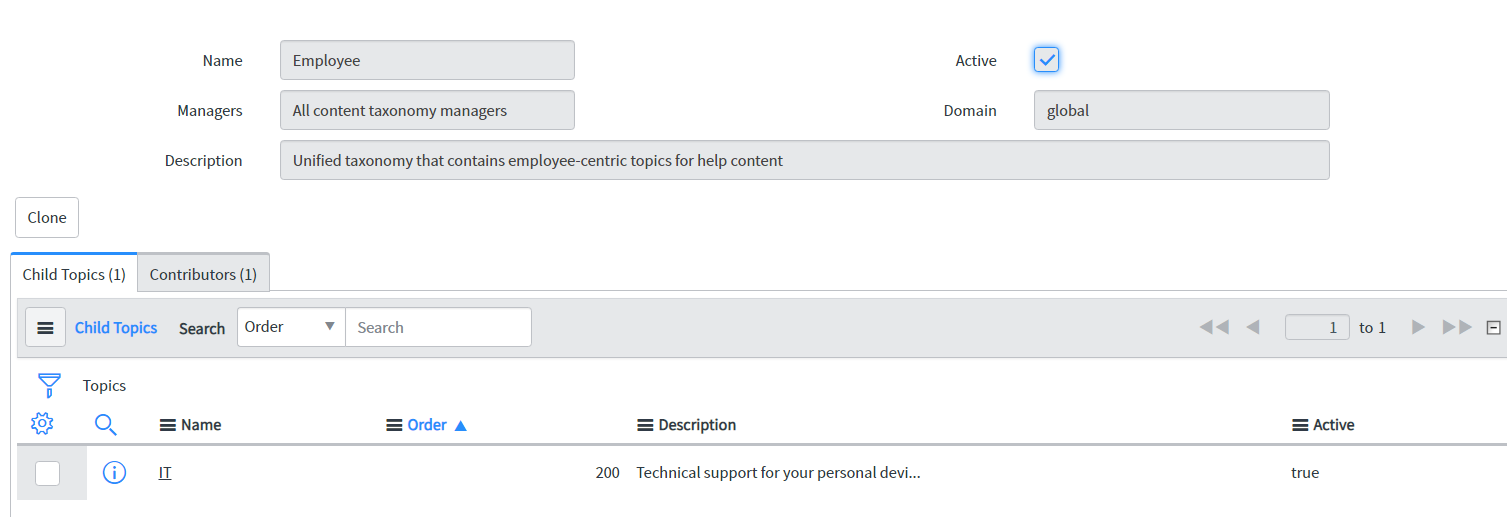
On our Dev instance (Rome Patch 1 Hotfix 1), i installed the Employee Center, Employee Center Core, and the Employee experience taxonomy plugins. I verified that the Employee taxonomy exists and is associated with the Employee Center portal. When I open the Employee Center portal, the mega menu is empty. The mega menu should contain the IT item but nothing is there.
Plugins:

Taxonomy:

Portal Configuration:

Employee Center:

I performed the same steps in my personal developer instance and the mega menu is populated using the Employee unified taxonomy as expected.

Am I missing something in the setup?
Thank you
Solved! Go to Solution.


- Mark as New
- Bookmark
- Subscribe
- Mute
- Subscribe to RSS Feed
- Permalink
- Report Inappropriate Content
10-27-2021 05:25 AM
Hi Mah,
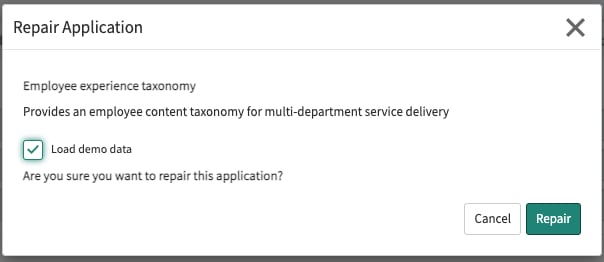
Is the demo data for the employee experience taxonomy app installed? Try repairing and making sure 'load demo data' is selected.



- Mark as New
- Bookmark
- Subscribe
- Mute
- Subscribe to RSS Feed
- Permalink
- Report Inappropriate Content
10-27-2021 04:55 AM
Hi,
Please follow this doc, its a step by step process:
https://docs.servicenow.com/bundle/rome-employee-service-management/page/product/employee-center/task/migrate-sp-to-ec.html
Please mark my answer as Correct & Helpful, if applicable.
Thanks
Sandeep
- Mark as New
- Bookmark
- Subscribe
- Mute
- Subscribe to RSS Feed
- Permalink
- Report Inappropriate Content
10-27-2021 05:25 AM
- Mark as New
- Bookmark
- Subscribe
- Mute
- Subscribe to RSS Feed
- Permalink
- Report Inappropriate Content
10-26-2022 11:52 AM - edited 10-26-2022 02:11 PM
Hi Allison, do you know what "data" specifically was needed to be loaded to get the menu to display? If we build a menu off demo data, wont we need to install the demo data to migrate from dev to Prod.
Thanks, Ken
Update: The data is the related Connected Content, etc as the menu items wont display if they are empty. A 'Display even if empty" check box would be nice.
- Mark as New
- Bookmark
- Subscribe
- Mute
- Subscribe to RSS Feed
- Permalink
- Report Inappropriate Content
10-27-2021 05:36 AM
Thank you!!! I did not load the demo data initially. The mega menu appeared when I did a repair and loaded the demo data.
Thank you again...
