- Mark as New
- Bookmark
- Subscribe
- Mute
- Subscribe to RSS Feed
- Permalink
- Report Inappropriate Content
01-05-2026 12:56 PM

- Mark as New
- Bookmark
- Subscribe
- Mute
- Subscribe to RSS Feed
- Permalink
- Report Inappropriate Content
01-05-2026 01:40 PM - edited 01-05-2026 01:41 PM
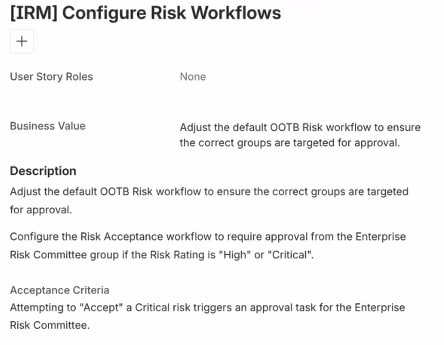
Indeed - There isn’t an actual flow called Risk acceptance workflow sitting in Flow Designer. That’s why you can’t find it.
So in IRM, risk acceptance isn’t handled by a single standalone flow. When a risk is set to Accept, ServiceNow kicks off a mix of:
risk treatment logic
approval rules
OOB subflows that run behind the scenes
So when the story says like “configure the Risk Acceptance workflow”, what it really means is:
“configure who needs to approve a risk when the treatment is Accept and the rating is High or Critical.”
That control usually lives in Approval Rules, not in a flow you directly edit.
What to check instead:
Go to Risk Management → Administration → Approval Rules - Menu names can vary by version
Look for rules tied to:
Treatment = Accept
Risk Rating = High / Critical
Add or update the rule to require approval from the Enterprise Risk Committee group
You will basically see IRM related flows and subflows in Flow Designer, but they’re invoked automatically and usually aren’t meant to be edited directly from my experience.
In a nutshell:
There’s no single Risk acceptance workflow to open
Approval behavior is driven by rules, not a visible flow
Flow Designer is involved, just not in an obvious way
@MuhammadSameer - Please mark as Accepted Solution and Thumbs Up if you found Helpful!!
- Mark as New
- Bookmark
- Subscribe
- Mute
- Subscribe to RSS Feed
- Permalink
- Report Inappropriate Content
01-05-2026 01:40 PM - edited 01-05-2026 01:41 PM
Indeed - There isn’t an actual flow called Risk acceptance workflow sitting in Flow Designer. That’s why you can’t find it.
So in IRM, risk acceptance isn’t handled by a single standalone flow. When a risk is set to Accept, ServiceNow kicks off a mix of:
risk treatment logic
approval rules
OOB subflows that run behind the scenes
So when the story says like “configure the Risk Acceptance workflow”, what it really means is:
“configure who needs to approve a risk when the treatment is Accept and the rating is High or Critical.”
That control usually lives in Approval Rules, not in a flow you directly edit.
What to check instead:
Go to Risk Management → Administration → Approval Rules - Menu names can vary by version
Look for rules tied to:
Treatment = Accept
Risk Rating = High / Critical
Add or update the rule to require approval from the Enterprise Risk Committee group
You will basically see IRM related flows and subflows in Flow Designer, but they’re invoked automatically and usually aren’t meant to be edited directly from my experience.
In a nutshell:
There’s no single Risk acceptance workflow to open
Approval behavior is driven by rules, not a visible flow
Flow Designer is involved, just not in an obvious way
@MuhammadSameer - Please mark as Accepted Solution and Thumbs Up if you found Helpful!!
- Mark as New
- Bookmark
- Subscribe
- Mute
- Subscribe to RSS Feed
- Permalink
- Report Inappropriate Content
01-05-2026 02:45 PM
Thank You!