- Mark as New
- Bookmark
- Subscribe
- Mute
- Subscribe to RSS Feed
- Permalink
- Report Inappropriate Content
03-30-2022 05:15 AM
Hi Experts,
My question is related to BCP module.
On plans[sn_bcp_plan] table there is one OOTB "Generate PDF" UI action and this UI action visible on BCM workspace as well.
Current Situation- When I click on "Generate PDF" it generates pdf but it takes servicenow logo/ header and footer
Requirement- Clinet wants thier header and footer in the pdf
Question- How can I achieved this?
Below is attached OOTB pdf sample

Many thanks in advance
Thanks,
NS
Solved! Go to Solution.


- Mark as New
- Bookmark
- Subscribe
- Mute
- Subscribe to RSS Feed
- Permalink
- Report Inappropriate Content
03-30-2022 05:34 AM
Hello,
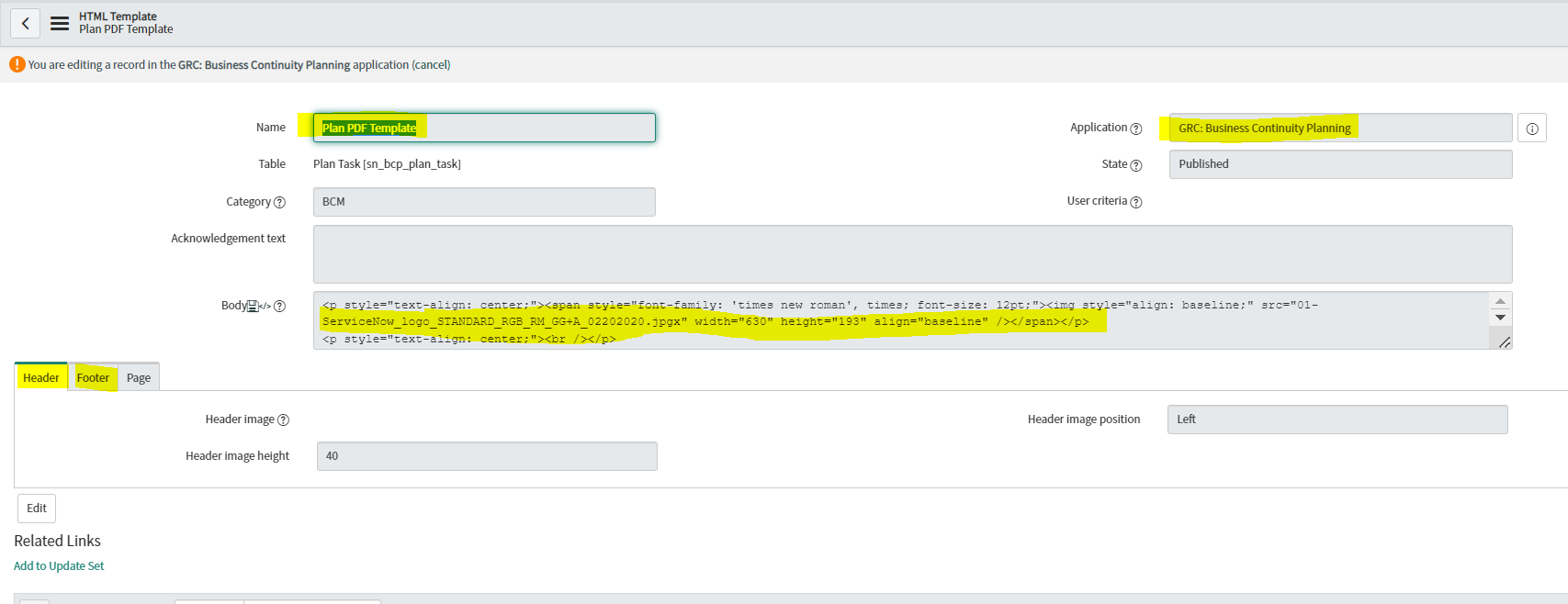
Go to "Document Templates->All Document templates-> Plan PDF Template and modify the "Plan PDF Template" and specify the client logo under Body and Header footer as per client requirement.

Please Mark ✅ Correct/helpful, if applicable, Thanks!!
Regards
Sulabh Garg
Regards
Sulabh Garg
- Mark as New
- Bookmark
- Subscribe
- Mute
- Subscribe to RSS Feed
- Permalink
- Report Inappropriate Content
06-12-2025 04:54 AM
Hi @Sulabh Garg @NS16 , I want to use that preview pdf button from Document template table in Incidents table, can you help me how to use or how to download the generated pdf from incident