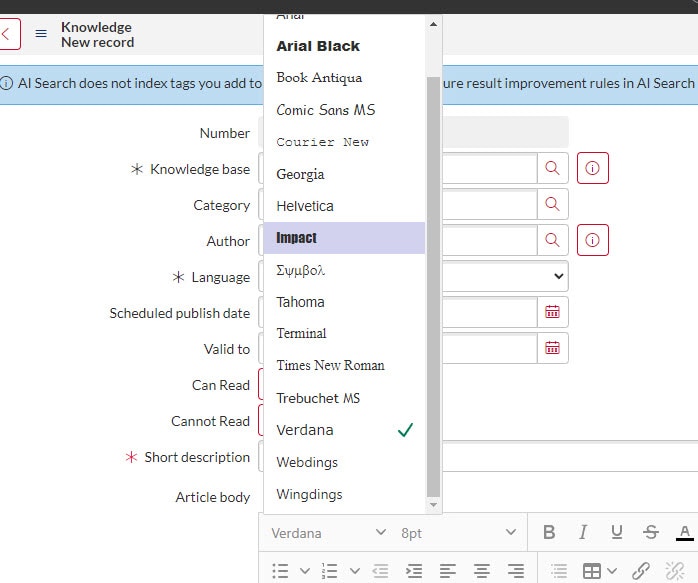
Adding Fonts to be used in Knowledge Articles

- Mark as New
- Bookmark
- Subscribe
- Mute
- Subscribe to RSS Feed
- Permalink
- Report Inappropriate Content
07-11-2023 09:55 AM
I was asked to add Proxima Nova as a font to be used on Knowledge Articles. I have added it to glide.ui.html.editor.v4.font.collection, cleared my cache, relaunched my browser, and it is still not working. I have the font downloaded on my computer as well. Is there something I am missing?
- Labels:
-
Human Resources Service Delivery

- Mark as New
- Bookmark
- Subscribe
- Mute
- Subscribe to RSS Feed
- Permalink
- Report Inappropriate Content
07-12-2023 05:54 AM
Hi @cwillard ,
The only supported fonts are listed in the property file "glide.ui.html.editor.v4.font.collection".
New or custom fonts are not supported but there is a way to add them within the body of the TinyMCE (HTML) editor. There are different ways to add the font within the body of a html file, here is an example:
<html>
<head>
<title>Test</title>
</head>
<body>
<link href="https://fonts.googleapis.com/css?family=Darker+Grotesque&display=swap" rel="stylesheet">
<h1 style="font-family: 'Darker Grotesque', sans-serif;">This is a font test</h1>
</body>
</html>
Now, since the TinyMCE (HTML) editor give the options to edit the body only, it will look like this:
<p>
<link href="https://fonts.googleapis.com/css?family=Titillium+Web&display=swap" rel="stylesheet">
<h1 style="font-family: 'Darker Grotesque', sans-serif;">This is a font test</h1>
</p>
- Mark as New
- Bookmark
- Subscribe
- Mute
- Subscribe to RSS Feed
- Permalink
- Report Inappropriate Content
07-12-2023 08:15 AM
Thanks Sandeep, I was looking at this community thread and made my changes based on that: https://www.servicenow.com/community/itsm-forum/how-to-add-a-new-font-or-import-font-into-servicenow...
Is that solution no longer an option?
- Mark as New
- Bookmark
- Subscribe
- Mute
- Subscribe to RSS Feed
- Permalink
- Report Inappropriate Content
08-05-2024 10:04 AM
Use the glide.ui.html.editor.v5.font.collection property instead. Note this will work for fulfiller view HTML editors but not in workspace.
- Mark as New
- Bookmark
- Subscribe
- Mute
- Subscribe to RSS Feed
- Permalink
- Report Inappropriate Content
08-05-2024 11:13 AM
Hi @cwillard ,
Please refer below thread:
Mark the comment as a correct answer and also helpful once worked.
Thanks & Regards,
Sumanth Meda