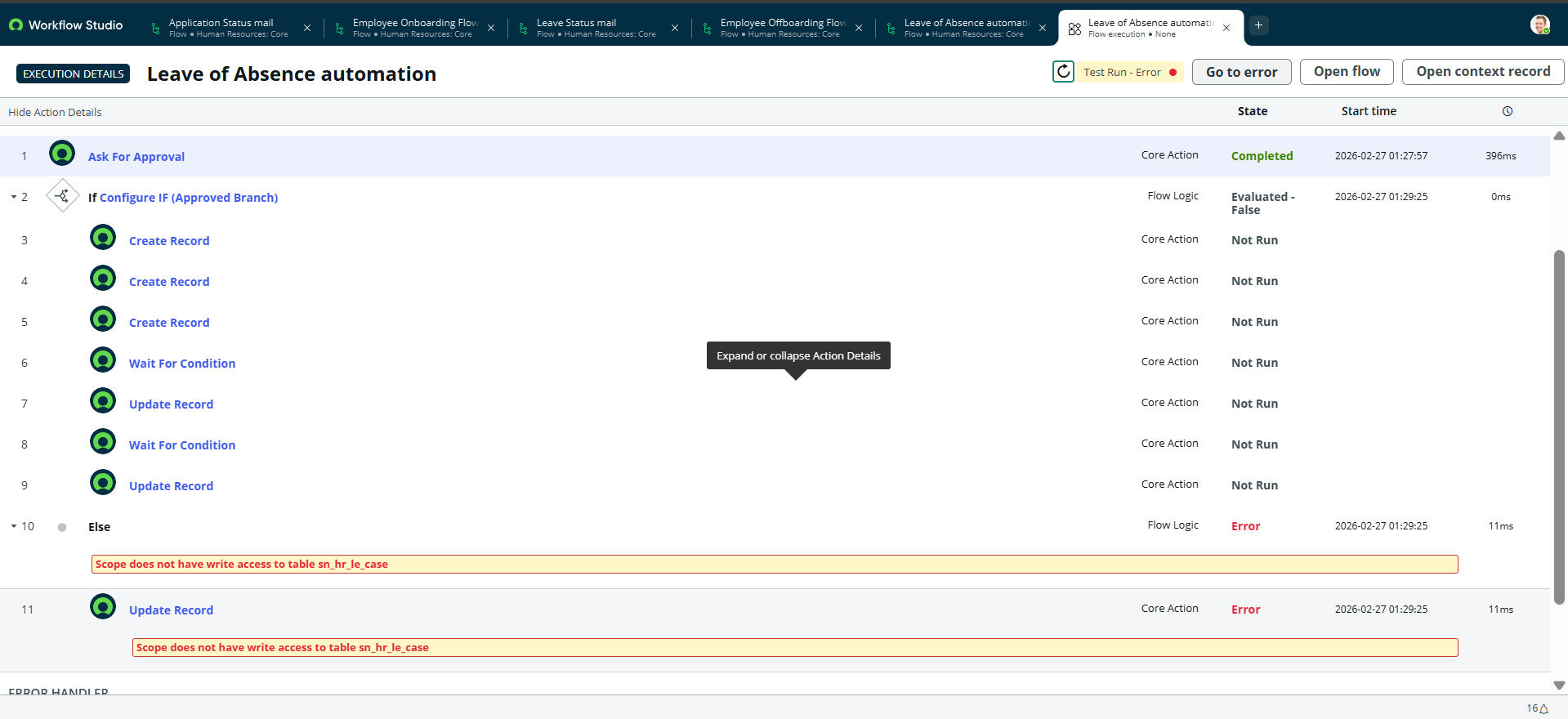
Flow Designer Cross Scope Access Error Scope does not have write access to sn_hr_le in Else Rejected

- Mark as New
- Bookmark
- Subscribe
- Mute
- Subscribe to RSS Feed
- Permalink
- Report Inappropriate Content
03-01-2026 10:09 PM
Hi Team,
I am currently working on an Employee Offboarding Flow in Flow Designer (HRSD module). The flow is triggered when an offboarding request is submitted and follows an approval process.
The Approved branch is working as expected, including record creation and updates. However, in the Else (Rejected) branch, I am trying to update a record in the table sn_hr_le_case, and I consistently receive the following error:
“Scope does not have write access to table sn_hr_le_case”
Some details:
Application scope: Custom scoped application
Table being updated: sn_hr_le_case
Action used: Update Record (Flow Designer)
Error occurs only in the Rejected (Else) branch
Other flows like Onboarding and Leave Automation are working with current roles
I would like to understand:
Why is write access restricted specifically in this scenario?
Is this due to cross-scope privileges between my custom app and the HR Core scope?
Should I create a Cross Scope Access (Application Access) privilege explicitly?
Is there a recommended best practice to handle updates to HR tables from a custom scoped Flow?
Any guidance on the correct and secure way to resolve this would be greatly appreciated.
- Labels:
-
Human Resources Service Delivery
- Mark as New
- Bookmark
- Subscribe
- Mute
- Subscribe to RSS Feed
- Permalink
- Report Inappropriate Content
03-01-2026 11:31 PM
@Pavankumarkp , which scope are you using in the flow ?
Check this KB article - https://support.servicenow.com/kb?id=kb_article_view&sysparm_article=KB0854565
Thanks,
Nayan
- Mark as New
- Bookmark
- Subscribe
- Mute
- Subscribe to RSS Feed
- Permalink
- Report Inappropriate Content
03-01-2026 11:40 PM
Hii @Pavankumarkp
This error happens because the flow is running from a custom application scope and trying to update a table (sn_hr_le_case) that belongs to the HR Core application scope. HR tables are protected, and by default they don’t allow write access from other scopes. That’s why it only fails in the Rejected branch — that’s the only place where your flow actually tries to update that HR table.
So the issue is not your logic or branch condition. It’s a cross-scope security restriction.
Here are the correct ways to fix it (recommended order):
Best Practice (Recommended)
Create a subflow inside the HR Core scope that performs the update, then call that subflow from your custom app flow. This is the standard approach because it keeps HR data access inside its own scope and follows platform security design.
Alternative
Create a Cross-Scope Access privilege allowing your app to write to sn_hr_le_case:
System Definition → Cross Scope Privileges → New → Target = sn_hr_le_case → Operation = write → Status = allowed.
In short: the failure is caused by scope isolation, not permissions or roles. HR tables are intentionally locked down, so the clean solution is to perform the update from within the HR scope (via subflow or action).
Hope this helps anyone else hitting the same issue.
- Mark as New
- Bookmark
- Subscribe
- Mute
- Subscribe to RSS Feed
- Permalink
- Report Inappropriate Content
03-02-2026 08:18 PM
no the flow is running in HR Core application scope.
- Mark as New
- Bookmark
- Subscribe
- Mute
- Subscribe to RSS Feed
- Permalink
- Report Inappropriate Content
03-02-2026 08:39 PM
Try this @Pavankumarkp
Create a subflow inside the HR Core scope that performs the update, then call that subflow from your custom app flow. This is the standard approach because it keeps HR data access inside its own scope and follows platform security design.