- Mark as New
- Bookmark
- Subscribe
- Mute
- Subscribe to RSS Feed
- Permalink
- Report Inappropriate Content
04-06-2020 10:26 AM
Hello,
I am trying to create a pretty basic closed HR Task report, where I run into trouble is I also want the report to contain the name of the HR Service the HR Task is sitting on and the Assigned To of the HR Case.
In PeopleSoft, I would just join the HR Task Table and the HR Case Table. Is that the same in ServiceNow? If so, how would I go about doing this?
I have the Reporting Admin role, but not a full Admin role. If I need to have someone with a full Admin role complete the setup, I can, I just need to be able to walk them through it as well.
Thanks much!
J Dean
Solved! Go to Solution.

- Mark as New
- Bookmark
- Subscribe
- Mute
- Subscribe to RSS Feed
- Permalink
- Report Inappropriate Content
04-06-2020 06:45 PM
Hello,
The "Parent" field on HR Task is a reference field.you can dot walk any reference field and include them in reports. we can use these fields in filter conditions as well as columns in the list view.

Once you expand, you can choose the HR Case table and expand that for HR case columns.
Option 2:
you can also create database view pretty easily. please use "Parent" as a common field. for more information refer
Thanks,
Sai


- Mark as New
- Bookmark
- Subscribe
- Mute
- Subscribe to RSS Feed
- Permalink
- Report Inappropriate Content
04-06-2020 10:38 AM

- Mark as New
- Bookmark
- Subscribe
- Mute
- Subscribe to RSS Feed
- Permalink
- Report Inappropriate Content
04-06-2020 02:37 PM
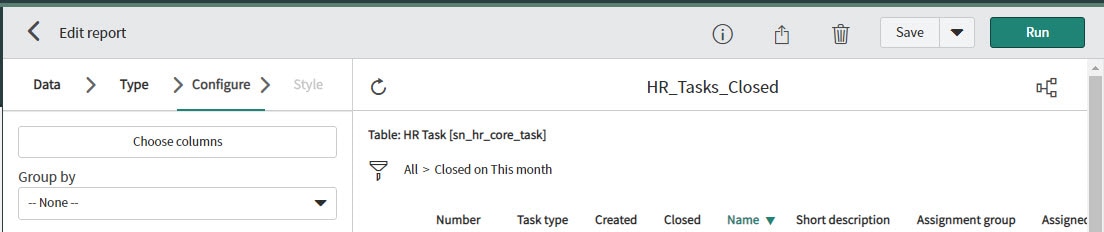
Thank you for your response Ashutosh. Is your example from the View/Run on the Filter Navigator. I am asking because my screen does not mirror yours, I do not have anything above the conditions section. Do I need to select something to get these fields? Do I need full Admin access to see these fields?
- Mark as New
- Bookmark
- Subscribe
- Mute
- Subscribe to RSS Feed
- Permalink
- Report Inappropriate Content
04-07-2020 01:24 AM
Hi,
You can use choose column on your right. I am using old UI for reporting and not the new one so it is not same.
Thanks,
Ashutosh

- Mark as New
- Bookmark
- Subscribe
- Mute
- Subscribe to RSS Feed
- Permalink
- Report Inappropriate Content
04-06-2020 11:03 AM
Report on HR Case and dot-walk to HR task fields. This way you'll have all the fields from HR task and case in the single report.
Please mark my response as correct answer and helpful if it helped solved your question.
-Best Regards
Prateek kumar
Please mark my response as correct and helpful if it helped solved your question.
-Thanks