kim_purcell
Kilo Explorer
Options
- Subscribe to RSS Feed
- Mark as New
- Mark as Read
- Bookmark
- Subscribe
- Printer Friendly Page
- Report Inappropriate Content
11-19-2014
12:13 PM
If you are trying to configure your map pages, you may struggle with map markers not showing up on your Google Maps. Map pages on your instance ideally enable you to graphically display data on a Google Map based on the location and link these to your records. These can be easily generated with basic JavaScript; however, your Google Maps API (v.3) may sadly leave you with one lonely marker on your map:
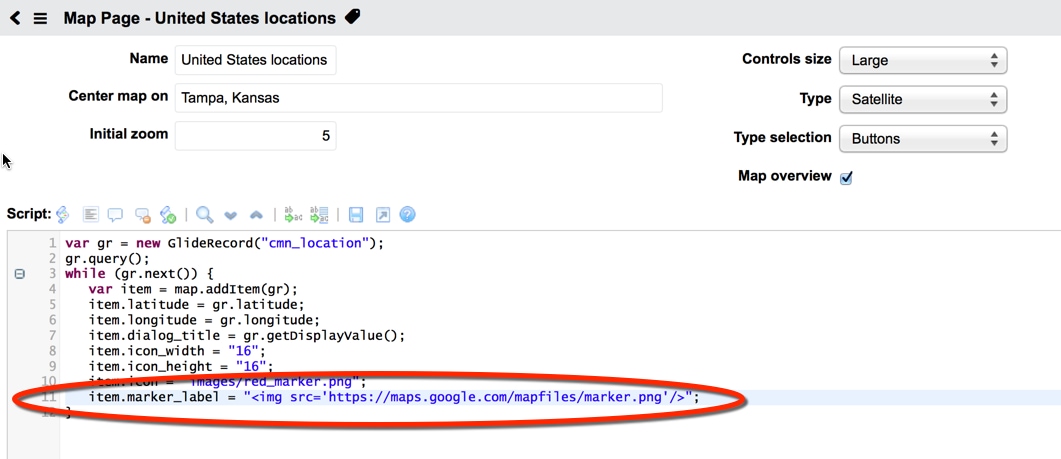
Google map markers are a type of overlay that are designed to be interactive. In order to display all of your markers that link to your records, you can add a line of script to the Map Page table:
- In the navigation filter, enter Map Pages.
- Select the type of map.
- Add this line to the script in the while loop:
item.marker_label = "<img src='https://maps.google.com/mapfiles/marker.png'/>";
(If you have more than one while loop for map icons, add the line to all of them.)
You should now be able to view all of your markers on the Google Map:
For more information, see:
Google maps API 3.14 deprecated: only one marker is placed on map
- 8,344 Views
1 Comment
You must be a registered user to add a comment. If you've already registered, sign in. Otherwise, register and sign in.