How do i add three more fields to the resolve pop up

- Mark as New
- Bookmark
- Subscribe
- Mute
- Subscribe to RSS Feed
- Permalink
- Report Inappropriate Content
12-11-2025 10:27 PM
Hi All,
I'd like to add three additional fields to the Resolve Pop Up in Service Operations Workspace.
i tried this method below: Solved: Add additional field on the Resolve Pop Up in Serv... - ServiceNow Community, but it didn't work. So is there a way to get this working?
Thank you so much

- Mark as New
- Bookmark
- Subscribe
- Mute
- Subscribe to RSS Feed
- Permalink
- Report Inappropriate Content
12-15-2025 10:21 PM
Hi @daisy_dai
-
Open any Incident record in the standard "Classic" UI (not in the Workspace).
-
Right-click the form header and select Configure > Form Layout.
-
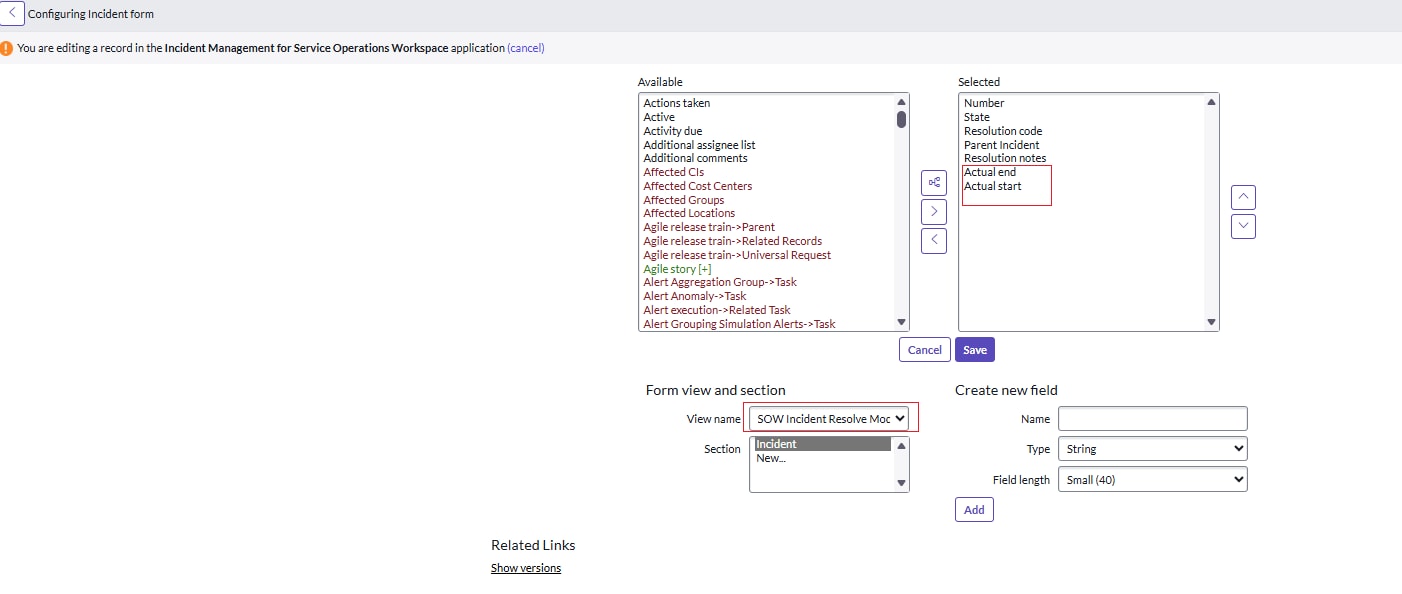
In the "View name" dropdown, search for SOW Incident Resolve Modal.
-
Add your three additional fields from the "Available" column to the "Selected" column.
-
Click Save.


Happy to help! If this resolved your issue, kindly mark it as the correct answer ✅ and Helpful 👍 and close the thread 🔒 so others can benefit too.
Warm Regards,
Deepak Sharma
Community Rising Star 2025
- Mark as New
- Bookmark
- Subscribe
- Mute
- Subscribe to RSS Feed
- Permalink
- Report Inappropriate Content
12-16-2025 12:33 AM
- Mark as New
- Bookmark
- Subscribe
- Mute
- Subscribe to RSS Feed
- Permalink
- Report Inappropriate Content
12-16-2025 12:37 AM

- Mark as New
- Bookmark
- Subscribe
- Mute
- Subscribe to RSS Feed
- Permalink
- Report Inappropriate Content
12-16-2025 09:44 PM
@daisy_dai
Please check the screenshots... is is working...
Just save the layout and re login to the instance and check it again...


Happy to help! If this resolved your issue, kindly mark it as the correct answer ✅ and Helpful 👍 and close the thread 🔒 so others can benefit too.
Warm Regards,
Deepak Sharma
Community Rising Star 2025