- Mark as New
- Bookmark
- Subscribe
- Mute
- Subscribe to RSS Feed
- Permalink
- Report Inappropriate Content
01-27-2026 02:56 AM
In Incident Variable Editor, when I am clicking on collapse icon some varaibles are not getting hidden.
While some variables are kidding. I have used containers. Varaible from 1st container are hiding but for other containers they are not hiding
Solved! Go to Solution.

- Mark as New
- Bookmark
- Subscribe
- Mute
- Subscribe to RSS Feed
- Permalink
- Report Inappropriate Content
01-27-2026 08:13 AM
This example is in a Catalog Item, with other variables and variable sets before and after the Details section, but the same should be the case on the Variable Editor of a table form.
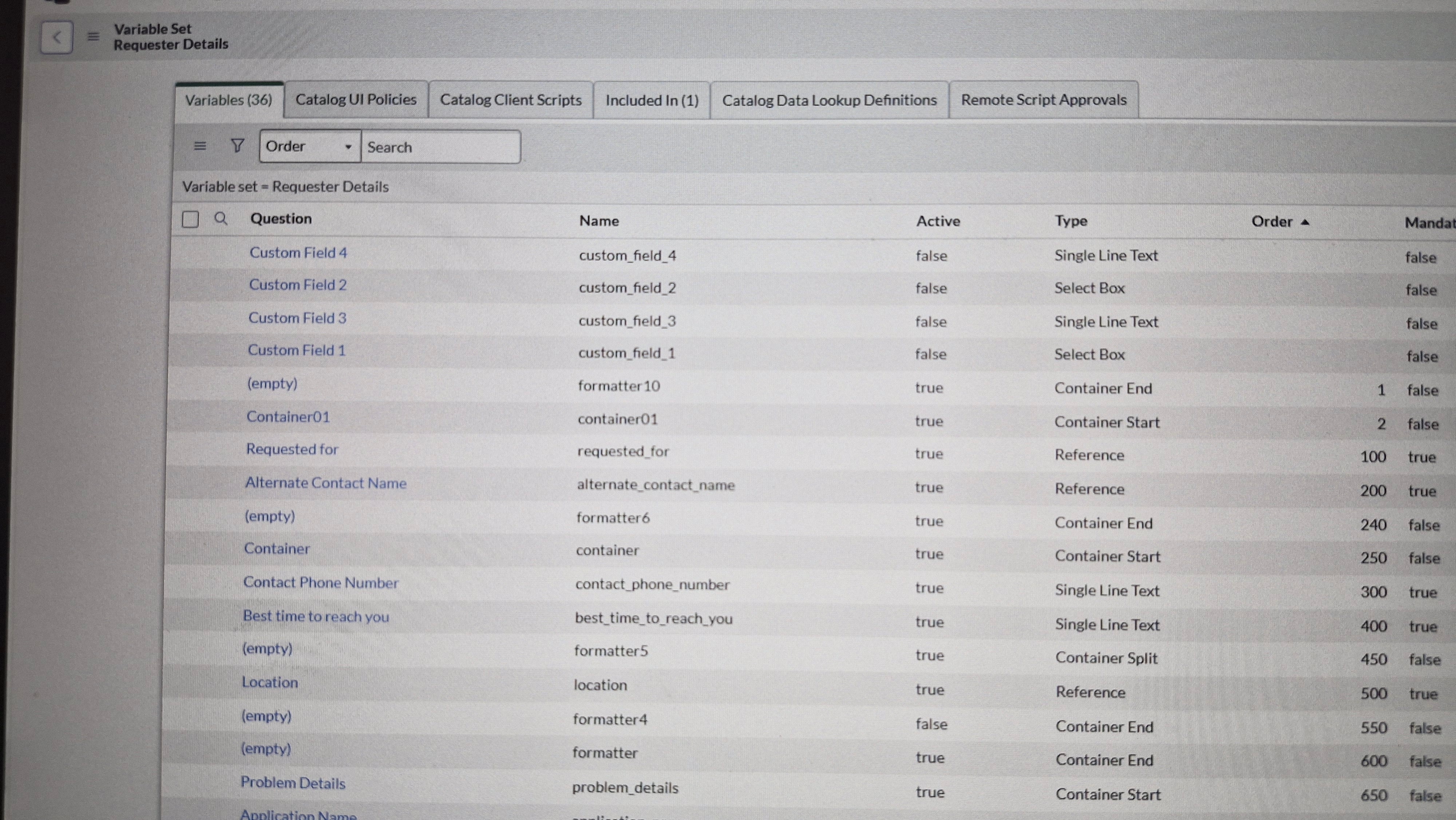
Here's what my variable set looks like:

This is how the form looks with the Details section expanded:

... and collapsed:

- Mark as New
- Bookmark
- Subscribe
- Mute
- Subscribe to RSS Feed
- Permalink
- Report Inappropriate Content
01-27-2026 04:04 AM
- Mark as New
- Bookmark
- Subscribe
- Mute
- Subscribe to RSS Feed
- Permalink
- Report Inappropriate Content
01-27-2026 04:13 AM
Yeah, that will do that. You're only collapsing Container01, which contains only 2 variables. Just because you're not showing the title for 'Container' it still exists, and you're not collapsing it. You'll need to put all of the variables in the same container. Not shown in your screenshots, but it looks like maybe you want 2 columns after the first two variables. You can try another container start after the second variable without a container end first to see if the split works, then two container ends at the end of this section.
- Mark as New
- Bookmark
- Subscribe
- Mute
- Subscribe to RSS Feed
- Permalink
- Report Inappropriate Content
01-27-2026 06:50 AM
Tried to end both containers at end of 2nd container but it didn't worked
- Mark as New
- Bookmark
- Subscribe
- Mute
- Subscribe to RSS Feed
- Permalink
- Report Inappropriate Content
01-27-2026 08:13 AM
This example is in a Catalog Item, with other variables and variable sets before and after the Details section, but the same should be the case on the Variable Editor of a table form.
Here's what my variable set looks like:
This is how the form looks with the Details section expanded:
... and collapsed:

- Mark as New
- Bookmark
- Subscribe
- Mute
- Subscribe to RSS Feed
- Permalink
- Report Inappropriate Content
01-27-2026 03:34 AM
Hi @AmayS
It should work. Could you please check if the container and variables have been added properly in the container?
Regards
Dr Atul G. - Learn N Grow Together ServiceNow Techno - Functional Trainer
LinkedIn: https://www.linkedin.com/in/dratulgrover
YouTube: https://www.youtube.com/@LearnNGrowTogetherwithAtulG
******************************************************************************************