- Mark as New
- Bookmark
- Subscribe
- Mute
- Subscribe to RSS Feed
- Permalink
- Report Inappropriate Content
08-07-2026 08:07 AM
When I am trying to create a report under data visualization for the incidents closed last month, I would like to extract the all the activity log details for each incident.
As the activity formatter is not a field available, please suggest an alternate field which I can add under the columns in the report creation to get this data
Solved! Go to Solution.
- Mark as New
- Bookmark
- Subscribe
- Mute
- Subscribe to RSS Feed
- Permalink
- Report Inappropriate Content
08-08-2026 10:19 PM
Hello @dassan
I replicated your requirement in PDI.
Activity Formatter is not a field, it's a UI Component.
Activity Formatter consists of comments and worknotes + field changes + attachments + emails
1) If you want to extract only Comments and Work notes, you can directly find on the incident List view. No Customization required.(Refer Screenshot 1) --> here you get all the comments and worknotes in a single cell
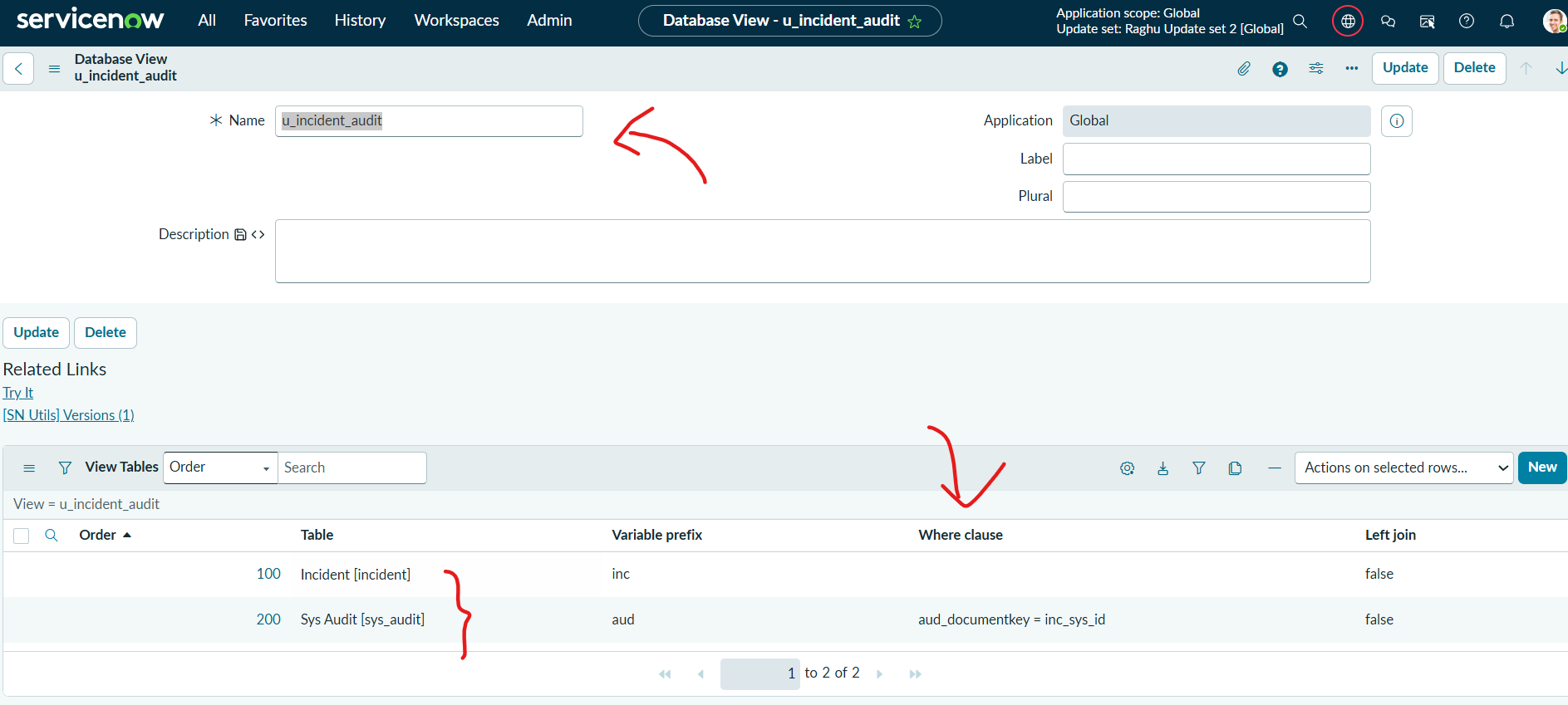
2) if you want fields changes + Comments and Work notes, you need to build a database view joining incident to sys_audit table(Refer Screenshot 2&3) ----> Here you get multiple rows per incident
Note: document key is nothing but incident sys_id.
3) if you want fields changes + Comments and Work notes + emails + attachments, then there's no reliable way where you can extract everything at one place because
Attachments are stored in sys_attachment table
emails are stored sys_email table.
Please mark Helpful, if my reply added any value.
Thank You
Raghavendra G
- Mark as New
- Bookmark
- Subscribe
- Mute
- Subscribe to RSS Feed
- Permalink
- Report Inappropriate Content
08-07-2026 04:17 PM
Hi @dassan :
- Mark as New
- Bookmark
- Subscribe
- Mute
- Subscribe to RSS Feed
- Permalink
- Report Inappropriate Content
08-08-2026 10:19 PM
Hello @dassan
I replicated your requirement in PDI.
Activity Formatter is not a field, it's a UI Component.
Activity Formatter consists of comments and worknotes + field changes + attachments + emails
1) If you want to extract only Comments and Work notes, you can directly find on the incident List view. No Customization required.(Refer Screenshot 1) --> here you get all the comments and worknotes in a single cell
2) if you want fields changes + Comments and Work notes, you need to build a database view joining incident to sys_audit table(Refer Screenshot 2&3) ----> Here you get multiple rows per incident
Note: document key is nothing but incident sys_id.
3) if you want fields changes + Comments and Work notes + emails + attachments, then there's no reliable way where you can extract everything at one place because
Attachments are stored in sys_attachment table
emails are stored sys_email table.
Please mark Helpful, if my reply added any value.
Thank You
Raghavendra G