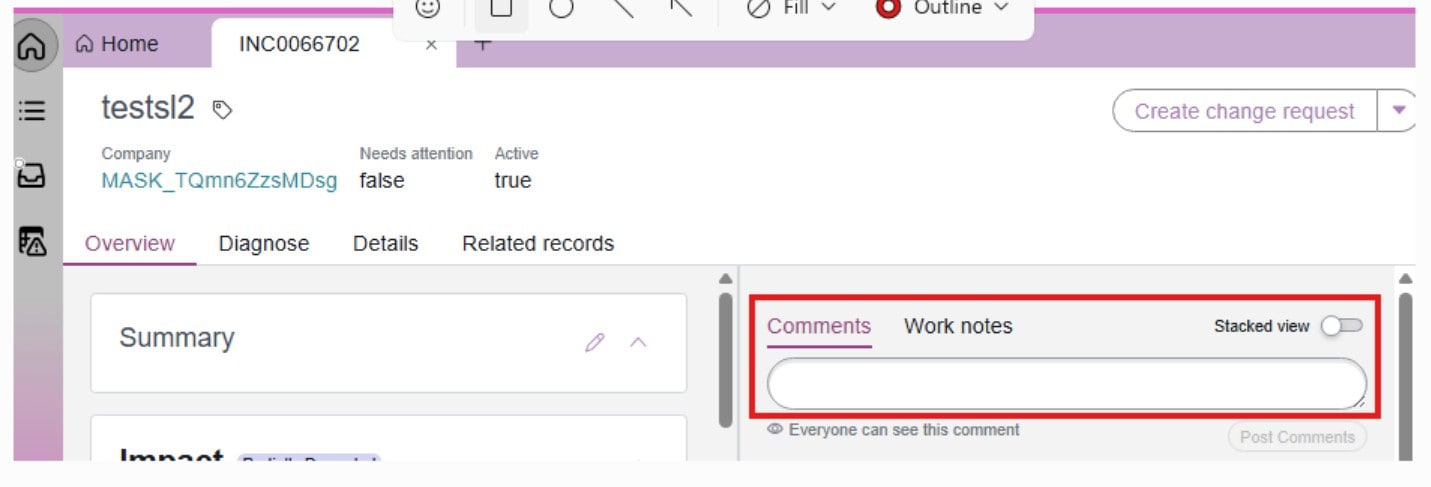
How to update "comments and Worknotes " fields color on Service Operation Workspace View .

- Mark as New
- Bookmark
- Subscribe
- Mute
- Subscribe to RSS Feed
- Permalink
- Report Inappropriate Content
05-21-2026 11:03 PM


- Mark as New
- Bookmark
- Subscribe
- Mute
- Subscribe to RSS Feed
- Permalink
- Report Inappropriate Content
05-21-2026 11:15 PM
you already raised a question earlier and discussions on it
How to update "Comments and Worknotes" fields colors on incident for Service Operations Workspace
I suggested to raise a case with ServiceNow for this
Ankur
✨ Certified Technical Architect || ✨ 10x ServiceNow MVP || ✨ ServiceNow Community Leader

- Mark as New
- Bookmark
- Subscribe
- Mute
- Subscribe to RSS Feed
- Permalink
- Report Inappropriate Content
05-22-2026 12:12 AM - edited 05-22-2026 02:02 AM
Hi @ashok17
try with
- Navigate to System Properties
- Locate the following properties:
glide.ui.activity_stream.style.comments
glide.ui.activity_stream.style.work_note
- Enter your desired HEX color code (e.g #E67E22) into the value field.
- Type cache.do in the navigator to clear your cache, then log out and log back in to see the changes
For color-code the notes after they are submitted in the Activity Stream : Check ServiceNow Documentation on this: Configure journal field tile icons and colors in Configurable Workspace
Regards
Tanushree Maiti
ServiceNow Technical Architect
LinkedIn: https://www.linkedin.com/in/tanushreemaiti
- Mark as New
- Bookmark
- Subscribe
- Mute
- Subscribe to RSS Feed
- Permalink
- Report Inappropriate Content
05-22-2026 01:49 AM
Hi @Tanushree Maiti ,
Thanks for response, If we open 'System Properties > UI Properties. ' the page shows as mentioned below

- Mark as New
- Bookmark
- Subscribe
- Mute
- Subscribe to RSS Feed
- Permalink
- Report Inappropriate Content
05-22-2026 02:16 AM
HI @ashok17
If you search by color on page , you will get it . Anyway - I updated the post with actual sys_properties name. Check and update as per your requirement.

Regards
Tanushree Maiti
ServiceNow Technical Architect
LinkedIn: https://www.linkedin.com/in/tanushreemaiti