- Mark as New
- Bookmark
- Subscribe
- Mute
- Subscribe to RSS Feed
- Permalink
- Report Inappropriate Content
08-15-2022 11:21 PM
I need help to provide a button on top right corner to download list view as excel.I know i can go with export from list cloumn but i need a button. Thanks
Solved! Go to Solution.


- Mark as New
- Bookmark
- Subscribe
- Mute
- Subscribe to RSS Feed
- Permalink
- Report Inappropriate Content
08-16-2022 01:07 AM
function generateExcel()
{
g_navigation.open('/' + tableName + '_list.do?EXCEL&sysparm_query=your_query', '_blank');
}
PLEASE MARK MY ANSWER CORRECT IF IT HELPS YOU
- Mark as New
- Bookmark
- Subscribe
- Mute
- Subscribe to RSS Feed
- Permalink
- Report Inappropriate Content
08-15-2022 11:36 PM
hello
you can do one thing
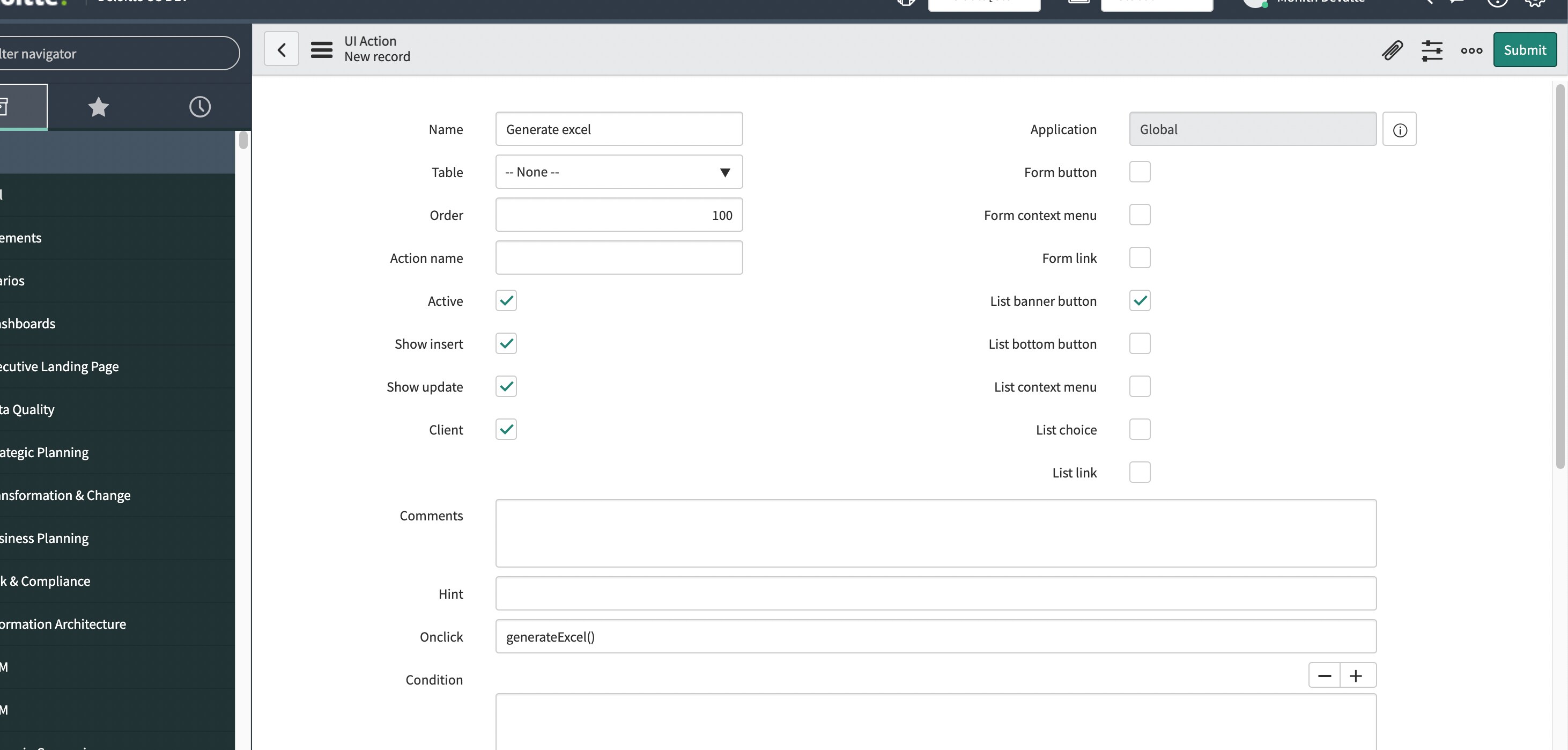
1)Create a UI action where check the check box LIST BANNER BUTTON like below and check the client check box and give the on click function name as generateExcel()

2)Place the script as below
function generateExcel()
{
g_navigation.open('/' + tableName + '_list.do?EXCEL', '_blank');
}
replace the table name
PLEASE MARK MY ANSWER CORRECT IF IT HELPS YOU
- Mark as New
- Bookmark
- Subscribe
- Mute
- Subscribe to RSS Feed
- Permalink
- Report Inappropriate Content
08-16-2022 12:48 AM
Hi
- Mark as New
- Bookmark
- Subscribe
- Mute
- Subscribe to RSS Feed
- Permalink
- Report Inappropriate Content
08-16-2022 01:07 AM
function generateExcel()
{
g_navigation.open('/' + tableName + '_list.do?EXCEL&sysparm_query=your_query', '_blank');
}
PLEASE MARK MY ANSWER CORRECT IF IT HELPS YOU
- Mark as New
- Bookmark
- Subscribe
- Mute
- Subscribe to RSS Feed
- Permalink
- Report Inappropriate Content
08-19-2022 05:27 AM
Is there anyway that we can change the name of excel file. I know in servicenow file name will be table name. Just wanted to confirm