- Mark as New
- Bookmark
- Subscribe
- Mute
- Subscribe to RSS Feed
- Permalink
- Report Inappropriate Content
03-10-2022 02:33 AM
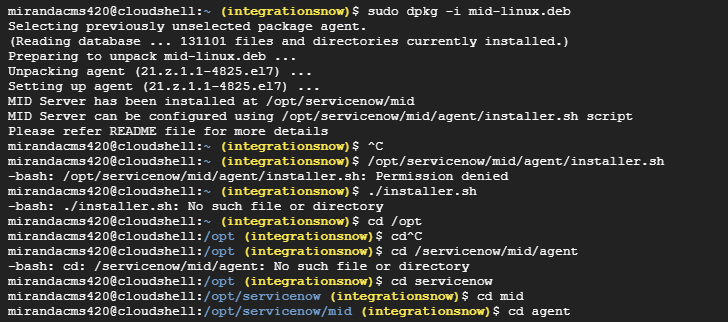
Hi guys, i'm trying to install a Linux Mid Server in a ubuntu virtual machine. I'm following the steps described in Install a MID Server on Linux | ServiceNow Docs, but after i install de DEB installer, i can´t progress to the next step.
In the command prompt says that "MID Server can be configured using /opt/servicenow/mid/agent/installer.sh script", but i can't see this directory and i don´t know how to access it. Did you guys know to do this?

Solved! Go to Solution.

- Mark as New
- Bookmark
- Subscribe
- Mute
- Subscribe to RSS Feed
- Permalink
- Report Inappropriate Content
03-11-2022 02:41 AM
I believe it's the account issue or the connection issue to the instance check the account which you used to configure this mid server having the mid_server role.
Also check this KB article for more troubleshooting steps
https://support.servicenow.com/kb?id=kb_article_view&sysparm_article=KB0661756
Regards,
Vivek
- Mark as New
- Bookmark
- Subscribe
- Mute
- Subscribe to RSS Feed
- Permalink
- Report Inappropriate Content
03-10-2022 05:06 AM
do you need to chown the file? I see permission denied?
should you be able to cd to the installer script dir, then sh installer.sh from there?


- Mark as New
- Bookmark
- Subscribe
- Mute
- Subscribe to RSS Feed
- Permalink
- Report Inappropriate Content
03-10-2022 06:34 AM
Hi Claudia,
Try executing the following command.
sudo /opt/servicenow/mid/agent/installer.sh
As you are not the root user and sudo needs to be used when executing the commands for installation.
Hope it helps.
Thanks,
Raj
- Mark as New
- Bookmark
- Subscribe
- Mute
- Subscribe to RSS Feed
- Permalink
- Report Inappropriate Content
10-24-2022 03:00 AM
Executing this command helped :
sudo /opt/servicenow/mid/agent/installer.sh


- Mark as New
- Bookmark
- Subscribe
- Mute
- Subscribe to RSS Feed
- Permalink
- Report Inappropriate Content
03-10-2022 05:13 PM
Hi Cláudia,
Is there anything below what's currently being displayed in the screenshot?
Is there an "agent" directory? If not, try executing "sudo ls -la" to list directories.
If it's possible to cd to directory agent, do a "sudo ls -la" to list files and there permissions to check file "installer.sh" exists.