- Mark as New
- Bookmark
- Subscribe
- Mute
- Subscribe to RSS Feed
- Permalink
- Report Inappropriate Content
06-18-2018 08:47 AM
Our instance recently upgraded from Jakarta patch 7 to patch 8a. We have 4 MID servers 3 of them have been upgraded to patch 8a but one MID Server haven't been upgraded and version field showing yellow color. I couldn't see upgrade related link to make a manual upgrade. If anyone experienced this issue before please let me know the solution.
Thanks.
Solved! Go to Solution.
- Mark as New
- Bookmark
- Subscribe
- Mute
- Subscribe to RSS Feed
- Permalink
- Report Inappropriate Content
07-11-2018 05:33 AM

- Mark as New
- Bookmark
- Subscribe
- Mute
- Subscribe to RSS Feed
- Permalink
- Report Inappropriate Content
06-18-2018 09:09 AM
Oh wow, seems you have bigger user issues than just your midserver upgrading.. I think someones messing with permissions on what you can and cannot see.. you should be able to see a bunch of UI actions other than those.
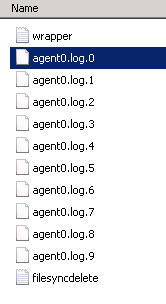
Regardless.. Goto the midserver host directly.. look in the ~/agent/logs folder where you'll find the agent0 log, find the upgrade clues...
Then work on those UI actions for your user.. kinda need those 🙂
- Mark as New
- Bookmark
- Subscribe
- Mute
- Subscribe to RSS Feed
- Permalink
- Report Inappropriate Content
06-18-2018 09:38 AM
Thanks Doug, will do that.
- Mark as New
- Bookmark
- Subscribe
- Mute
- Subscribe to RSS Feed
- Permalink
- Report Inappropriate Content
06-18-2018 10:50 AM

- Mark as New
- Bookmark
- Subscribe
- Mute
- Subscribe to RSS Feed
- Permalink
- Report Inappropriate Content
06-18-2018 10:53 AM
Exactly look at the agent0.log.0 file and look for any errors in regards to upgrading...
You are welcome to send me a copy and I can have a quick look as well if you would like (doug.schulze@servicenow.com)
- Mark as New
- Bookmark
- Subscribe
- Mute
- Subscribe to RSS Feed
- Permalink
- Report Inappropriate Content
06-18-2018 11:53 AM
Doug - I just sent you the log file.
Thanks!